How-To Guide
Show which email actions a default-mail app actually replaces
Compare email-link handoff with an in-app composer before claiming that choosing a default changes every email action.
For an independent email-app founder, “make us your default” is a useful adoption request. “Every email button now opens here” is a much larger promise. A person can select your app successfully and still encounter a different composition interface—or a button that never opens a mail client.
Before a creator recommends replacing an existing mail app, show the originating action as well as the destination. The acquisition decision is whether your campaign promises a supported email-link handoff, a particular workflow, or a universal replacement you have not established.
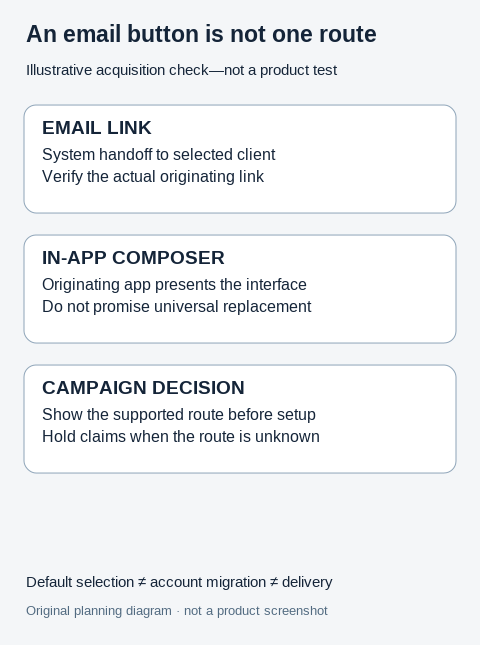
Two composition routes require different campaign claims. Illustration, not a tested product result.
 Superdirector
Make it work for your brand
Find it. Remake it. Post it. Superdirector turns the viral formats in your niche into your brand's carousels, X posts and video scripts, and keeps the calendar full.
Start with two real switching obstacles
In an Adobe community question, a form author reports that a PDF email button behaves differently from other email actions on iPads configured for Outlook. The author says another Acrobat sharing route works. The visible replies suggest settings checks; they do not establish a verified resolution. This is a managed-device case, not proof of a defect in every consumer email workflow.
A separate Mozilla support discussion describes a website-generated email action working in Safari but doing nothing in Firefox on iOS. The author reports filing a reproducible bug, and later replies identify the tracked issue. The thread's “solved” label should not be read as evidence that the product behavior was fixed.
These are two independently authored examples of the task: people want an email action in another product to reach a usable compose window. They do not establish current failure rates, keyword volume or a reason to recommend one mail client over another.
Separate default selection from composition inside another app
Apple's default-app guidance describes Email as the app used when opening links to send email. Its default-mail entitlement reference says the system launches the default client for a mailto: link and describes requirements for an app to qualify. Check that your actual released app supports the feature before making it the campaign's next step.
There is also a different mechanism. Apple's mail composition controller documentation describes a composition interface presented inside the originating app; messages from that interface queue in the user's Mail outbox. It is not the same thing as demonstrating an external link opening your selected client. That document also contains a broad statement about mailto: opening built-in Mail; for default-client routing, use Apple's dedicated default-app and entitlement references rather than treating that statement as a universal current rule.
Do not diagnose a particular third-party button's implementation from its appearance. Ask the product team which mechanism your own integration uses. For external apps, record the observed route and mark the implementation unknown unless documented. A failed button is not automatically a failed default setting.
Make a route comparison, not another settings tutorial
Consider LetterPocket, a fictional email client. Its proposed creator brief is about replying to a public enquiry link from an iPhone. The following is a test plan, not a report of successful behavior:
| Starting action | Evidence to capture | Allowed campaign conclusion |
|---|---|---|
| A plain email link on the campaign's test page | Selected default, tap, client opened, recipient and subject | Name this tested email-link route if it works |
| A generated email button in the viewer's relevant website | Browser, page action, resulting window or failure | Claim support only for the observed route and versions |
| An email action inside another app | Originating app, compose interface, recipient and attachment state | Explain the observed boundary; do not promise to replace that app's composer |
Use synthetic recipients and harmless sample content. Stop before sending unless the test account and recipient are authorized. An opened compose window proves neither message delivery nor account migration. Do not expose a creator's inbox, account credentials or private correspondence to make the clip feel authentic.
Keep account setup separate: choosing a default is not proof that an account is configured, that old messages moved, or that every attachment survived. A campaign about migration needs its own preservation evidence; this comparison concerns the action that starts a new message.
Give the creator a complete claim and a visible boundary
For an Instagram Reel or YouTube Short, begin with the actual email link and show the destination without cutting across the handoff. Then identify the tested browser and explain that some apps use their own email interfaces. Put the supported action beside the installation or default-selection request, not only in a distant FAQ.
A fictional, conditional caption might be: “Use LetterPocket for email links like the enquiry link shown here, after setup and default selection. Email buttons inside other apps can follow different routes.” Publish that only after the named route works in the released build. It is not approved copy for an actual product.
For X, a two-panel comparison can be more useful than a claim of total replacement: “email link opens selected client” versus “originating app presents its own composer.” Label diagrams as illustrations. Never manufacture screenshots of another app behaving incorrectly.
If the campaign's main task cannot reach your app, change the task or hold the creative. Repeating default-selection instructions is not an honest substitute for a missing route. Do not instruct viewers to delete a working mail app or remove an account merely to satisfy the demonstration.
Decide what a failed handoff should change
Retain a small route record: originating app or browser, OS and app versions, account setup state, selected default, action attempted, observed composer and unresolved limitation. When someone reports a mismatch, ask for the originating action before asking them to repeat setup or share private mail.
After an authorized campaign runs, separate visits, default-selection attempts, successful target-route openings and completed user tasks. Those observations can guide the next creative revision; this article claims no conversion lift. Retest affected routes when the product, browser or platform changes, and withdraw a broader replacement claim if the evidence no longer supports it.