How-To Guide
Show a drawing-app trial without promising every viewer a free offer
A premium brush demonstration and a free-trial offer answer different questions.
By the Superdirector editorial team.
A premium brush demonstration and a free-trial offer answer different questions. The first shows what the tool does. The second depends on the selected subscription, available offer and the person's eligibility. Before placing “try free” over a drawing clip, connect those three records to the purchase explanation.
This guide produces an offer-to-copy map for a subscription drawing app. It does not report a purchase test, recommend a price or claim that a longer trial improves conversion.
Freeze one useful drawing action
Choose an actual premium task that a prospective customer can understand, such as applying a particular brush to an original sample drawing. Use only an action the current build supports. Record the build and whether the demonstrated capability is included in the selected subscription. Do not substitute footage from a higher tier or leave the inclusion question to a tiny disclaimer.
Keep the feature demonstration independent from the offer claim. A viewer may be able to buy access without being eligible for the trial shown in your example. Conversely, a configured offer does not prove that the advertised drawing capability belongs to that product.
A first-time iOS founder's question illustrates the underlying confusion: how does trying a feature relate to downloading the app and accepting a subscription? Replies introduce additional ideas, but their commercial advice is not evidence about your product or audience. The question is a qualitative signal, not measured search demand.
Original AI-generated editorial illustration. Show the drawing task separately from the offer: demonstrating a brush does not establish anyone’s free-trial eligibility. This is not a product capture, customer scene or completed test.
Original visual by OpenAI image generation directed by the editorial assistant. Created 2026-10-24.
Check configuration and eligibility separately
Apple's introductory-offer guide distinguishes a configured offer from a customer's ability to redeem it. Offers have product, storefront and date context; customers can redeem one introductory offer per subscription group. Creating an offer for another product in that group does not establish another entitlement to a trial.
Ask the implementation owner for a supported eligibility result in an authorized test environment. Record the selected product and group alongside it. Do not infer eligibility from a fresh installation, a different app login or the fact that an offer exists in App Store Connect. An unresolved result belongs in an unknown branch, not the eligible branch.
A separate historical developer report describes a sandbox purchase sheet showing ordinary pricing instead of an intended trial. The author later attributed their case to an offer date. That is not a diagnosis of your mismatch. It demonstrates why the selected offer and displayed terms need checking rather than guessing from a label.
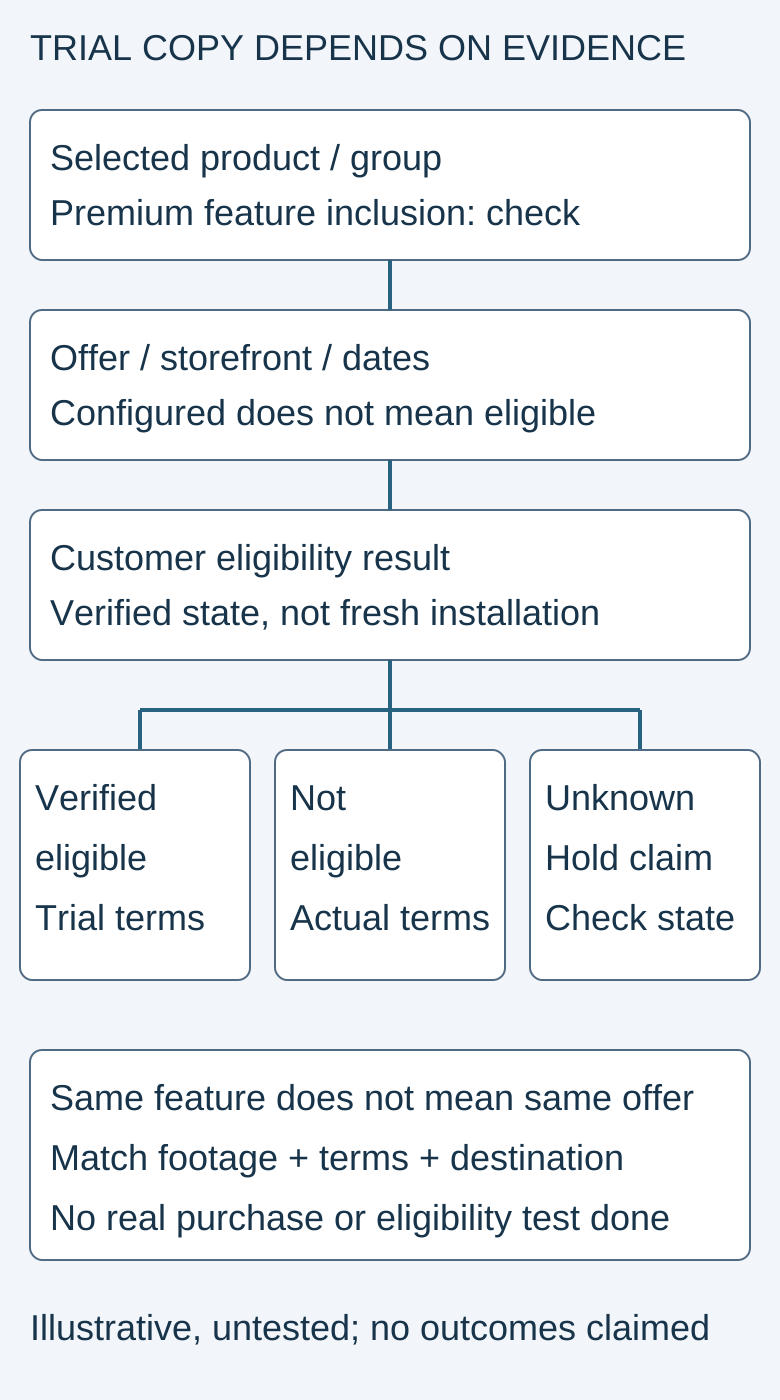
This is an original evidence map. It contains no live price, tested eligibility result or purchase confirmation.
Original visual by the Superdirector editorial team. Creation date not recorded.
Two storyboard examples, not invented results
Example A uses a synthetic fixture called Eligible-A. First show the premium brush action, then the selected subscription and its verified offer details. In the production script, insert the actual trial duration, renewal amount, currency and billing period from the matching evidence. Until those fields are verified, keep them blank and do not export a convincing “free” claim.
Example B uses Returning-B, a fixture whose recorded state is not eligible for the introductory offer. The drawing action can remain the same, but the offer explanation cannot. Show the ordinary terms actually available for that selected product. Do not reuse Example A's overlay merely because it looks better or because the app is newly installed.
These examples are proposed test cases. Neither fixture has been executed here. If your real app has another state, such as eligibility still loading, record that state explicitly and verify its actual behavior. Do not claim the purchase is free while waiting for evidence.
Keep the billed amount legible
Apple's subscription guidance calls for clear subscription content, duration and renewal pricing. For a free trial, show its length and the amount billed afterward. The billed total, rather than a smaller equivalent monthly breakdown, must be the most prominent pricing element in the purchase flow.
A short launch clip should not contradict the real purchase screen. Keep any verified eligibility limitation next to the offer, preserve the renewal explanation in the crop and check the destination before approval. This does not make a video a substitute for the complete purchase flow or required product terms.
Use the offer evidence worksheet to compare the exact creative, selected product, eligibility evidence and displayed purchase terms. Stop the creative review if these disagree. Do not create a real charge, reset a customer's account or alter production offers simply to obtain attractive footage.
Validate understanding before measuring acquisition
Ask a reviewer what the demonstrated feature does, who can receive the trial, and what happens after it ends. Record misunderstandings separately from interface defects. If the reviewer thinks every returning customer gets another free period, revise the offer explanation rather than counting their interest as a qualified lead.
After publishing the demonstration, distinguish views, trial starts, completed useful drawing work and paid renewals. A trial start is not a full-price buyer, and this article supplies no forecast about either. The immediate done-when is narrower: one useful feature demonstration whose offer wording matches the selected product and verified customer state, with unknown cases withheld.