How-To Guide
Define the phone-free promise before promoting your Apple Watch app
Distinguish companion-app independence, a distant or powered-off phone and offline use before choosing a Watch-app campaign promise.
“Leave your phone behind” sounds like one benefit. For an app buyer, it can mean several different things: no companion app to install, no phone nearby during use, no powered-on phone elsewhere, or no network connection at all. A wrist-only video does not establish any of them.
Before briefing a creator, choose the exact task and the exact dependency you intend to remove. Then show enough of the setup and result that a viewer can understand what remains required. The strongest campaign may make a narrower promise than the headline you first imagined.
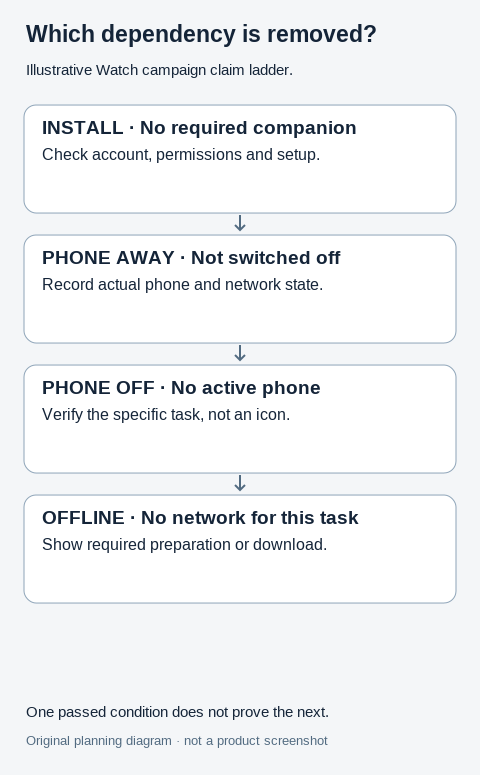
Original claim model: each removed dependency requires its own evidence.
 Superdirector
Make it work for your brand
Find it. Remake it. Post it. Superdirector turns the viral formats in your niche into your brand's carousels, X posts and video scripts, and keeps the calendar full.
Start with the buyer's distinction
In one public Apple Watch discussion, a new cellular-watch owner asks for apps that work with the phone away or switched off. Replies disagree about particular messaging behavior. The disagreement is not evidence that a named app currently works or fails; it shows why “standalone” needs a task-specific explanation.
A separate non-cellular-watch owner asks for useful apps when leaving the phone behind and describes discovering downloaded audio. That is a different requirement: a task available without the phone or a cellular connection. Promotional replies in the thread are not independent product validation.
These are two qualitative observations, not a market-size estimate. They support checking the intended meaning before spending production effort on a phone-free claim.
Separate four promises
| Proposed phrase | What must actually be established |
|---|---|
| Install independently | The Watch app can be installed and used without its companion iPhone app |
| Use away from the phone | The advertised task works with the phone out of range in the stated connection conditions |
| Use while the phone is off | The task does not depend on that phone remaining active elsewhere |
| Use offline | The task works without the network, including any preparation or downloaded content it needs |
Apple's independent watchOS app guidance distinguishes watch-only apps from apps that have an optional iPhone companion. It also tells developers to verify functions such as account setup, permissions and data access on the Watch itself. Independence from a companion app does not, by itself, establish that every feature works offline.
Apple's Watch-without-iPhone explanation separately describes network-connected and disconnected capabilities, including playback of content already downloaded to the Watch. It also identifies phone-state dependencies for some communication functions. Do not use that general platform page as proof that your own app supports a particular feature.
Choose a task that can be completed, not merely opened
Consider a fictional app called Pocket Rehearsal. Its proposed Watch task is playing a short rehearsal cue selected by the user. This is a planning example, not a tested product or an assertion that the feature exists.
The creator's brief should answer four questions: how the cue reaches the Watch, whether the user must authenticate elsewhere, which connection the playback needs, and what the person can do if the cue has not been prepared. Opening a menu on the wrist does not answer those questions.
If preparation requires the phone, show that step rather than calling the entire experience phone-free. A truthful promise might distinguish preparation from later use. If the feature streams from a service, do not imply the same recording proves downloaded playback. If the current implementation cannot complete the task under the proposed conditions, change the claim or fix the product before filming the success scene.
Make a small connection-state record
For the real product, record the Watch model, operating system, app build, account state and content already present. Add the state of the phone and the Watch's own connection. Use an authorized test setup with harmless sample content.
Inspect the specific conditions relevant to the claim rather than creating an enormous compatibility grid. A campaign about leaving the phone in a locker might require an away-from-phone check. An offline claim needs a disconnected check as well. Do not infer that switching one device setting removed every possible connection; have the technical owner verify the actual test state.
Record the task result and the fallback separately. “Playback completed” and “the app explained that a download was missing” are both useful observations, but they support different marketing statements. An unknown result should remain unknown, not inherit a pass from a nearby row.
If reconnection is part of the advertised benefit, inspect what happens afterward. Does the product reflect the completed action where expected? Do not add a seamless cross-device outcome to the video solely because it would be convenient.
Review the expectation before inviting installation
Ask someone unfamiliar with the app what they believe they need to install, prepare and keep connected. Ask whether they expect the phone to remain powered on. If their answer differs from the real requirement, revise the asset even if the demonstrated task looks excellent.
Do not encourage a buyer to purchase cellular hardware or a service plan on the strength of an untested implication. Do not imply emergency reliability, universal coverage or all-day battery performance from a short controlled example.
The release decision is simple: each phone-free phrase must name the task and match the state actually checked. If the evidence only supports “use this prepared feature away from your phone,” that can be a useful benefit on its own. It does not need to become a claim that the entire app works independently, offline and everywhere.