How-To Guide
Give an App Clip campaign a completed task, not just a smaller install funnel
Separate an App Clip visitor’s immediate task from the later full-app invitation, using the actual entry context and a checked completion.
By the Superdirector editorial team.
An App Clip campaign should explain what someone can finish now. If the person scans a code expecting to complete a useful task and encounters another instruction to install the full app, the campaign has not delivered its promise.
The founder's decision is not simply whether an App Clip can attract attention. It is whether this smaller experience serves the actual occasion better than a working website or the full app—and whether the creative makes that choice understandable.
Separate immediate value from the later install
Apple's App Clip design guidance describes both on-the-go and demo experiences. It says people should be able to complete the offered task or demo without installing the full app, and discourages marketing-only clips. The guidance also distinguishes an appropriate later invitation from interrupting the task with repeated install requests.
That leaves room for a useful acquisition experience, but not for withholding the promised result until the visitor converts.
In a developer discussion about App Clip conversion, the author promotes a teleprompter clip and asks about the approach. Replies disagree about fit; one user wants temporary functionality rather than a lasting install, while another asks to try the full app's distinguishing feature. These are qualitative observations, not verified conversion results. Do not reuse the thread's unverified numerical success claim as a benchmark.
A separate consumer discussion includes people describing one-off payment and travel use, confusion about what an App Clip is, and a complaint about obtaining a receipt. It does not establish adoption rates. It does suggest a useful rehearsal question: after the immediate interaction, does the person have the outcome they actually needed?
Write the occasion before choosing the asset
Consider a fictional app called Gallery Trail. Its proposed App Clip lets a visitor open an original audio description for the exhibit label in front of them. The full app offers a collection of tours. This is a planning example, not a tested product or a claim about museum accessibility.
The occasion card has five parts:
| Question | Illustrative answer to verify |
|---|---|
| Where is the person? | Beside a specific exhibit label |
| What are they trying to do? | Hear that exhibit's audio description |
| What does the invitation promise? | Open this description, not download an entire tour library |
| What completes the task? | The correct audio is available with understandable playback controls |
| What belongs to a later choice? | Installing the full app to explore additional tours |
Do not substitute a generic welcome screen for the exhibit the person selected. Nor should the launch video imply an offline tour, a particular language or a transcript unless those capabilities have been implemented and checked.
When enlarged, scroll horizontally to read the diagram.
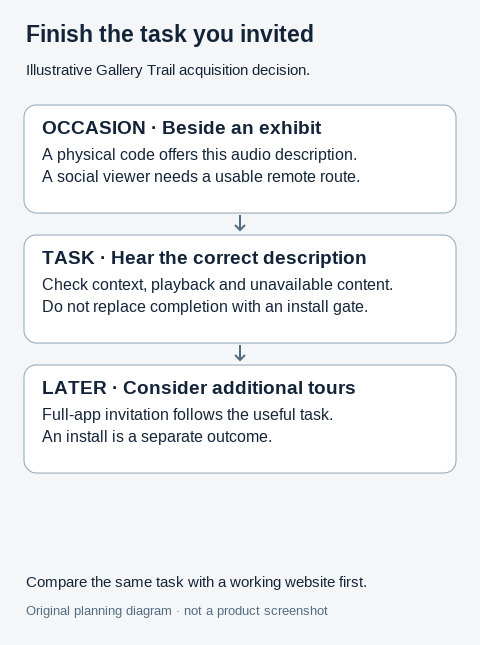
Original occasion-to-outcome model: finish the immediate task before the later full-app invitation.
Original visual by Superdirector editorial team. Creation date not recorded.
Check the task before asking for the full app
Rehearse the actual invitation, the presented App Clip card, the context that opens and the finished task. Record what happens when the expected content is unavailable. If the route fails, provide the real alternative rather than repeating the same scan instruction.
Then inspect the full-app case separately. Apple says installing the full app replaces the App Clip and later invocations open the full app. That platform behavior does not prove your full app preserves the selected exhibit or the relevant user state. Check that implementation before claiming a seamless continuation.
For Gallery Trail, the follow-on invitation might explain that the full app contains additional tours. It should not obscure playback or make a visitor install merely to finish the description already promised. If the visitor leaves without installing but successfully uses the description, that can still be a successful immediate experience.
Compare alternatives before committing production effort
Make a small decision note with three options: a working web destination, the App Clip, and the full app. Compare the same task in the same intended context. Record real implementation effort and unresolved dependencies; do not assign invented conversion percentages to make one option win.
Choose the App Clip only if its actual experience supplies a reason to use it. A feature label alone is not that reason. If the proposed clip is only a menu pointing to an install page, revisit the task scope. If the website already completes the task well, the next useful campaign may explain that route instead.
For a demo rather than an on-site transaction, ensure the offered experience represents what the customer needs to evaluate. This is not the same as filling an app with convincing sample content; see the existing sample-to-own-work guidance for that separate onboarding problem.
Keep the two outcomes separate after launch
Track completed immediate tasks separately from full-app interest where your authorized measurement supports it. A displayed card, a launched clip and a finished audio interaction are not interchangeable events. Preserve unknowns rather than assigning every nearby install to the campaign.
The stop condition is practical: do not promote the invitation while it cannot deliver the named task. Once it can, judge the later install invitation on its own evidence. An App Clip can introduce the larger product without treating the visitor's immediate need as an obstacle to conversion.