How-To Guide
Before promoting your Amazon offer on Instagram, check who is selling the item
Check both the Amazon product and selected merchant offer before using seller-specific service promises in an Instagram campaign.
A social post can link to the correct Amazon product and still promise something the selected merchant does not provide. Product identity and offer ownership are different checks.
That distinction matters when a seller's Instagram or YouTube creative says “buy from us,” names its own dispatch service, or describes an offer available only from its business. A matching product image and ASIN do not establish that the shopper's selected offer belongs to that seller.
The practical response is not to promise permanent control of Amazon's purchase buttons. It is to separate product-level claims from seller-specific promises, inspect the offer actually displayed, and remove claims the destination cannot reliably support.
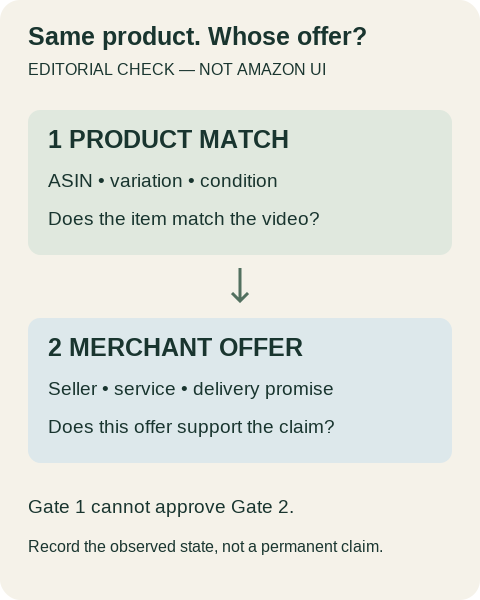
Illustrative product-versus-offer check. A product match is separate from evidence for the promoted merchant promise; this is not an Amazon interface or tested placement result.
 Superdirector
Make it work for your brand
Find it. Remake it. Post it. Superdirector turns the viral formats in your niche into your brand's carousels, X posts and video scripts, and keeps the calendar full.
Understand the product-versus-offer distinction
Amazon's Featured Offer explanation, dated April 10, 2026 and checked October 26, describes an Offer Display that can contain one or more Featured Offers. These show purchase buttons and attributes such as price, condition and shipping speed. Customers can also inspect additional offers through the other-sellers area.
That means “the Buy Box” should not be treated as a permanently owned button or necessarily a single fixed offer. Amazon's explanation of competing seller offers also distinguishes the price, shipping fees, delivery promise and returns policy associated with different sellers. Those are reasons to inspect the selected offer rather than infer its details from the product title.
This guide is about truthful off-Amazon creative, not a method for winning Featured Offer placement. It does not diagnose why an offer is or is not featured.
Do not diagnose offer ownership from a percentage
In a public seller question about Featured Offer percentage, a merchant who described selling their own brand asked whether a lower percentage meant another seller had appeared. In a reply, they said they were directing Facebook traffic to the product page.
The post is a useful example of the campaign concern, not proof that another merchant took those orders. The account is self-reported, and the public discussion does not establish the cause. A percentage alone is not an observation of what a particular shopper selected.
For the campaign review, write the question more narrowly: “Does the offer shown on the route we are promoting support the seller-specific statement in this video?” That is answerable with an observed shopper state. “Where did every lost purchase go?” is not.
Mark every claim as product-level or seller-specific
Consider a fictional brand called Cedar Desk selling a pen organizer. These are editorial examples, not a real product or tested Amazon listing.
| Proposed creative claim | What needs to match |
|---|---|
| “The organizer has three compartments” | The actual product and configuration |
| “Choose the walnut finish shown here” | The selected variation and its listing |
| “Buy directly from Cedar Desk” | The selected seller identity, not merely the brand name |
| “Our team dispatches this tomorrow” | That merchant's actual fulfillment arrangement and current promise |
| “This offer includes our optional gift service” | The specific offer and verified service terms |
The first two checks concern the product. The final three concern an offer or merchant. Do not let a successful product match silently approve the remaining claims.
Also distinguish a brand name from the seller's displayed business name. If those differ, establish the legitimate relationship internally before writing instructions. Do not tell viewers that another seller is unauthorized, counterfeit or unsafe merely because its name differs. Those are separate claims requiring evidence and the appropriate process.
Inspect the selected offer without pretending it is universal
Use the public destination that the campaign will actually link to. Record the marketplace, observation date, selected product variation, visible condition, seller identity, fulfillment information where shown, displayed price and delivery estimate. Record the shopper context you can legitimately inspect, such as the delivery region shown on the page. Do not include a customer's private address in the shared evidence.
Then check the selected cart offer before payment if that is available in your authorized review environment. Does the merchant identity still agree with the offer-specific sentence? Are the condition and variant still the ones shown in the video? Stop before purchasing unless a separate purchase test has been authorized.
Do not claim to have tested contexts you cannot access. One observation is evidence of that observation, not a guarantee for every viewer or every later visit. A page screenshot is not proof of a completed purchase, seller attribution or campaign revenue.
Choose creative that survives the observed state
Use the result to make a specific editorial decision:
- Product correct, intended seller selected: retain only the seller-specific claims supported by the observed offer and current merchant terms. Add a recheck owner; do not call the state permanent.
- Product correct, another merchant selected: remove “buy from us” and unsupported merchant-service promises from a product-level campaign. If those services are the reason for the promotion, hold that version until a verified route and accurate explanation exist.
- No featured offer, but other purchase options are visible: do not show an effortless one-button purchase that the observed page does not offer. Explain the actual route only after checking it, or hold the CTA.
- Offer state cannot be verified: keep the product demonstration separate from any merchant-specific acquisition claim.
Avoid inventing a special URL that supposedly locks the seller. Link construction is not a tested outcome. A Brand Store page or attribution link should not be assumed to override the purchase offer either. Each claimed behavior needs its own evidence.
Make the handoff readable, not accusatory
A short product-led caption might simply identify the organizer and direct viewers to current buying options. That is different from a merchant-led caption saying the viewer is buying from a particular business. Use the version your evidence supports.
If a merchant-led campaign legitimately requires checking the seller field, make that instruction concise and show the current interface in a controlled recording. Do not bury the requirement under an unrelated lifestyle montage. Do not imply the audience should disregard product condition, delivery terms or price while searching for a name.
For YouTube or Instagram, keep the final CTA consistent across speech, overlay, caption and destination. If the seller's offer changes, editing the link alone may leave a false service promise in the video. Keep a list of the assets containing that promise so they can be revised or paused together.
Keep a small offer-state record
The useful record has five parts: the proposed merchant claim, the observed offer, the observation context, the editorial decision and the next recheck trigger. Stock changes, fulfillment changes, a new promotion or a reported mismatch are reasons to inspect it again.
This does not prove campaign effectiveness or guarantee future placement. It prevents a narrower error: claiming that a product page necessarily sells through your offer because it shows your product.
For help organizing the claim, demonstration and CTA in one brief, see the planning workflow. Keep the product proof and merchant-offer proof separate so a correct product shot cannot approve an unsupported selling promise.