How-To Guide
Audit the route from a campaign promise to an Amazon Brand Store product
Primary guidance was checked on October 24, 2026.
A campaign can link to the correct brand and still send the buyer to the wrong experience. Someone who clicks to inspect a particular folding lamp should not need to work out which department contains it before they can recognize the product again.
The useful review is not simply “does the link open?” It is “can a person follow the promise in this creative to the relevant product or collection without being misled?” That question connects the advertisement, Store page, visible product tile and final destination.
This guide is for a brand or agency reviewing an already planned Amazon Brand Store route. It is not account-setup advice, permission to activate a campaign, or proof that a Store converts better than a direct product destination. Primary guidance was checked on October 24, 2026.
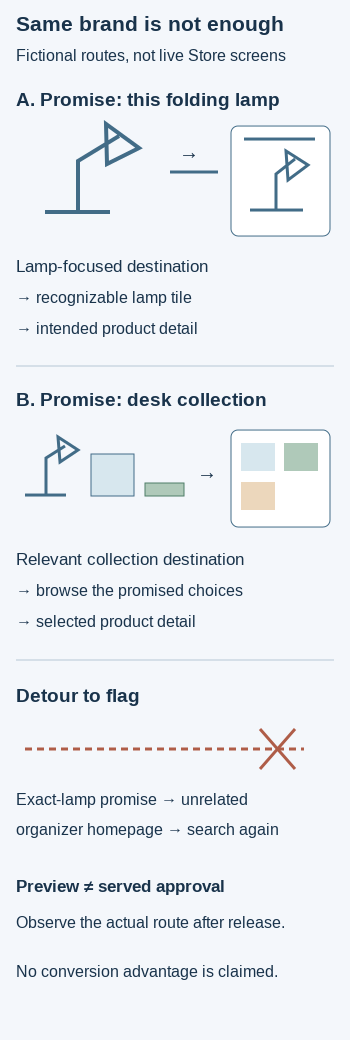
Original route illustration, not a live Store screenshot or a measured conversion comparison.
 Superdirector
Make it work for your brand
Find it. Remake it. Post it. Superdirector turns the viral formats in your niche into your brand's carousels, X posts and video scripts, and keeps the calendar full.
Write down what the creative actually promises
Before changing a URL, summarize the buyer's task in one sentence. There are two materially different examples:
- Inspect the folding desk lamp shown in this demonstration.
- Explore the desk-accessory collection shown in this room setup.
The first is an exact-product task. The second invites a choice across a collection. A general brand introduction could be a third task, but do not quietly substitute it for either of the first two.
Keep the exact creative revision with the sentence. If the video changes from a collection montage to a close-up of one product, reconsider the destination. An old URL can remain technically valid after its purpose stops matching the new edit.

AI-generated illustrative mockup. These are fictional creative and destination concepts, not Amazon Store screenshots or observed buyer results. The destination should preserve the actual campaign promise.
Choose a destination that preserves the promise
For the fictional lamp campaign, a relevant Store page should make the same lamp easy to identify and provide an understandable path to its product detail. For the fictional collection campaign, a curated collection page can be the appropriate next step because browsing is part of the promise.
These are editorial examples, not screenshots of an existing Store or reports of measured buyer behavior. The right destination depends on the actual creative, supported placements and product availability. A route through a Store is not automatically better or worse than every alternative.
Amazon's navigation guide recommends relevant Store or product-detail destinations and distinguishes product grids from individual product tiles. That supports checking the path and its merchandising purpose. It does not establish the outcome of your own campaign. Amazon Brand Store navigation guidance
Make a small destination map
Record the campaign creative, promised item or collection, selected Store URL, visible page title, relevant tile, and destination reached from that tile. Add the observation date and device. Use the real names and URLs in the working record rather than placeholders once the account owner has authorized inspection.
A map should identify the actual path, not merely list pages that exist somewhere in the Store. If the promised lamp is only reachable through a different menu, record that detour. If the relevant tile is hidden or missing, keep the path unresolved instead of declaring success because the brand logo appears.
Also note what happens when the product is unavailable. Do not fabricate a replacement promise or imply that an alternative is the same item. Some merchandising elements can change with availability, so verify the observed experience rather than assuming a screenshot remains current.
Inspect recognition before inspecting polish
Open the selected destination as a buyer would, using a permitted preview or live view appropriate to the release state. Ask whether the first meaningful content makes the campaign's subject recognizable. A beautiful hero dominated by unrelated organizers can be a poor continuation of a lamp demonstration.
Match the names, physical appearance and relevant product details across the creative and page. A shared brand color is not sufficient evidence that the right product is present. Avoid using a similar-looking model as a stand-in without disclosure.
The primary seller guide includes a photograph of a Store displayed on a tablet, showing category navigation and a branded product area. It is useful as a structural reference, not proof that those pictured controls work or that the same layout is suitable for your buyer task. Use actual inspection to establish behavior.
Keep preview, submission and served version separate
Amazon's creation guide explicitly separates functionality review in mobile and desktop preview from submission for publishing. A prepared page or successful preview is therefore not a publication receipt. Amazon Store creation and review guide
Maintain a short status record: prepared revision, preview observations, submission state if authorized, approval evidence, and the version actually served. Do not call a page live because someone selected a submission button. Do not call a link accepted end to end because the preview opens.
On mobile, inspect the real crop, navigation and product-finding sequence. On desktop, repeat the task rather than assuming the wider layout is automatically clear. Do not activate spending or send traffic simply to complete this editorial review; release decisions require their own authorization.
Ask an unfamiliar reviewer to follow the promise
Show a reviewer the creative, then let them open the planned destination without coaching. Ask them to find the promised product or collection and explain why they believe it is the correct one. Record wrong turns, uncertain labels and any point at which they lose the connection to the creative.
Use those observations to revise the route or page. Do not convert a single successful review into a conversion claim. If later campaign evidence is available, keep its date range, audience and creative revision attached. A change in traffic mix or product availability can complicate any before-and-after interpretation.
The immediate done-when is specific: the reviewed creative points to the intended served page, the promised item or collection is identifiable, the relevant path works on the checked surfaces, and unresolved availability or variant issues are explicit. Until those observations exist, the route is a prepared hypothesis, not a validated buyer journey.