How-To Guide
Match your Steam Playtest invitation to admission and playable status
Write Steam Playtest invitations that distinguish requesting access, admission and a currently playable build.
“Request access,” “you have been admitted” and “you can play now” are different messages. Before a creator announces your Steam Playtest, check the signup route, the viewer's admission state and the app's current playable state separately. A campaign can be technically accurate about one and still mislead about the others.
Valve supports limited and open Playtest signups and separately controls whether the Playtest is playable. In limited signup, requesting access does not itself grant admission. Steam emails players when they are admitted, but not whenever the build becomes playable or non-playable. Plan your own accurate status communication rather than relying on the wrong notification. Steamworks Playtest documentation
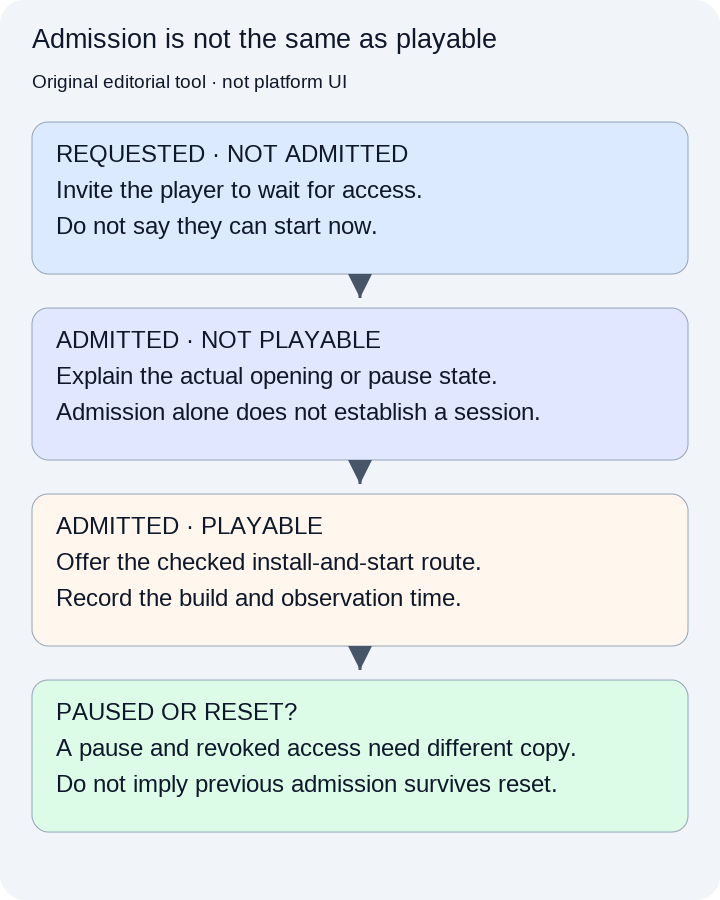
Original editorial decision tool, not platform UI or a measured product result.
 Superdirector
Make it work for your brand
Find it. Remake it. Post it. Superdirector turns the viral formats in your niche into your brand's carousels, X posts and video scripts, and keeps the calendar full.
Build the invitation from the current state
Ask the test owner for a dated state record. Do not infer it from an old trailer, a visible store page or the number of people who expressed interest.
| Checked situation | Appropriate message | Do not imply |
|---|---|---|
| Requests accepted; admission limited | Request access for the test. | Every requester can play immediately. |
| Account admitted; test not playable | You have access, but play is not currently available. | Reinstalling or requesting again will open it. |
| Account admitted; test playable | Start the named test under its stated conditions. | Permanent ownership of the full game. |
| New signups closed; existing test continues | Current participants can continue under the checked conditions. | Closing requests ended everyone's access. |
| Test no longer playable | The current playable period has ended or paused, as verified. | A signup button or old invitation guarantees entry. |
This is an editorial message matrix, not a substitute for checking Steamworks or the actual participant route. If the team cannot establish a row, hold the corresponding claim.
Do not turn admission into evidence of play
A solo developer's first Playtest account explicitly separated admitted participants from waiting requests, yet still could not tell who had launched or why feedback was absent. In a different game's recruitment discussion, a participant described repeatedly requesting access without receiving it. These are self-reported contexts, not a shared diagnosis or a benchmark.
Keep requests, grants, observed play and feedback as distinct observations. An accurate invitation cannot make someone available at the scheduled time, and a grant does not prove they installed or played. Do not increase urgency merely to compensate for an information gap.

A partial fictional review-copy record distinguishes sent access from unknown activation and missing feedback. No key, outreach result or coverage total is shown. Original AI-generated editorial illustration. Reused here to separate Playtest admission from observed play and feedback; the pictured review-copy example is not Steam Playtest UI.
Give a creator two versions of the invitation
For the fictional Lantern Ferry Playtest, suppose the team is collecting limited requests before the next session. A suitable draft says: “Request access on the main game's Steam page; admission is limited. The test owner will publish the playable schedule at the stated status destination.” The owner must fill in a real destination and supported schedule before use.
The later playable-period version should address the intended audience: “Already admitted? The named test period is now available.” If new requests are also open, explain that separately. Do not combine both groups into “everyone can play now” unless the actual route supports it.
For a YouTube video that may remain online after the test, avoid baking an undated “live now” claim into every scene. Use an accurate period label and keep the controlled description current. For Instagram or X, prepare the closing or paused-status wording before the opening post is scheduled.
Distinguish a pause from a reset
Valve's Playtest documentation now describes an irreversible reset that removes participants and disables Playtest keys. That is different from marking a test non-playable. Do not use “reset,” “pause” and “closed” interchangeably in public copy. The release owner must confirm which operation actually occurred before the content team describes its consequences.
This guide does not instruct you to perform a reset or revoke access. Those actions require their own authorization and operational review. The editorial task is to avoid telling former participants that their admission persists when the test owner has performed a different operation.
If a future test is planned but not committed, say that plainly. An earlier admission is not a promise of every future opportunity under every possible configuration.
Rehearse the transition that changes the message
Before publishing, have an authorized reviewer compare the proposed invitation with the actual base-game store route and the intended participant state. Check the moment the campaign changes from requesting interest to inviting play, and the moment it stops inviting play. Keep private access details out of public captures.
If the viewer cannot launch, record what is known: correct application, admission state, playable state and the observed error. Do not tell everyone to buy the full game or change branches as a generic remedy. A Playtest is a separate route, and the cause of one failure is not established by the campaign's expectations.
The deliverable is a state-bound invitation set, a reliable status destination and an owner for changing the message. It does not establish testing success, feedback quality or future purchases.
See the planning workflow to turn the verified Playtest state and gameplay scope into a social brief. It does not admit players, configure access or notify participants for you.