How-To Guide
Write Steam preview-branch instructions that include a way back
This guide is for a developer preparing instructions for an existing game's preview branch.
“Join the beta” is incomplete guidance. A tester needs to know which game and branch you mean, whether they are eligible, what will change in their installed copy, how to confirm the intended version, and what conditions apply when leaving.
This guide is for a developer preparing instructions for an existing game's preview branch. It is not a deployment tutorial, an invitation to bypass access controls or a promise that changing builds safely restores every save. The worked example is fictional; no Steam account or game installation has been changed for this article.
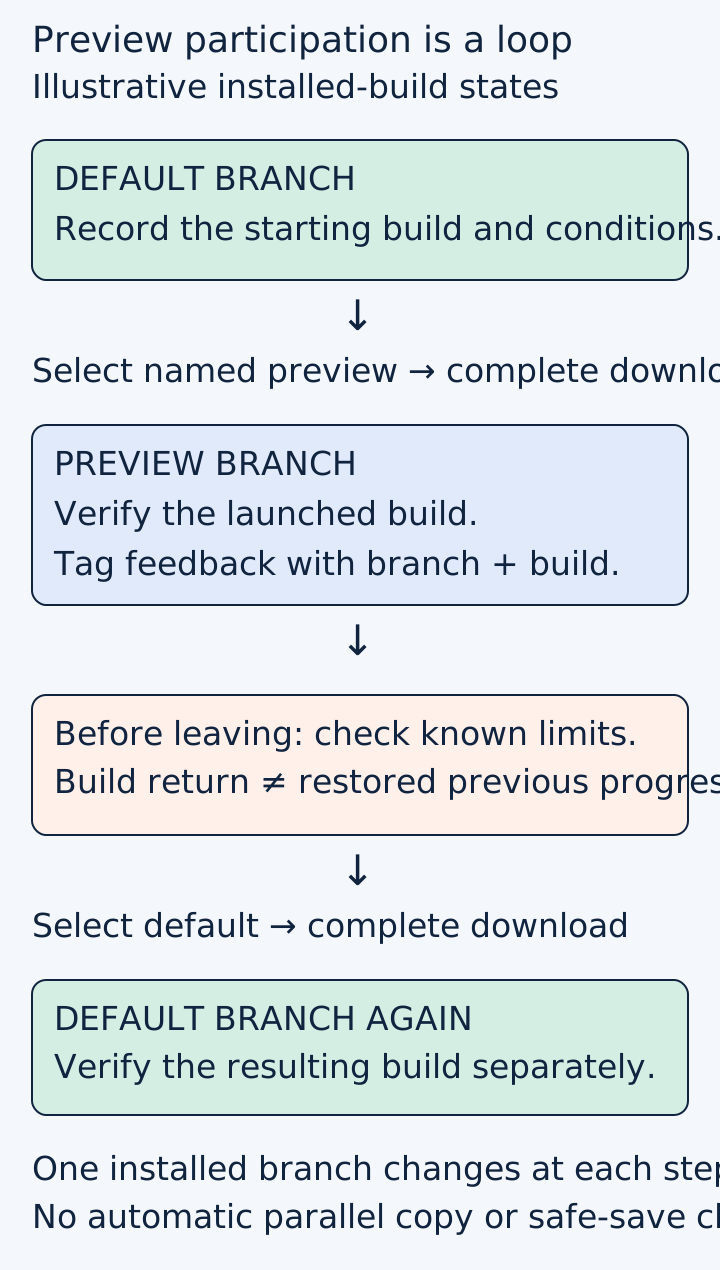
Original branch-participation map. It does not depict two automatically parallel installations or guarantee data compatibility.
 Superdirector
Make it work for your brand
Find it. Remake it. Post it. Superdirector turns the viral formats in your niche into your brand's carousels, X posts and video scripts, and keeps the calendar full.
Put the participation decision before the clicks
Write a short preview card containing the game name, branch name, purpose, intended testers, known limitations and feedback destination. Include an observation date because both the client interface and the branch contents can change.
For a fictional bridge-puzzle game, the purpose might be to test a revised camera control. The card should ask eligible testers to check that control and report the observed build, rather than vaguely requesting opinions about the entire game.
If access is restricted, share instructions only through the authorized route and keep private access details out of public screenshots. A branch name or password is not a substitute for entitlement to the application. Steam's testing guide distinguishes testing access arrangements, packages and the separate Steam Playtest app. Make sure the invitation and the instructions refer to the same route.
Use the current client route, then verify the result
Steam's branch documentation currently describes opening the game's Properties from the Library and selecting Game Versions & Betas. It explains that selecting a branch starts a download that replaces the installed branch, and that a non-default selection is indicated near the Play control.
Rehearse the instructions in the client your testers will use. Capture the actual labels without exposing private account information. If the branch is not visible, do not instruct everyone to reinstall or purchase another copy. Check the intended application, access requirements and authorized branch configuration first.
Keep three observations separate:
- The desired branch was selected.
- The required download completed.
- The launched game reports or otherwise demonstrably matches the intended build.
A screenshot of the selection menu proves only the first observation. If your game has no visible version identifier, identify another reliable, documented way for the test owner to distinguish builds. Do not invent a menu label that does not exist.
Explain what the test replaces, and what it does not promise
A preview branch is not automatically a second independent copy alongside the normal installation. Say what the tested route actually changes and which existing data it may use. Obtain game-specific save and multiplayer guidance from the responsible developer before encouraging people to switch.
A player question about beta participation with main-branch friends illustrates the decision a public invitation can leave unanswered. Replies make claims about that particular game's timing and compatibility; they are not a basis for promising the same behavior in yours.
Keep this article's scope narrow. It does not design save migration or certify rollback. If the team has not established whether preview progress is usable after leaving, mark that uncertainty clearly and use disposable test progress where appropriate. Do not call a route harmless merely because the client allows another branch to be selected.
Give feedback enough context to be useful
Ask for the branch and observed build, the task attempted, expected behavior, actual behavior and a reproducible sequence when possible. Request only information needed for the test. Do not ask players to post account credentials or private access codes with a bug report.
The fictional camera preview might ask a tester to rotate the view around a bridge, reset it, and describe where it differs from the documented expectation. That is more actionable than “tell us if anything feels wrong.” Separate reports from the normal build and preview build so a changed behavior is not diagnosed against the wrong version.
An actual FLOSS developer announcement described a beta branch for early testing and feedback in December 2025, with later 2026 development updates. It provides a dated operator example of communicating the purpose, not proof of that game's current branch state or the effectiveness of a particular invitation.

A fictional bridge-camera task keeps the preview’s question concrete. Returning to the normal build and save compatibility are separate concerns. Original AI-generated editorial illustration.
Include the return route before inviting anyone
Describe how the tester selects the default or non-beta option using the current client interface, waits for the corresponding download and checks the resulting build. Rehearse that route with authorized test data before publishing the instructions.
Do not write “instant return” unless a measured test supports a narrowly qualified statement, and do not guarantee a duration across different downloads and connections. More importantly, distinguish returning the installed build from restoring previous progress. Those are different outcomes.
If a return condition remains unresolved, state the limitation in the invitation before the tester commits time. A clear preview boundary is preferable to a reassuring sentence that the team has not verified.
Review the invitation as a complete loop
Have a reviewer follow the draft instructions without coaching: identify eligibility, choose the correct branch, wait for installation, confirm the build, submit a test report through the intended route and return under the documented conditions. Do not actually send a report or invite external testers without the relevant authorization.
Record where the instructions fail and which observation was missing. An adjacent software-engineer's release-process question shows interest in how game testing relates to release decisions, but it is not exact measured demand for this article. Keep the proposed workflow separate from reported community experiences.
The output should be a dated participation card, observed entry and exit steps, a build-identification method and a feedback template. Actual branch availability, product compatibility, tester outcomes and publication remain unverified until those checks are performed on the real game.