How-To Guide
What are the best Stack Influence alternatives for product seeding?
Stack Influence alternatives for product seeding, checked against each vendor’s own site on November 4, 2026: prices, rights, and when to stay with Stack.
By the Superdirector editorial team. Vendor sites read on November 4, 2026; no tool was bought or tested.
At a glance
What are the best Stack Influence alternatives for product seeding?
It depends on who buys the product and who ships it. Stack Influence has creators buy from your listing and bills you per post, and we found no creator-buys model like it on the pages we read for the six options. Shopify Collabs and GRIN suit a brand that ships its own gifts, though Collabs takes no new creator signups. Insense is a screened creator marketplace on a subscription, Upfluence and Aspire are bought by quote or demo, and Collabstr is for paying a named creator. Stay with Stack if you want creators to buy the product and billing only for completed posts.
- Stack bills a fixed fee for each finished post, plus the creator’s product purchase; its own pages quote the fee as $30 and as $39.
- Gifting options leave shipping with you, so the cost of a post depends on how many gifts become posts.
- Prices come from the vendors’ own sites as of November 4, 2026.
Direct answer
Short answer: it depends on who buys the product and who ships it. Stack Influence has creators buy your product from your listing and bills you per post, and we found no creator-buys model like it on the pages we read for the six options below. To keep that model, stay with Stack. To ship gifts yourself, Shopify Collabs and GRIN charge no fee per post, though GRIN has plan fees and Collabs a commission on automatic payments, and Collabs is not taking new creator signups. Insense is a screened creator marketplace on a subscription, Upfluence and Aspire are bought by quote or demo, and Collabstr is for paying a named creator. Before any of that, ask Stack one question: we found no Stack page saying whether a store with no Amazon listing can use it.
Who wrote this. We sell SuperDirector, a creator-marketing tool, so we have a stake in the category. It is not a seeding, creator-hiring or creator-payment platform, so it is not in the list; one short section near the end says what it does. Statements about other companies come from their own pages, read on November 4, 2026. We did not buy or try any tool, and we make no claim about which gets better results. This is written for a brand that sends product to creators in return for posts. Product seeding here means giving a product, or paying for the creator’s purchase of it, so a creator posts about it with no creator fee agreed in advance.
What Stack Influence’s own pages say, and what they leave unsettled
According to Stack’s self-serve pricing page, creators opt in to your brief and “buy your products with their own money from your eCommerce listing.” The creator pays first and posts. Stack then bills you for a flat fee per successful post (1 credit is 1 post) and for that purchase, taxes and shipping included, so you pay for the product once. If a creator never posts, the page says you never pay for that collaboration. For a brand selling the product, the reimbursed purchase can also produce sales proceeds back to the business. A gross Stack invoice is therefore not the same as the brand’s net cost; reconcile both in the cost section below.
Seven details matter when you compare:
- Two charges per post. The post fee and the product purchase are billed separately, so one post costs the sum of both.
- Two prices on Stack’s own pages. Stack’s pricing page lists an average price per creator of a $30 flat fee, in a table that compares Stack with other platforms. A Stack blog post says $39 per successful post, with volume discounts as you scale. The self-serve page shows credits and no dollar amount. We found no page that reconciles the figures. We read one creator as one post, so neither is treated as the price for your contract. Ask Stack which applies at your volume.
- Credits are a pool. The self-serve page says credits are handed out by creator demand for each product, so a popular product can use them faster, and that on average 80% of credits are consumed and billed each month. It does not promise 100%.
- Pausing does not stop the clock. The same page says your billing cycle keeps running when you pause, unused credits do not roll over, and products can be swapped at the end of each 30-day cycle.
- Rights. The self-serve page says you get full usage rights to the image and video content creators produce, with no time-frame or usage restrictions. Stack’s platform overview says only “usage rights.” Get the full wording in your contract, not only on the page.
- Which stores. Stack’s platform overview calls its model “Guaranteed product seeding” and says creators buy from your online store. The self-serve page says “your eCommerce listing” and asks for your ASIN stage, an Amazon term. We found no page saying whether a store with no Amazon listing can use it, so a Shopify-only brand should ask Stack that exact question before planning around it.
- Claims we did not check. The self-serve page says Stack’s campaigns influence up to 50% of the metrics behind Amazon’s A10 ranking algorithm, and recommends activating 20% to 50% of your monthly sales volume as creators. Stack’s home page says 410k vetted creators while the self-serve page says a pool of 300k+. No page we read gives a baseline or an audit for any of these.
Stay with Stack Influence if
- you sell through a listing that creators can buy from, and you want the purchase to come from the creator’s own order. The platform overview says its model means no manual shipping and no inventory loss for you.
- you want to be billed only for posts that were completed. The self-serve page says Stack bills weekly on completed collaborations and that a creator who never posts costs nothing.
- you do not want to run shipping and follow-up yourself. Gifting tools such as Collabs and GRIN leave the shipping with you; Upfluence lists bulk product sending and Aspire a Shopify fulfilment feature, which take some of it over.
- you want whitelisting set up. The platform overview says Stack secures Partnership or Spark code permissions so you can run ads from creator profiles.
- the Stack price you were quoted is one you can live with. Its published figures disagree, so that is a question for Stack, not for us.
If none of these describes you, read on. If you do stay, get the fee in writing and run your own numbers through the cost section below.
Why these options, and in this order
The six cover three models: gifting tools you run yourself (Shopify Collabs, GRIN), vendors that list product seeding or shipping among their features (Insense, Upfluence, Aspire), and a paid-creator marketplace (Collabstr), which is not seeding and is there for a brand that decides gifts are not enough. We also read Intellifluence’s home and pricing pages. They describe monthly plans and flat-rate paid creator offers, and we found no product-seeding feature on them, so it is not in the list.
We ordered them by how much of the price each vendor’s own page states, gifting tools first. Collabs and GRIN publish their fees, Insense publishes plan prices, Upfluence says its price is a quote, and Aspire’s page offers a demo. Collabstr comes last. The order says nothing about quality.
The options at a glance
| Vendor | Buying model | Listed price (page read Nov 4, 2026) | Product handling on its page | Best fit |
|---|---|---|---|---|
| Stack Influence (the baseline) | Credits; creators buy from your listing | Flat fee per post, $30 or $39 on different Stack pages; the creator’s purchase billed on top | Creator buys the product; Stack bills you for it after the post | No shipping on your side, pay per post |
| Shopify Collabs | Free app; you invite creators directly | Free to install; 2.9% commission processing fee on automatic payments may apply | Send and track gifts through Shopify | Gifting to creators you already know; the help page says it takes no new creator signups |
| GRIN | Plans billed by the month | Four tiers: $0, $200, $500 and $1,500 a month, each with a management fee on wallet deposits | 100 gifts a month on Starter, 300 on Growth; a gifting-only campaign needs no wallet deposit | A gifting program you run, with a readable price |
| Insense | Subscription to a screened marketplace | Brand $1,500 a quarter ($500 a month) or $400 a month on annual billing; trial from $650 a month; creator payments and a 10% marketplace fee (20% on the trial) are extra | Lists product seeding as a use case | Hiring from a screened creator marketplace |
| Upfluence | Quote built from modules | Custom-quoted | Scale Creator Programs plan sends products in bulk in one click | A large program with a store |
| Aspire | Book a demo | No price found | Lists Shopify fulfilment that ships product to creators | A Shopify store that wants gifting managed in one tool |
| Collabstr | Hire a creator from a profile | Free $0 (10% hiring fee); Pro $249 and Premium $333 a month, billed annually (Premium hiring fee 5%); plus an Enterprise plan | No seeding feature on the page we read | Paying a named creator for content |
These are platform prices. For gifts you send, the product and its shipping come on top.
Shopify Collabs: free, but you run it, and creator signups are closed
Shopify’s app listing says Collabs is free to install, with a 2.9% commission processing fee on automatic payments that may apply, and that you can send and track gifts through Shopify. Its help page says merchants can send gifts or discount codes, track affiliate sales and pay affiliates.
The same help page says Collabs isn’t accepting new creator signups at this time. Creators with existing brand partnerships can still use it, and merchants can still send direct invites and accept applications. So today Collabs reaches creators you invite or who are already on it; ask Shopify how many you could reach. If you need creators found for you, it does not do that job now.
GRIN: gifting plans with a published price
GRIN’s pricing page shows four tiers. Free is $0 a month with a 20% management fee on wallet deposits; Starter is $200 with 10%; Growth is $500 with 7%; Scale is $1,500 with 5%. Free covers 10 gifts in total and 2 live campaigns, Starter 100 gifts a month and Growth 300. GRIN also lists a custom Enterprise plan and a 30-day free trial of Starter.
A campaign that only gifts needs no wallet deposit, GRIN says, while paid and affiliate campaigns need a wallet balance of at least $250. Since the percentage fee sits on deposits, a gifting-only brand may owe none; confirm that with GRIN. The page adds that GRIN takes no cut of creator earnings and tracks your program creators’ posts automatically, with impressions and engagement, and that it connects to Shopify in one click or to a custom store through its API.
Insense: product seeding as one use case
Insense’s pricing page lists Product Seeding as a use case: send free products to influencers in exchange for reviews and new partnerships. Confirm the compensation agreed for your own brief before budgeting it as gifting only. Insense is a subscription creator marketplace. On Brand you pay $1,500 each quarter ($500 a month) or $4,800 a year on annual billing ($400 a month), so a year costs $6,000 on quarterly billing and $4,800 on annual. A trial from $650 a month is limited to 1 campaign and up to 10 creators to hire, and moves to the quarterly plan unless you cancel.
Plan prices are not the whole bill. The page says creator payments are not included, and that a marketplace fee is added to each creator payment: 20% on the trial plan and 10% on Brand. It says content can arrive in as few as 7 to 10 business days, depending on how fast you hire creators and ship your product, if required. When you seed, the shipping is yours.
Upfluence and Aspire: bought by quote or demo
Upfluence’s pricing page says its pricing is modular and custom-quoted. Its Scale Creator Programs plan includes sending products in bulk in one click, and it lists a database of more than 14 million creators. E-commerce integrations (Shopify, WooCommerce, Magento, BigCommerce and Amazon) appear on its Scale Programs and Auto-pilot plans, not on Find Creators. We found no price.
Aspire’s home page says creators can pick from a curated catalog or have product sent directly, and lists a Shopify fulfilment feature for shipping products to creators. It offers a demo and shows no price; its pricing URL gave a 404 error on November 4. For both, budget a sales call.
Collabstr: pay a named creator
Collabstr’s pricing page says the Free plan costs $0 a month, searches 1.3m+ creators and has secure payments and escrow. A hiring fee is added to the total price when you hire a creator: 10% on Free. On annual billing Pro is $249 a month and Premium $333, and only Premium lets you post unlimited campaigns that creators apply to. This is paid content, not seeding: you agree a fee with the creator first. Read our own Collabstr comparison if you are weighing it.
What a posted video costs when you gift or pay per post
A useful comparison separates the cash leaving your account from the cost after creator purchases return proceeds to your business. Stack bills for completed posts and reimbursed purchases; a gift you ship consumes product and shipping even if no post follows. Neither the reimbursement amount nor the product’s retail price alone is a fair comparison with your own cost of a gift.
| Record for the same batch | Creators buy through Stack | Brand ships gifts |
|---|---|---|
| Platform charges | The contracted fee per completed post and any other invoiced charge | Plan, service or payment fees actually owed |
| Product and fulfilment | Your product cost and fulfilment costs for creator orders, without counting a charge twice | Your cost of every unit shipped, including units that produce no post, plus shipping |
| Creator cash | The purchase reimbursements billed to you; retain the tax and shipping breakdown | Any creator payment actually agreed; do not assume every seeding brief is unpaid |
| Money returned to the brand | Net sales proceeds actually retained from creator orders, after refunds and returns | Usually no product-sale proceeds from a free gift; retain any actual related receipts separately |
| Result denominator | Completed posts verified for that batch | Completed posts verified for that batch, with pending outcomes kept separate |
Use your own invoices and store settlement records. For net cost, add the campaign’s brand outlays and product/fulfilment costs that are not already included, then subtract the sales proceeds actually retained from those creator purchases. If your net sales proceeds already deduct payment or marketplace fees, do not add those fees again. For cash planning, retain wallet funding, prepaid credits and money not yet spent as separate lines; do not count both a wallet deposit and the creator payment funded by it as two creator costs.
Divide the resulting batch cost by its verified completed posts. If none has posted yet, cost per post is not available. Also report shipped units, orders, pending posts and elapsed time so a still-running batch does not look like a completed failure. Use the same costs and observation window for both routes; we have no comparable measured gift-to-post rate, merchant proceeds or product-cost data for these vendors, so this page supplies no break-even percentage.
Before choosing a test size, ask Stack for its minimum credit commitment, any upfront charge, which post fee applies, and what happens to paused or unused credits. Its page says an average of 80% of credits is consumed and billed each month, that full usage is not guaranteed and that unused credits do not roll over. A small illustration is not proof that a vendor sells that batch size. Finally compare rights, quality, speed and the hours your team spends; the cheapest recorded post is not automatically the right one.
When enlarged, scroll horizontally to read the diagram.
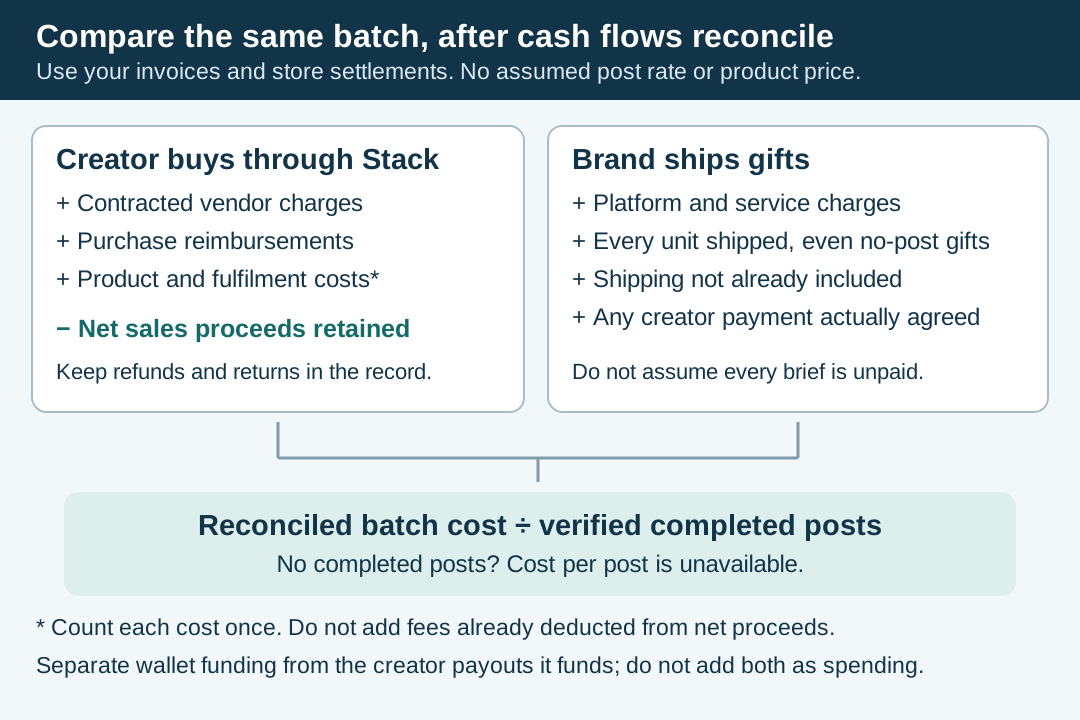
An original planning worksheet for the two buying models. Fill it with your own invoices and store settlement records; it supplies no assumed prices or break-even rate.
Original visual by Superdirector editorial team. Creation date not recorded.
Rights and disclosure before you switch
Two items change with the model. First, rights. Stack’s self-serve page says full usage rights come with its content. Insense’s page words this two ways. Its FAQ says creators grant brands perpetual digital rights while keeping the copyright, and its feature list says you receive the full digital copyright, so get the contract term. For Collabs, GRIN, Upfluence and Aspire, none of the pages we read states a usage-rights term. Ask each vendor, and use our usage rights checklist to record the channels, term and territory you agree.
Second, disclosure. The FTC’s Endorsement Guides say a connection the audience would not reasonably expect, such as free or discounted products, must be disclosed clearly and conspicuously, whether or not the advertiser requires an endorsement in return. The same guides say advertisers should guide their endorsers on disclosure and monitor their compliance. The Guides explicitly include monetary payment as well as free or discounted products. Our practical inference is to plan clear disclosure for a reimbursed purchase too, and have counsel assess the actual arrangement rather than treating reimbursement as an exemption. Ask each vendor who tells creators what to disclose and who checks, then see how to review a creator’s disclosure in the caption and video. This is not legal advice.
Where SuperDirector fits
SuperDirector is ours, and it is not a seeding, creator-hiring or creator-payment platform. Its UGC campaign planning page says it plans campaigns with brand context, hooks, scripts, shot plans, proof requirements and creator-ready briefs before you spend on creators. That step comes before any option above and replaces none of them. Skip it if your platform already covers it.
Test one batch before moving the rest
First confirm the minimum batch and credit commitment each vendor actually sells, any upfront payment, and pause or unused-credit terms. Choose a batch you can fulfil on both routes with the same product and brief. Track completed and pending posts, days elapsed, product and shipping costs, all vendor charges, and any net sales proceeds returned to you. Our UGC content brief guide helps keep the requested work consistent. A small batch can reveal operational problems; it does not establish a reliable long-term post rate.