How-To Guide
Launch a Bengaluru weekend-trip planner with planning demos, not destination montages
Make six Bengaluru trip-planner walkthroughs around departure times, shared preferences, manual budgets and unresolved bookings.
How do I launch a weekend-trip planner for people in Bengaluru without running a generic travel-inspiration page?
Make each launch post solve a concrete planning decision: departure window, trip length, competing preferences, budget inputs or saved-plan review. Show how the app handles that decision with its actual features. Attractive destination footage may earn attention, but it does not explain why someone needs your planner rather than another travel-inspiration account.
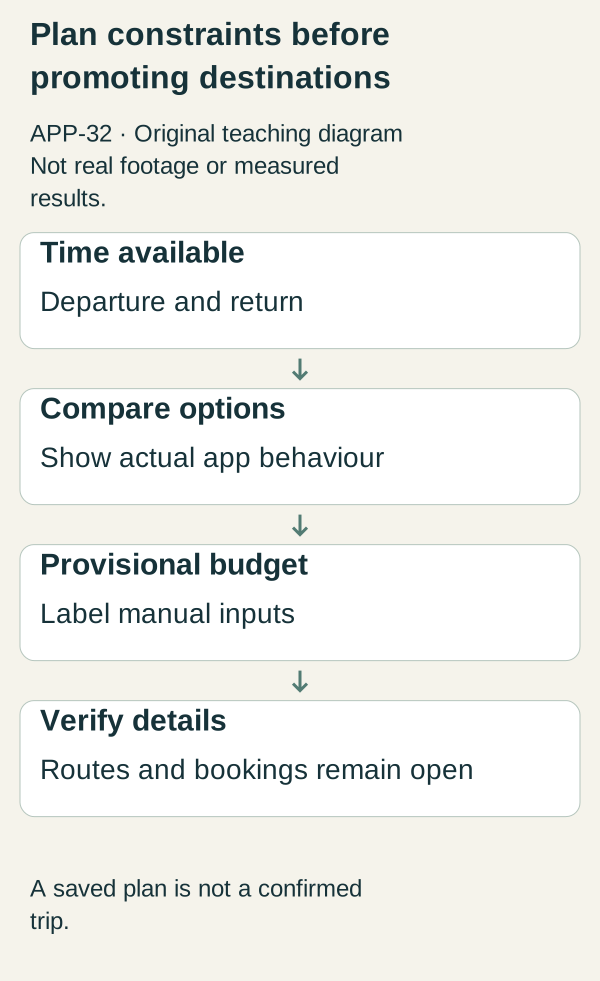
Original illustrative teaching diagram. Show weekend-trip time constraints, actual comparison behaviour, manually entered budget and unconfirmed details. This is planning guidance, not product footage, customer evidence or measured results.
Make each launch post solve a concrete planning decision: departure window, trip length, competing preferences, budget inputs or saved-plan review. Show how the app handles that decision with its actual features. Attractive destination footage may earn attention, but it does not explain why someone needs your planner rather than another travel-inspiration account.
You do not need a travel-filming budget to demonstrate planning. You need a clean screen recording, transparent example inputs and clear boundaries around what the app knows. Routes, prices, opening hours, weather and availability can change, so do not turn an illustrative plan into a current travel recommendation.
 Superdirector
Make it work for your brand
Find it. Remake it. Post it. Superdirector turns the viral formats in your niche into your brand's carousels, X posts and video scripts, and keeps the calendar full.
Choose a planning problem the build can actually solve
Our fictional product, Weekend Window, helps users compare a Friday-evening departure with a Saturday-morning departure, save trip notes and organise a provisional budget. It does not book transport, guarantee travel times or verify attraction availability. We use these assumptions only to show the content method.
The target user is planning a short trip from Bengaluru, but not every example needs a famous destination. A useful first scenario is: “We have one free night, leave after work and disagree about how much travelling is acceptable.” The app's value is making those constraints visible.
Do not use a neighbourhood label as a proxy for a user's precise location. Record the demo with broad, fictional departure information. If your real workflow needs exact addresses, use a safe demonstration location and keep a home or workplace out of view.
Six complete walkthroughs
1. Friday evening versus Saturday morning
First frame: “Same weekend, two departure windows.” Enter the two possible start times in the real planner and show what changes. If the app cannot calculate routes, show its comparison notes and do not simulate route intelligence.
Narration: “This is a planning example, not a live traffic forecast. I am comparing the time we want to leave and the time we need to be home.” End on the saved comparison and invite viewers to inspect the actual planning features.
A visible trade-off is the useful outcome. Do not declare one option faster without current route evidence.
2. One night or two
First frame: “Can this plan fit the time we actually have?” Show the return constraint before adding activities. Place example activities only in slots the current app supports, and label durations as illustrative if they are invented.
Say: “I am reducing the plan to one overnight stay. These are placeholder activities until we check opening times and travel details.” The clip shows editing and does not suggest the itinerary is ready to book.
3. Separate fixed and optional spending
First frame: “What must we budget for before adding extras?” Enter fictional amounts for transport, accommodation and optional activities. Keep the currency and assumptions visible. Explain whether the app adds entered amounts or fetches live prices.
If it only totals manual entries, say exactly that. “Plan with your own quotes” is a useful proposition. “Find the cheapest weekend” would be a different, unsupported claim.
4. Compare two people's priorities
First frame: “One person wants less driving; the other wants more stops.” Use fictional travellers and show whatever comparison mechanism actually exists: notes, tags or an editable checklist.
Do not invent collaboration if the product is single-user. You can say: “I have written both preferences in my plan so we can discuss them.” If sharing is built, test its permissions and recipient experience before showing it as effortless group planning.
5. Keep unresolved details visible
First frame: “A saved itinerary is not a confirmed booking.” Demonstrate a checklist for accommodation, access conditions, transport and current local information, if the app supports it. Otherwise show an original planning card beside the screen and do not pass the card off as product UI.
The end state should clearly mark what remains unverified. This is especially important when a polished screen can look more authoritative than its data deserves.
6. Re-plan when one constraint changes
First frame: “Our departure moved. What needs changing?” Alter one fictional input and show how the actual plan responds. If updates are manual, include that work in the capture.
Narration: “The app keeps the plan in one place; it does not confirm that the new route or booking is available.” Close with a task-led invitation: “Try organising one real weekend's constraints after checking the beta details.”
A worked content brief you can reuse
Scenario: two fictional adults planning one overnight trip from Bengaluru.
Constraint: leave after work and return the following evening.
Product job: compare departure options and keep a provisional spending list.
Opening: “Before choosing the destination, can we agree on the time we have?”
Proof sequence: show the departure and return fields; enter both options; reveal the saved comparison; open the unverified-details checklist.
Visible labels: “Illustrative plan,” “Manually entered amounts” and “Check current travel details before booking,” where applicable.
Next step: the real beta information page, not a fabricated booking result.
Blank version: traveller situation ___; hard constraint ___; built feature ___; example inputs ___; output actually produced ___; unresolved facts ___; visible labels ___; destination ___; feedback question ___.
Produce locally relevant content without pretending expertise
Use terminology your intended users recognise, but have a local reviewer check phrasing and context. Bengaluru-specific usefulness comes from real constraints and supported coverage. Sprinkling place names into a generic script does not supply it. Do not claim knowledge of current road conditions from a stock photo or an old blog post.
Use original interface footage and your own diagram of the planning steps. If maps or photographs are included, check their licence and any attribution requirements. A screenshot is not automatically yours to republish because you can see it in a browser.
For this worked example, assume a ₹10,000 ceiling, not a shopping list of tools. Identify the bottleneck first: unclear product flow, missing local review or unreadable recordings. Get actual costs for necessary work before committing. You can prepare the screen-led approach without booking a trip merely to film promotion.
Learn from the right signals
Ask viewers or approved testers what they believe the app does. If they expect bookings, live prices or guaranteed routes, the creative is overstating the product. Fix that before trying a more exciting hook.
Track the specific planning task attempted, where people stop and what information they need next. A popular destination clip does not establish demand for a planning tool. A modestly viewed walkthrough, by contrast, can still reveal a serious product misunderstanding.
Your next action is to record the changed-departure scenario in one honest take. It shows both usefulness and friction, and that is a better foundation than a destination montage.
Supporting reference and scope
Rawcut's existing-footage guide covers practical sequencing and the difference between overlays and captions. This article applies that production distinction to an original planning scenario. It gives no route, destination, price or travel-time recommendation, and none has been verified.