How-To Guide
Explain a Shopify gift card’s send-on date without promising a midnight delivery
Explain Shopify gift-card scheduled sending without promising midnight recipient delivery or confusing the purchaser receipt with the gift email.
By the Superdirector editorial team.
“Schedule their gift for their birthday” and “it lands at midnight” are different promises. Before putting the second one into an Instagram ad, check the gift-card system actually used by your store. Shopify's native recipient form offers a send-on date; its current help describes an approximate sending window, not a midnight delivery guarantee.
For a small DTC brand, the campaign needs to explain three things: who receives the card, when sending is scheduled, and what the purchaser sees. A beautiful picture of a physical envelope can confuse all three if the real offer is an email containing store credit.
Establish which gift-card route you sell
Start on the actual gift-card product page, on a phone, outside the theme editor. Is there a recipient-information option? Can a buyer enter another person's email and choose a date? Does the offer use Shopify's native form, a third-party application or a custom storefront? Keep the answers separate; instructions for one route do not establish the behavior of another.
The current Shopify recipient-field help, checked October 26, 2026, says support depends on the theme. It describes recipient email, optional name and message, and an optional sending date. Its native scheduled cards are sent approximately between 4 am and 10 am in the purchasing customer's timezone. That is not a recipient-local midnight commitment.
If your store uses an application with a different schedule, read that application's current documentation and test your configured route before using its promise. A screenshot of a time field alone is not proof of a delivered email.
Write the offer as credit, not a selected present
A gift-card image can show the kinds of products the recipient could choose, but do not make it look as if the pictured product is included. In a fictional pottery-store campaign, a card beside a mug may suggest that the mug ships with it. A clear “email gift card” label and a separate product-choice scene solve different problems: delivery format and future selection.
Name the actual value options and currency from the current product page. If a depicted item costs more than the card value, avoid implying the card covers it in full. Likewise, do not introduce an expiry, refund or redemption promise simply because another shop uses it. Those terms need the merchant's own verified offer and applicable review.
The creative task is to help a giver choose this form of gift, not to pretend it is the same as a wrapped physical item. Show the recipient choosing later if that is genuinely how the offer works.
Storyboard the buyer and recipient separately
This fictional four-scene plan is designed for a short Instagram explanation, with a longer YouTube walkthrough available if the form needs more teaching:
| Scene | What to show | What it clarifies |
|---|---|---|
| 1. The gift | “Email gift card” with a verified value option | No parcel or pictured product is included |
| 2. The form | Recipient email and optional message using invented details | The giver must choose the recipient route |
| 3. The date | The real send-on field, with the store's accurate timing explanation | A date selection is not an exact-time appointment |
| 4. The handoff | Distinct buyer receipt and recipient-card examples | A purchase confirmation is not the recipient's inbox |
Use a controlled demonstration or clearly labeled mockup, never a customer's live gift-card code. Treat the code as usable value, not decorative text. Even a short screen recording can expose it frame by frame. Redact recipient details, order identifiers and redeemable codes before an editor receives the footage.
When enlarged, scroll horizontally to read the diagram.
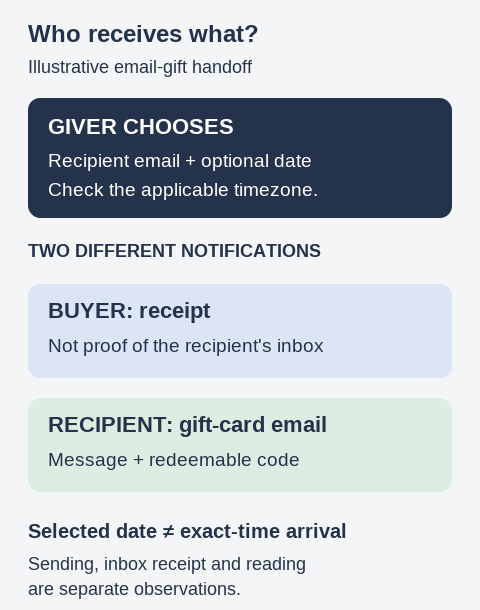
Figure: An illustrative two-person handoff. Selecting a date, sending a notification and the recipient reading it are different events.
Original visual by Superdirector editorial team. Creation date not recorded.
Choose wording that survives the timezone question
For the native form, a useful starting line is: “Choose an email gift card, add their details, and select a sending date. Check the sending-time information before planning a timed surprise.” Put the applicable timezone explanation on the product page near the date field, not only in an inaccessible footer.
If the giver and recipient live in different timezones, make that limitation visible before purchase. Do not silently convert the published native help into a promise about the recipient's morning. If an exact moment is essential to the buyer, explain that your documented route does not establish it. Let them choose another gifting method rather than inventing a workaround.
Older forum posts can still describe missing recipient functionality, and older announcements can use broader timing language. Those are reasons to inspect today's store, not reasons to promise a feature based on the age of a search result.
Rehearse the whole gift, not just the product form
Use the store's approved testing process and controlled inboxes. Do not create real-value cards or charge a payment method without the owner's authorization. Where a test purchase is not available, record the remaining delivery check as untested and limit the campaign promise accordingly.
Review at least the immediate-recipient path, a scheduled path and the self-purchase path where the recipient option is not selected. Watch for a mismatch between what the form invites and what the email explains. A custom notification template or another language version may need its own inspection; a good English preview does not prove all variants are complete.
For each observed test, record the selected date, relevant timezone, purchaser notification and recipient notification separately. Receiving the purchaser's receipt is not the same observation as finding the gift in the recipient inbox. Nor does one successful email establish guaranteed delivery timing for every future order.
Make the final CTA match the available route
If the recipient form is available and the experience has been checked, send the campaign to the exact gift-card product page. If it is missing, repair the offer before filming a demonstration of controls the buyer cannot use. Do not substitute an ordinary product page and hope the buyer discovers the gift-card process.
Before launch, ask a reviewer to explain what arrives, who receives it and what “scheduled” means. Revise the creative if they describe a physical package or an exact midnight send. The first success criterion is a correctly understood gift—not a claimed sales uplift.
See Superdirector's planning workflow to organize the scenes and destination notes. This guide does not claim that Superdirector issues gift cards, schedules their delivery or verifies a merchant's notification system.