How-To Guide
Check what the source app shares before promising “save from any app”
Choose a receiving-app demo by the content the source actually supplies, rather than assuming its Share button or app icon proves success.
A receiving app can support a PDF and still fail to receive one from the place a viewer starts. The source might offer selected text, a web address or a different sharing route. Installing the receiving app cannot manufacture an input the source never supplies.
For a founder promoting a share extension, this changes the acquisition brief. Choose the source app and the content representation together. Do not film a successful handoff from Files and advertise it as proof that someone can save the same kind of item from every messaging or email app.
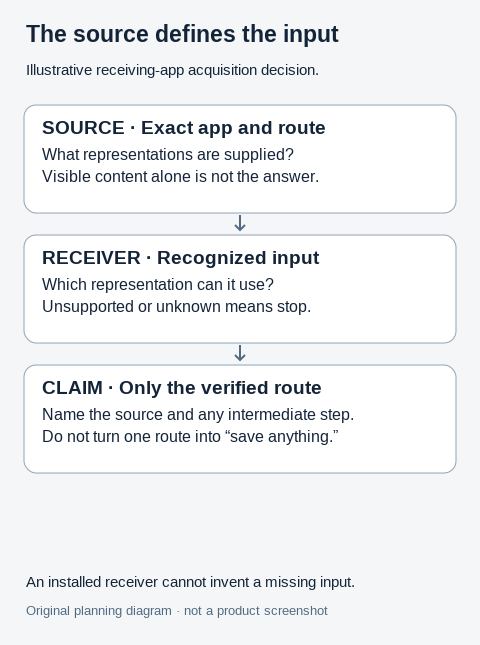
Original receiving-input decision model, not a product test result.
 Superdirector
Make it work for your brand
Find it. Remake it. Post it. Superdirector turns the viral formats in your niche into your brand's carousels, X posts and video scripts, and keeps the calendar full.
The audience's starting point is part of the feature
A Mail user asking how to share an email into Notes describes looking for a sharing route after trying another email app. Visible replies distinguish selected text, a PDF route and a link back to the message. Treat those as historical user discussion, not current universal instructions. The important task is that “keep this email” did not identify a single equivalent input.
A separate Dropbox customer thread describes a Safari-to-Dropbox route producing an unexpected file while intermediate routes through other apps behaved differently. Another customer asks why the receiver appears as an option if that handoff does not work. A staff member reports a successful test, so the thread does not establish a universal or current defect. It does identify a receiving-route problem that a generic “Share to our app” demonstration can miss.
These two observations do not establish how frequently sharing fails. They do show why a campaign should not assume that the viewer's source app supplies the same thing as the founder's demonstration.
Ask what is handed over, not what is visible
Apple's item-provider documentation explains that extensions inspect supplied attachments for recognized data types and load usable representations. One item provider can supply multiple formats. The visible document or preview is therefore not a complete description of what the receiving extension can request.
This is not a call for the marketing team to debug extension code. Ask the implementation owner to identify what the actual source supplies in the tested route, which representation the receiver accepts, and what the receiver does when none is supported. Keep the technical evidence in the review record; translate it into a clear task claim for the buyer.
Do not assume an app icon appearing in the sharing interface proves the advertised operation will succeed. Conversely, an absent option does not establish that the receiving app is broken. The source, content type, extension configuration and current context need separate inspection.
Choose the source before choosing the creator scene
Imagine a fictional reference-organizer app called Parcel Notes. Its proposed benefit is keeping a one-page rehearsal handout supplied by another app. The example is an editorial fixture, not an observed product result.
Build the creative around the audience's actual source. If the intended viewers receive handouts in a messaging app, a Files-only demonstration leaves the main acquisition question unanswered. If the product only accepts a file supplied through Files, that may still be useful, but the invitation must say so and include any necessary intermediate step.
Use a small source-input record:
| Source and route | Input actually offered | Receiver decision | Campaign consequence |
|---|---|---|---|
| Verified file-sharing route | Supported file representation | Perform the checked action | Name this source and route |
| Verified selected-text route | Text, not the whole document | Accept text only if supported | Do not promise full-document capture |
| Verified link-sharing route | Address, not supplied file bytes | Use only the documented supported behavior | Do not imply the receiver was handed the document |
| No supported representation | Unsupported or unknown | Explain the limit or stop | Remove the broad install promise |
These are planning categories, not test results for any named source app. Replace them with actual observations before publication. If the source offers multiple representations, record the one the receiving product actually uses rather than treating them as identical.
Film the boundary instead of hiding it
Show the harmless fixture in the named source, the exact sharing action and the receiver's supported operation. Keep any intermediate export, download or conversion visible or clearly explained. A cut that silently moves a file into a more cooperative app changes the feature being demonstrated.
If the receiver accepts text but loses the relationship to the original message, describe that scope. If it handles a link but must separately retrieve accessible content, do not imply that every private or restricted source can be fetched. Do not bypass access controls or copy other people's private material to make the demonstration pass.
Include an unsupported-input example when it answers a likely audience question. The goal is not to make the product look unreliable; it is to stop the viewer from mistaking a different source route for the one you verified. A clear “this route is not supported” can be more useful than a generic instruction to reinstall.
Match the acquisition channel to the supported starting point
For Instagram, show a recognizable source context and a readable qualifier naming the supported input. “Keep a document shared through this verified route” is less expansive than “save anything,” but it tells the right viewer what to try.
For YouTube, make a side-by-side explanation of two source routes only when they reveal a meaningful difference in supplied content. Do not create a long installation tutorial that avoids the input question. An X post can explain one unsupported case and link to a maintained source-compatibility note without presenting a speculative workaround as product support.
Keep the scope tied to current versions and the exact route, not a permanent claim about all content from a brand. A source app may expose several sharing controls with different purposes. The fact that one works does not validate the others.
Stop at the right boundary
A collection migration is a different task; the notes-import fidelity guide covers preservation across an import. An outgoing scanner export is also different; the receipt-output guide covers the artifact a recipient receives. Here, the decision comes earlier: can the source supply an input that allows the receiving app to offer its advertised action at all?
Before release, ask a reviewer to name the supported starting app, content type and any intermediate step. If they answer “anything from anywhere,” narrow the creative. If the real source does not provide a usable input, stop that acquisition route rather than adding traffic to an impossible promise.