How-To Guide
Private or unlisted YouTube video for a creator review?
Choose private or unlisted YouTube access for a creator-video review. Test each reviewer, pin the exact cut, and verify approval and public release.
By the Superdirector editorial team. Official YouTube Help sources reviewed October 29, 2026.
At a glance
Should a team use private or unlisted YouTube access for an embargoed creator video?
Use private sharing when only selected reviewers may watch the cut. Use unlisted only when forwarding the URL is acceptable. Test the exact upload from each intended reviewer’s context, then record content approval and the later public-release readback as separate decisions.
- Private limits playback to selected viewers; unlisted can be watched and reshared by anyone with the link.
- A channel owner’s successful play is not a reviewer access test or content approval.
- A saved schedule is not proof that the approved upload became public.
A brand may approve a sponsor video and still let the wrong people see it before launch. A YouTube review link is an access decision: private limits playback to selected viewers, while unlisted lets anyone with the link watch and pass it on. Choose the route from the actual permitted audience, then test it from a reviewer’s context. Keep that access result separate from approval of the video and from the later decision to make it public.
This guide is for an agency or brand reviewing a creator’s *unpublished* YouTube cut. It does not claim that any link setting prevents an invited viewer from recording or disclosing what they see. It offers a blank review and release card, a CSV record, and an original visibility decision diagram. The assets contain no real channel, person, or embargo data.
Direct answer: choose by who may receive the cut
Use private when only named people may view the video. In YouTube Studio, the owner can share a private upload with selected email addresses. Use unlisted only when the client accepts that the URL can be forwarded. YouTube says anyone with an unlisted link can watch and reshare it, and an unlisted video may surface in search if someone adds it to a public playlist. Neither route is a substitute for deciding who is allowed to see the cut. YouTube’s privacy settings define these behaviors.
Ask the release owner a precise question before uploading: “May anyone who receives this URL view this exact cut before launch?” If the answer is no, a word such as *confidential* in an unlisted title does not impose access control. If private sharing will not work for a required reviewer, resolve the access route with the owner or use another authorized review system; do not silently widen the audience.
| Review need | Candidate YouTube route | What must be verified |
|---|---|---|
| A fixed list of reviewers may watch | Private upload, shared with selected viewers | Each required reviewer can open the intended upload in their actual viewing context. |
| The client permits link forwarding | Unlisted upload | The client accepts redistribution, and the received URL opens the intended cut. |
| The cut is ready for everyone | Public release or a saved publication schedule | The release owner, approved upload, time zone and actual public result are recorded separately. |
YouTube says its systems and human reviewers may review private videos for ad suitability, copyright and abuse prevention. Treat *private* as a YouTube viewer setting, not as a promise that only your team can process the file. YouTube Help.
When enlarged, scroll horizontally to read the diagram.
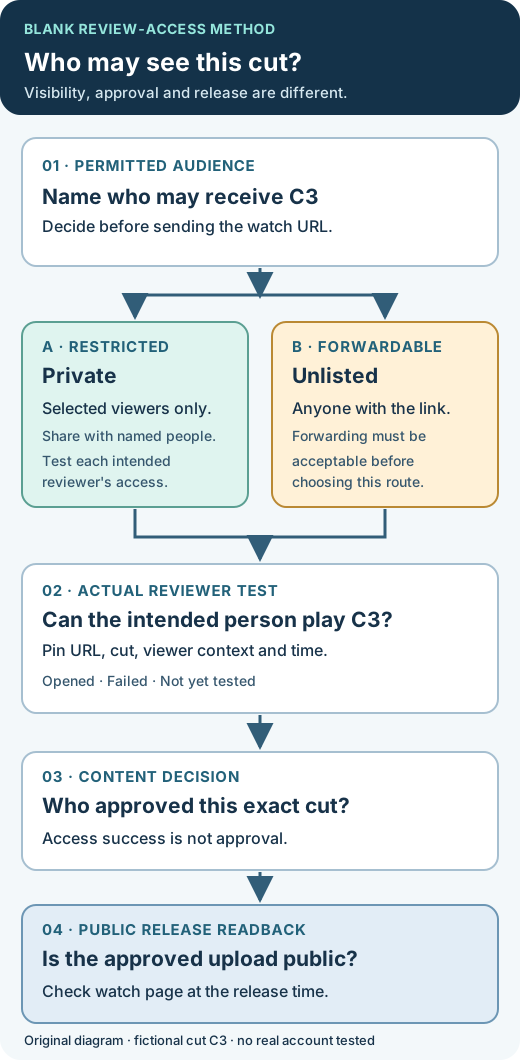
Original editorial diagram. The fictional C3 cut illustrates three independent decisions: viewer access, content approval and public release. It depicts no real channel or client.
Original visual by Superdirector editorial team. Created 2026-10-29.
Test access as a reviewer, not as the channel owner
The channel owner opening a watch page proves only the owner’s access. For private review, the owner must first share the upload with each named viewer. Then have each required reviewer open the exact upload from the invitation or watch URL in the account or link context they will use for the actual review. Do not send passwords or access codes through an editorial worksheet. Record a role or private reference for the person tested, the date and time zone, the visible cut identifier, and one of opened, failed, or not yet tested. “Link sent” is not an access result.
For a private review, the invited person should confirm that the correct cut plays with the expected sound and picture. If they used a different signed-in account than the one shared, resolve that specific problem and retest. If the recipient is a legal or retailer reviewer, test their access too; a client contact’s successful play does not establish another person’s access.
For an unlisted review, a fresh viewer context can check the route the forwarded URL will take. That successful play is evidence of reachability, not of confidentiality. YouTube does not require a Google Account to watch an unlisted video, and the link may be reshared. If the audience rule forbids forwarding, change the review route rather than declaring a passed unlisted test secure. YouTube Help.
Pin the reviewed upload before asking for approval
An approval must refer to a specific version. In the private campaign record, keep the watch URL or video ID, creator channel, cut label or file revision, current visibility, access test, and the owner who can change it. If the creator uploads a new revision to a different URL, repeat the access and content review against that upload. If the video changes at the same URL, identify and recheck the relevant revision rather than assuming the earlier approval covers it.
The review request should state what needs a decision. Product facts, disclosure, destination, on-screen text, sound and crop can require separate checks. The product-claim evidence guide addresses a proposed factual claim; the crop review guide addresses booked viewing surfaces. This page answers a narrower question: could the intended people view the exact cut before the team authorized its public release?
Keep the substantive approval in the existing content approval workflow. A person allowed to view the cut is not automatically allowed to approve or publish it. Name those roles in the review record instead of inferring them from who received an email.
Pick a feedback channel deliberately
YouTube says comments are unavailable on private videos, while unlisted videos can have comments. Do not change a restricted cut to unlisted solely to obtain a comment box. A private review can use an authorized document or existing review tool, with each note tied to the upload and timecode. For example, “Cut C3, 01:12, the caption names the earlier product color; update it to the approved color” tells the creator exactly what to correct. “The video looks wrong” does not. YouTube Help.
Separate access status from content decision in every feedback thread. “Reviewer 2 could open C3 at 09:20” is an access observation. “Brand owner approved C3 at 11:05 after the caption correction” is a content decision. Neither says that C3 is publicly available.
Fictional case: the easy link widens the embargo audience
Entirely fictional teaching example. A creator has a cut of a desk-lamp demonstration, labeled C3. A brand wants two named people to see it before announcing the product. The creator proposes an unlisted YouTube URL because it is easy to send. The brand’s actual condition is that the link must not be forwarded to anyone else. Those facts make the easy link a poor fit: YouTube’s unlisted setting permits anyone with the URL to watch and reshare it. No real brand or channel was checked for this example.
The release owner asks for a private upload and shares it with the two selected reviewers. Reviewer A can play C3. Reviewer B reports an access error because they were using a different account from the one invited. The record says Reviewer A: opened C3; Reviewer B: failed, account mismatch. It does not say “review complete.” After correcting the invitation, Reviewer B tests again and confirms the picture, sound and cut label. Only then does the content owner complete the separate C3 approval.
If either reviewer needs to send the cut to a colleague, the team asks the release owner whether that person should be added as a selected reviewer or whether another controlled review route is needed. It does not treat an existing access success as permission to widen the audience. The blank review and release card has one row per reviewer so a failed test remains visible beside its later retest.
Make public release a different action
Sending a review link, receiving comments and approving a cut do not publish it. Before release, record the exact approved upload, release owner, intended date, time and time zone, and the visibility setting saved in YouTube Studio. Check whether another cut was uploaded after approval. A release instruction naming only “the video” is easy to apply to the wrong upload.
YouTube’s documented scheduled-publication route sets a private video to go public at a chosen date, time and time zone. If review happened while the upload was unlisted, do not assume the unlisted state and a saved schedule are the same configuration; inspect the final saved setting and confirm the agreed reviewer access while moving to the release plan. YouTube also says a Community Guidelines strike can stop a scheduled video from publishing during the penalty period, requiring rescheduling. YouTube scheduling guide.
At the intended release time, open the public watch page in a viewer context and verify that the approved upload is public. Record the observation with time and URL. A schedule is an intent; a public watch page is the release readback. If the page is still private, remains unlisted, or shows another cut, give the release owner the precise observed state and resolve it in the existing publishing workflow. Public availability is not a claim about reach, search ranking or future sales.
Keep one short record that distinguishes the three decisions
Use one row for each review test and a final release row. The blank CSV contains headers only, so no unknown field has been converted to a pass. The printable card has no save or submit action; put completed records in the authorized campaign system rather than a public copy.
| Decision | Evidence to keep | What it does not prove |
|---|---|---|
| Review access | Exact upload, visibility, permitted audience, reviewer context, observed playback and time | Approval of the content or permission to publish. |
| Content approval | Exact cut/version, decision owner, dated approval and remaining changes | That every recipient could view the cut or that it is public. |
| Public release | Approved upload, planned time zone, saved visibility and dated public watch-page readback | Search indexing, recommendation, performance or sales. |
If a new upload, changed cut, changed audience rule or revised release time appears, update the specific row it affects and retest that decision. Do not erase a failed access test after it is repaired; retaining both observations explains why review took longer and which cut was actually approved.
Source and scope note
The platform behavior above comes from official YouTube video privacy settings and scheduled publication guidance, reviewed October 29, 2026. The three-decision record, fictional C3 case, SVG and blank worksheets are original editorial methods. They are not a report of a Superdirector client campaign, a tested real channel, legal embargo advice, or a promise about YouTube indexing or delivery.