How-To Guide
Recruit the first pantry-app users without claiming unmeasured savings
Create six pantry-app demos and a bounded beta invitation while separating inventory upkeep, first-user milestones and unmeasured savings.
How do I get the first 100 users for a pantry app without claiming it saves money when I have not measured that yet?
Show what someone can record, find and update in the app. Invite testers to try a specific inventory task and tell you where it breaks down. Until you have appropriate evidence, do not claim the app saves money, reduces food waste by a percentage or prevents food from becoming unsafe.
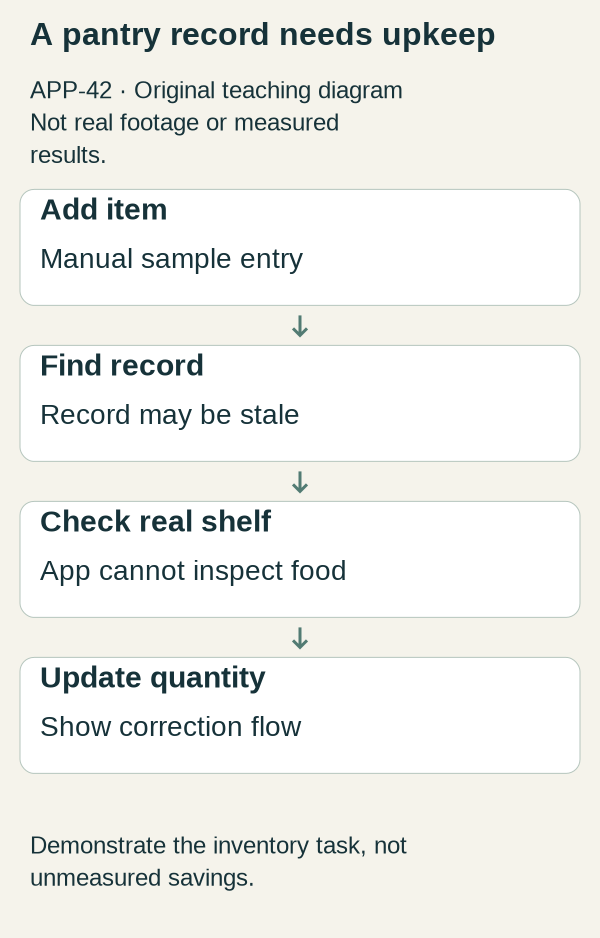
Original illustrative teaching diagram. Show manual pantry records, potential staleness, a real shelf check and quantity correction without savings claims. This is planning guidance, not product footage, customer evidence or measured results.
Show what someone can record, find and update in the app. Invite testers to try a specific inventory task and tell you where it breaks down. Until you have appropriate evidence, do not claim the app saves money, reduces food waste by a percentage or prevents food from becoming unsafe.
A content plan cannot guarantee “first 100 users”; it is a recruitment goal. Start with a group you can support and learn whether people keep their records accurate. Widen recruitment only when the workflow is useful enough to explain honestly.
 Superdirector
Make it work for your brand
Find it. Remake it. Post it. Superdirector turns the viral formats in your niche into your brand's carousels, X posts and video scripts, and keeps the calendar full.
Choose a small pantry task
ShelfNote, our fictional app, lets you add an item by hand, enter a date shown on its packaging, find the item later and mark it used. It does not detect purchases, verify freshness or know what is physically in the kitchen. Those boundaries are central to the example.
The first task is deliberately small: record three items already in one cupboard and find one of them later. Three is an illustrative testing scope, not an optimal number. A complete household inventory may be too much work for someone who has not yet decided whether the app is useful.
Use fictional labels or your own non-sensitive pantry items in recordings. Do not imply a date is a food-safety assessment. If the app stores date information, explain the field's actual meaning and direct users to the product's separately reviewed guidance where relevant.
Six complete demonstration briefs
1. Add what is actually there
First frame: “Start with one shelf, not your whole kitchen.” Show entering a sample item and its quantity. If entry is manual, keep the typing visible or label the shortened section.
Narration: “This is a record of what I enter. The app cannot see whether the item is still in the cupboard.” End with the saved item and an invitation to inspect the beta's actual features.
Avoid a magically populated pantry animation unless you label it prominently as a concept and not as a functioning product demonstration.
2. Find an item before making a list
First frame: “Did I record this already?” Search for the sample item using the app's real search or filter. Show the result and its last-updated information if available.
Say: “This helps me check my record. I still need to verify what is physically there.” Do not turn the clip into “never buy duplicates again.” The record can be incomplete or outdated, and no savings study has been conducted in this example.
3. Explain the date field
First frame: “This is the date entered from the label.” Show the actual field name and a fictional date. If a reminder is supported, demonstrate its setup without claiming it predicts safety or freshness.
Narration: “The app displays the date you enter. It does not inspect food or decide whether it is safe to eat.” Keep that boundary visible near any coloured warning state. A red or green badge can imply more certainty than the underlying data supports.
4. Mark something used
First frame: “An inventory only helps if you update it.” Show reducing a quantity or marking an item used, whichever the current product supports. Include the actual confirmation or undo behaviour.
That friction is nothing to hide; it is part of the product's maintenance requirement. A user who understands it before installing can judge better whether the tool fits their habits.
5. Correct a stale record
First frame: “The app says two; the shelf has one.” Use a staged, clearly illustrative mismatch. Update the record and show the corrected state.
Narration: “The app keeps the information you provide. Here is how I correct it when the cupboard and the record disagree.” Do not present the staged mismatch as a real customer failure or a measured common behaviour.
6. Invite a bounded beta task
First frame: “Can you record and find three items?” Explain the task, access requirements and feedback route. Ask where entry or retrieval was confusing. Do not ask how much money participants saved.
Suggested invitation: “I am testing a manual pantry list. Try adding a few items, finding one and updating its quantity. Please tell me which step was unclear. I have not measured money or food-waste savings.” Adapt the count to your support capacity and the actual beta instructions.
Turn the first-100 goal into observable stages
Keep separate counts for people who request access, receive access, create an inventory entry, return to the list and provide usable feedback. Do not call everyone who joins a waitlist an active user. Define the event you mean before reporting progress.
There is no defensible universal conversion rate to insert into this plan. Instead, use the observations to choose a next action. If people request access but cannot install, fix access. If they install but cannot add an item, inspect onboarding. If they complete the task but never update records, investigate the maintenance burden without assuming the cause.
Recruit in communities where household organisation or app testing is relevant and promotion is permitted. Offer the useful inventory exercise and leave out any exaggerated savings claim. Respect moderators and avoid posting the same invitation repeatedly across unrelated conversations.
A claims-and-evidence worksheet
Worked row: proposed claim “Find the items you entered”; evidence is a functioning search flow with sample records; limitation is incomplete or outdated inventory; approved wording is “Search your recorded pantry items.”
Rejected row: proposed claim “Save £50 every month”; evidence is absent; decision is remove, not soften to “could easily save.” Even a hypothetical amount can set an unsupported expectation when it headlines a benefit.
Blank row: proposed claim ___; observable feature ___; supporting evidence ___; important limitation ___; final wording ___; reviewer/date ___; destination consistency ___.
If you later investigate savings, design that research separately. Do not ask a handful of enthusiastic testers a leading question and present the responses as a causal study. Any future outcome claim needs evidence that fits its wording and its audience.
Use an illustrative $150 budget only for a clear bottleneck
For this worked example, assume a $150 ceiling; nothing requires you to spend it.
You can prepare the first demonstrations using screen capture and an original workflow diagram. If entry is hard to understand, improve the explanation before buying reach. If dates or food-related labels risk misunderstanding, obtain appropriate review. A disclaimer is not a universal fix.
Your next action is to record the stale-inventory correction. It shows both what the app is useful for and what upkeep it needs, which makes the beta invitation more honest and more likely to attract testers who understand the task.
Supporting reference and scope
LaunchList's first-signups guide splits early recruitment into phases. The pantry workflow and claims worksheet here are original applications. They do not replicate the guide's benchmarks and are not a proven route to 100 users. No financial or food-safety outcome is asserted.