How-To Guide
How to recruit a London dating-app waitlist without inventing members
Plan six honest London dating-app videos and a permission-based recruitment loop for a waitlist with no active members.
How do I get the first 100 women onto my London dating-app waitlist without paid ads or pretending we already have members?
Recruit the first useful local cohort by being explicit that you have no active members, showing the real product state and asking for private waitlist interest rather than public dating disclosures. A target of 100 women is a planning goal, not a promised outcome or proof of reciprocal matching availability.
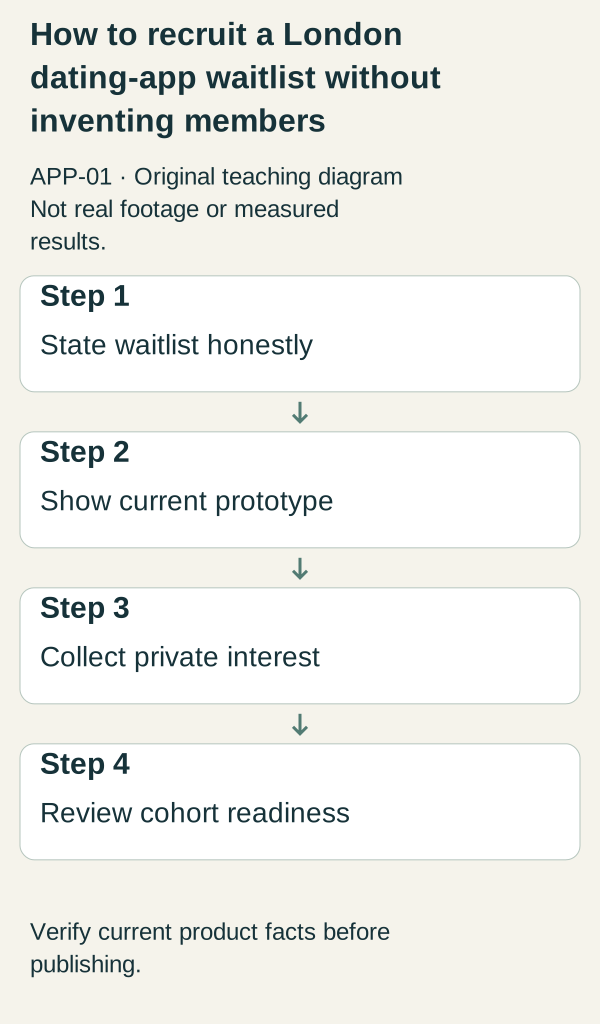
Original illustrative teaching diagram. State the London waitlist honestly, show its prototype, collect private interest and check cohort readiness. This is planning guidance, not product footage, customer evidence or measured results.
Recruit the first useful local cohort by being explicit that you have no active members, showing the real product state and asking for private waitlist interest rather than public dating disclosures. A target of 100 women is a planning goal, not a promised outcome or proof of reciprocal matching availability.
Show the proposed experience, explain its current status and give people one accurate next step. With no active members, you cannot demonstrate an available dating pool. You can explain a prototype and, if a working waitlist exists, invite people to receive updates without promising a match or a launch date.
The six briefs below are a content plan for a fictional London app called FirstFriday. In this teaching scenario it has a prototype, a working waitlist for launch updates and no live member experience. Its initial proposed beta area is Camden and Islington; invitations, pricing and opening date are unresolved. These are invented planning facts, not a real service or a claim that this area is sufficient for a dating marketplace.
 Superdirector
Make it work for your brand
Find it. Remake it. Post it. Superdirector turns the viral formats in your niche into your brand's carousels, X posts and video scripts, and keeps the calendar full.
Put the current state beside every claim
Prototype: Allowed when accurate: “This is a prototype of the proposed experience. These profiles are invented.” Unsupported: “See who is available near you.” Next step: view the proposed flow or read the project details. Invite waitlist signup only if that separate destination actually exists.
Waitlist-only: Allowed when accurate: “Join for updates about the proposed Camden and Islington beta. The app is not open for matching.” Unsupported: “Join active local singles tonight.” A signup is not an active member. Next step: open the working waitlist page, where its purpose and unresolved timing are clear.
Live beta: Allowed only after access is genuinely open: “The beta is open to invited participants in the stated area.” Unsupported without evidence: “Everyone gets a match” or “hundreds of verified members near you.” Next step: use the real invitation/access route. Do not reuse waitlist-only wording if the offer has changed, and do not infer active local participation from registrations.
FirstFriday's example label is “WAITLIST ONLY • PROTOTYPE SHOWN • NO ACTIVE MEMBERS.” Place it near demo footage and repeat it in the accompanying text. Do not hide the explanation after a long caption or use stock couples as apparent customers.
Six ready-to-adapt content briefs
Every brief below is an original teaching example. Use plain graphics for proposed plans and real recordings only for functions that exist. Suggested wording can be spoken, shown on screen, or split between both; keep the status label visible and check readability at phone size.
Brief 1: Explain what the demonstration is. First frame: a plain title, “What FirstFriday is testing,” beside an explicitly illustrated profile card marked “INVENTED PROFILE.” Exact wording: “This is a prototype for a proposed London dating app. The profiles in this walkthrough are invented, and nobody is available to match here yet.” Proof asset: an authorized recording of the actual prototype, with sample data throughout; otherwise an openly labeled concept sketch, not simulated live footage. Status label: “PROTOTYPE • DEMO PROFILES • WAITLIST ONLY.” Next step: “Read what the proposed beta includes before joining for updates.” Point to the real details page, not an unavailable download.
Brief 2: Explain whom the proposed test concerns. First frame: “Would you consider a small local beta?” with the two proposed borough names in text. Exact wording: “We are planning an adults-only beta focused on Camden and Islington. We want to learn whether people would try this local experience. We are not promising dates or matches.” Proof asset: the founder's written scope card, visibly titled “PROPOSED SCOPE.” This establishes the proposal, not eligible demand or neighborhood member density. Status label: “PLANNED BETA • NOT OPEN.” Next step: “Read the scope and decide whether you want launch updates.” Do not ask viewers to post dating preferences or exact whereabouts.
Brief 3: Make the geographical limit understandable. First frame: an original simple diagram highlighting Camden and Islington, labeled “PROPOSED TEST AREA, NOT MEMBER LOCATIONS.” Exact wording: “The first test is proposed for these two boroughs. This map shows a planning boundary, not people using the app. We have not announced expansion elsewhere.” Proof asset: a checked boundary illustration paired with the current scope document. Do not add fake profile pins or heatmaps. Status label: “PROPOSED AREA • NO ACTIVE MEMBERS.” Next step: “Check the current area on the beta-details page.” If that scope changes, replace the asset and wording together.
Brief 4: Distinguish planned controls from working controls. First frame: “What is built, and what is still planned?” with separate text columns. Exact wording for this example: “The prototype is for exploring the proposed experience. Reporting and blocking are still being specified; we cannot demonstrate them as working features. We will update the product details when we can show what actually works.” Proof asset: a dated status card approved by the founder. Do not invent a functioning report button or present a mockup as protection already in use. Status label: “CONTROLS PLANNED • NOT A LIVE SERVICE.” Next step: “Read the status notes or ask a general product question through the listed contact channel. You do not need to send precise location or dating preferences.” Avoid inviting sensitive stories into comments or DMs.
Brief 5: Explain the waitlist transaction. First frame: “What happens when you join for updates?” over a clean test recording of the real waitlist page. Exact wording: “This form is for launch updates. Joining does not create a dating profile or guarantee a beta invitation. An opening date, invitation process and beta price have not been announced.” Proof asset: the working form and its actual confirmation screen, using test data, plus the published explanation of what signup means. If the form or message contradicts this wording, correct the experience before filming. Status label: “WAITLIST ONLY • TIMING UNANNOUNCED.” Next step: “Join only if you want these updates.” Use the actual destination and do not suggest immediate matching.
Brief 6: Publish an honest status update. First frame: “Still preparing the beta,” with an actual production/update date added when made. Exact wording: “FirstFriday is still at the waitlist stage. We have not opened matching or set an opening date. Our next update will explain what is ready and what is still unresolved.” Proof asset: the current project status record. The example includes no signup counts, testimonials or progress claims because none were observed. Status label: “WAITLIST ONLY • NOT OPEN.” Next step: “Read the latest status before deciding whether to sign up.” If a real beta later opens, replace this brief with verified access details rather than silently changing its meaning.
An optional four-week production sequence
This is a way to organize content work, not a launch timetable. Stop, delay or combine weeks when the necessary facts or assets are missing. Week four does not oblige you to open the beta.
Week 1: check the scope and destination; make briefs 1 and 2 using the same labeled prototype assets. Week 2: make brief 3 and verify that its boundary matches the details page. Prepare brief 4 only after the status of controls is confirmed. Week 3: test the waitlist path and make brief 5. Remove unsupported claims from the destination as well as the video. Week 4: make brief 6 from the actual current state. If nothing material is ready, explain that plainly rather than manufacturing a launch milestone.
You can film these without a cast or customer footage: a founder narration, readable status cards, an original area diagram and authorized recordings suffice for the teaching plan. No budget figure is needed to make these decisions.
Review the right question after each post
Use a compact observation row: Post/brief ID: ____; publication date: ____; product state at publication: ____; destination checked: ____; observed visits, if available: ____; waitlist signups, if available: ____; general product questions: ____; attribution gaps: ____; next change: ____.
Concrete decision example: the clip says “join for updates,” but the linked page says “start matching.” Correct the page or stop directing people there before making another creative variation. This is a hypothetical mismatch, not an observed FirstFriday result.
If views are visible but visits are not measured, record that gap. If visitors arrive but few join, inspect whether the offer, geography and current state are understandable. Neither symptom proves a cause. Signup interest cannot establish that people will find mutually relevant participants when a beta opens. This plan supplies no universal signup target or opening threshold.
Content and operational questions to resolve, not a safety certification or legal-compliance checklist:
- Does each post describe the current product state rather than an aspiration?
- Can viewers tell whether profiles and interface controls are real, demonstration-only or planned?
- Do the stated area, pricing status and invitation instructions match the destination?
- Is there a monitored general product-question channel, without requests for sensitive dating details?
- Who corrects outdated posts and communicates a changed plan?
- Which product and operational issues still prevent an honest live-beta invitation?
This sheet does not establish that a dating service is safe or legally ready. Resolve those separate responsibilities before opening access; a completed content calendar is not evidence that they are satisfied.
Source context and originality: the structural approach was informed by inspection notes for three directly cited pages in a small Perplexity pilot: WhiteLabelDating's waitlist guide, LaunchList's first-signups guide and Waitlister's waitlist-signup guide. Their useful patterns were constraint-first openings, practical artifacts and diagnostic questions. This draft does not reuse their language, numeric targets, performance claims or commercial promises. Those observations cannot explain why a page was cited or predict citation of this draft. Sources inspected in that study: https://whitelabeldating.com/getting-started/waitlist-strategies https://getlaunchlist.com/blog/first-100-waitlist-signups https://waitlister.me/growth-hub/guides/how-to-get-waitlist-signups The original discussion lead, https://www.reddit.com/r/startups/comments/1p5tflo/how_to_get_the_first_users_for_a_dating_app_i/ , is problem context, not evidence this six-brief plan works. No outcome benchmark is borrowed from it.
Recruit through permission-based local distribution
Content explains the offer; distribution puts that explanation in front of people who may actually want it. Start by researching a small set of real London community organizers, adult social groups and relevant local creators. Inspect their current audience, geography, recent activity and promotion rules. Do not assume that a women-focused community is a dating-prospect list, or that a public member roster is permission for individual outreach.
Use a shortlist row with: community or creator name; verified public page; observed local relevance; stated posting or submission rules; permission contact; previous contact; decision. No named community has been vetted for this example. Leave a candidate out when you cannot explain the fit or find an appropriate contact route. Respect a stated no-promotion rule rather than reframing a commercial post as a casual recommendation.
A complete permission-request draft is: “Hi [verified organizer name], I am the founder of a proposed London dating app. It is currently a prototype and waitlist, with no active matching service. I am researching whether adults in [actual proposed area] would want launch updates. Would a clearly labeled product explanation and optional waitlist link be appropriate for your community? I would follow your rules, would not contact members individually, and would not ask people to disclose dating preferences publicly. If this is not a fit, no problem.” This is a draft for a suitable verified recipient, not a message already sent or permission to send broadly.
If an organizer agrees, use the approved placement and one of the six briefs above. A suitable public post can say: “I am building [real app name], currently a prototype with no active members. The proposed first test concerns [checked area]. This walkthrough uses invented profiles. The waitlist is for updates only, not immediate matches or a guaranteed invitation. Read the current details here: [verified destination]. Please do not share personal dating information in the comments.” Match the precise wording to the current product state and organizer’s permission.
Start with a manageable manual batch rather than a target derived from an invented conversion rate. For example, research five candidate spaces, assess each, and contact only the suitable organizers through their stated routes. Five is a workload choice, not an evidence-based acquisition threshold. Record approvals, declines and unanswered requests separately. Do not repost into a community that declined or treat silence as consent.
Ask existing personal contacts only where the relationship and context make the invitation appropriate. Let them choose whether to read or privately pass along the public details page; do not ask them for friends’ dating status, names or contact lists. A referral request should never expose that someone joined a dating waitlist. Avoid public leaderboards or member-count claims that could imply available matches.
After each permitted placement, record the exact post, date, destination and any available attributed visits and signups. Record unavailable measurement as unknown. A practical decision is to improve unclear access wording when questions show confusion, or stop using a space whose audience is outside the proposed area. Do not conclude that a channel failed because one tiny batch produced no measurable signups.
The target of 100 women remains a goal, not a launch-readiness certificate. Respect how people self-identify and do not infer gender or dating eligibility from profiles. Before inviting a live cohort, separately resolve reciprocal matching coverage, actual availability and operational readiness. A list of 100 email addresses cannot answer those questions. For this worked example, assume a £300 ceiling as a spending constraint: this workflow does not require paid acquisition, a paid community placement or purchasing member data.
The studied DatingPro acquisition guide discusses hyper-local recruitment and distinct activation metrics. LaunchList’s waitlist guide discusses staged outreach and source tracking. Neither supplies a verified London community shortlist or establishes conversion guarantees. The permission workflow and message drafts above are original additions designed to address those gaps.
Next action: research the first five candidate spaces and complete their permission and relevance fields before sending anything. Select one truthful brief only after you know where it may appropriately appear.