How-To Guide
Brief keyboard-app creators on Full Access before they film the setup
Separate Full Access capability from the keyboard’s actual data behavior, then explain the useful feature, permission choice and supported limits.
A creator can make a custom keyboard look useful in seconds. The viewer may then meet a permission warning that the video never explained. If the response is “ignore it, every keyboard asks,” the campaign has replaced a legitimate decision with reassurance it cannot substantiate.
Before filming, give the creator three separate facts: what the platform permission enables, why this particular product requests it, and what remains usable if the viewer declines. Those are different questions, and a polished setup clip should not collapse them.
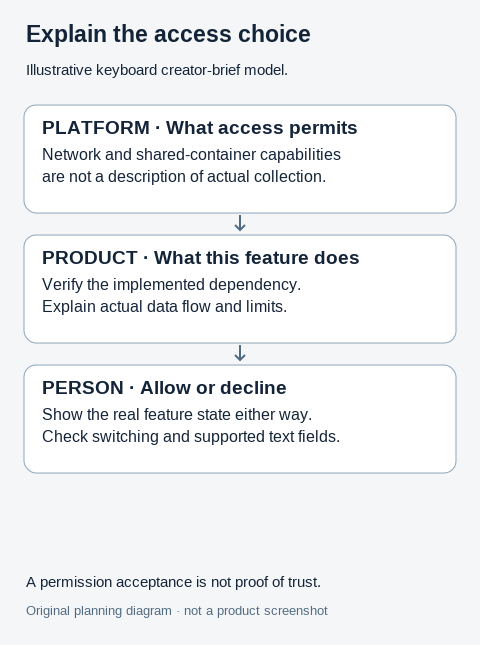
Original illustrative planning diagram, not a product screenshot or measured result.
 Superdirector
Have your AI do this for your brand.
7 days free, then $29 a month.
Distinguish capability from actual data handling
Apple's open-access keyboard documentation explains that a keyboard without open access is restricted from network access and from writing to the containing app's shared container. Full Access expands those capabilities, including the possibility of sending input for server processing. The user must enable it explicitly.
That does not establish what your keyboard collects, sends or retains. A permission creates capability; your implementation and current disclosures determine the product-specific explanation. “We need it for this feature” is not evidence that no other data leaves the device.
Two independent public questions show the buyer task. One iPhone user asks for customization without granting Full Access because of sensitive typing. Another privacy-community user asks which keyboard's input is covered. The questions are qualitative evidence of uncertainty, not a survey or a security assessment of any named app. Do not promote a reassuring forum reply into a guarantee.
Make a permission-to-feature card
For a fictional keyboard called Phrase Tile, suppose the intended benefit is inserting a short phrase the user previously saved. The team must verify where the phrase is stored and which capabilities the actual design requires. Do not assume a saved-phrase feature necessarily needs network access, or that Full Access means the product must transmit everything.
Complete this card with the implementation owner before writing the creator brief:
| Question | Evidence the team needs |
|---|---|
| What is the advertised action? | One supported insertion task with harmless sample text |
| Why is Full Access requested? | The specific implemented dependency, not a generic platform list |
| What happens without it? | Actual available features, limitations and explanatory state |
| What data leaves the device? | Verified data flow, purpose, recipient and retention explanation |
| What changes after revocation? | Tested behavior of the advertised action and any fallback |
If a row is unknown, keep it unknown and omit the corresponding marketing claim. Do not ask a creator to improvise answers about data collection.
Film the useful action and the choice
The discovery clip can begin with a mundane original sentence: “The workshop starts at ten.” Show the user selecting the saved phrase and inserting it into a supported test field. The content should be synthetic; do not use private messages, customer addresses or real credentials to make the example feel authentic.
The setup explanation should distinguish adding the keyboard, switching to it and making the Full Access choice. Apple's custom-keyboard guide describes enabling a keyboard in Settings and switching between keyboards. A downloaded containing app is not proof the viewer has activated the intended input method.
Show the actual explanation adjacent to the choice. If the user declines, demonstrate the real resulting state. If only part of the advertised feature remains available, say which part. Do not edit the declined state out of the tutorial and then claim that the feature works regardless of the choice.
Avoid the “works everywhere” trap
A systemwide keyboard is not necessarily available in every field or app. Apple's archived custom-keyboard guide describes secure text fields using the system keyboard and apps being able to reject custom keyboards. Treat that as a boundary to verify in the current supported context, not a reason to bypass a host app's controls.
Do not show a simulated keyboard overlay inside a password field and imply it is a real supported interaction. Nor should a creator announce that passwords are universally safe merely because secure fields have special treatment: sensitive information can also be entered into ordinary text fields.
Choose a normal test field for the benefit demonstration and explain the verified scope. If the keyboard does not appear in a particular app, do not instruct viewers to weaken that app's protections to reproduce the scene.
Give creators language they can substantiate
Replace “It's completely private” with the specific checked fact the team can support. That might concern a particular operation staying on-device, a documented server request, or a feature unavailable without access. It must describe the real product rather than this fictional example.
Replace “The warning means nothing” with an explanation of why the permission matters. A viewer can reasonably decide not to grant it even after understanding the benefit. The campaign's job is informed adoption, not maximum permission acceptance at any cost.
For Instagram and X, keep the task demonstration concise and place the permission dependency in readable accompanying copy. A YouTube setup walkthrough can show both choice branches and switching back. Link to the current product explanation rather than relying on an old creator reply for data-handling facts.
Check the result the viewer understood
Ask a reviewer what Full Access allows, why this keyboard requests it, what happens if they decline, and where the keyboard can perform the demonstrated task. A wrong answer is a reason to revise the brief before scaling the campaign.
Keep keyboard activation, permission choice and successful text insertion separate in any authorized measurement. Declining permission is not a product failure by itself, and a high acceptance rate does not establish trust or safe data handling.
The release gate is straightforward: the team must be able to explain the actual dependency without minimizing the warning or inventing privacy guarantees. If it cannot, improve the explanation or narrow the promoted feature before asking another creator to film it.
Frequently asked questions
Does Full Access establish what a keyboard collects or retains?
SuperdirectorHave your AI do this for your brand.
7 days free, then $29 a month.