How-To Guide
How do you make a TikTok slideshow (photo carousel) that gets views for your brand?
Make a swipeable TikTok photo post in the app: pick 1080 x 1920 images, switch to Photo, add a cleared sound and caption. Plus how to adapt Instagram slides.
By Bell Chen, founder of Superdirector — how the analysis works.
At a glance
How do you make a TikTok slideshow (photo carousel) that gets views for your brand?
In the TikTok app, tap +, open your gallery, tap Select multiple and choose your images in the order you want them, up to 35. After Next, make sure the post is set to Photo, not Video, so viewers swipe through at their own pace; Metricool notes TikTok often defaults to Video. Use images of at least 1080 x 1920 with large text on slide 1, add a sound from the Commercial Music Library if you post as a brand, write a caption with the words people search for, and post. Nothing guarantees views, but give it a first slide that makes people swipe and a last slide worth sending.
- Swipeable Photo posts and auto-playing video slideshows are two different things; pick Photo for lists and steps.
- Design at 1080 x 1920 (9:16); an Instagram 4:5 slide needs background added above and below.
- Business accounts should use commercially cleared sounds.
Photo posts and video slideshows are different
TikTok calls its swipeable format Photo Mode. In its 2022 announcement, TikTok described it as a carousel format available on mobile for photo content: still images that display one after another, with music, which viewers can swipe through at their own pace. Search "TikTok slideshow" and you will also find the other kind, a template that turns photos into an auto-playing video.
| Photo post (swipeable) | Video slideshow (template) | |
|---|---|---|
| Viewer control | Swipes back and forth at their own pace | Plays like a video, no swiping |
| Best for | Steps, lists, product details, before and after | Mood, story, announcements set to music |
| How you make it | Upload photos, set the post to Photo | Choose a template, or keep it on Video |
| Desktop upload | Not available, mobile only (per Metricool) | Upload a finished video file |
For a brand, the swipeable photo post is usually the one to learn first, because it is the TikTok version of the Instagram carousel you may already make.
Make the slideshow in the TikTok app
The steps below combine the walkthroughs from Shopify (September 2026) and Riverside. TikTok rolls features out gradually, and Shopify notes Photo Mode may not be available on every account or in every region yet, so update the app first if you cannot find it.
- Tap + at the bottom of the screen, then Upload (the gallery thumbnail beside the record button).
- Tap Select multiple and choose your images in order; Shopify notes they appear in the order you select them, up to 35.
- Tap Next. Check the toggle at the bottom: Photo makes it swipeable, Video makes it play automatically. Riverside shows the same Photo and Video choice.
- Add text to each slide only if your designs do not already carry it; text you add in the app is easier to edit later.
- Tap Add sound. For a brand account, pick from the Commercial Music Library; Shopify warns trending tracks may not be licensed for commercial use.
- Write the caption, add a few relevant hashtags, choose the cover and post.
Metricool points out that TikTok will often default to Video mode after you pick photos, and that the desktop uploader has no Photo Mode switch. If a slideshow you meant to be swipeable came out as a video, check this toggle first.
Design slides that make people swipe
TikTok's For You explainer says its recommendation system weighs strong signs of interest, such as watching a longer video all the way through, more than weak ones. TikTok does not say how it weighs swipes on a photo post, but the closest thing you can design for is people swiping to the end, so the slides have to pull people forward.
- Slide 1 sets up, slide 2 pays off. Modern Retail reported that the period-care brand August puts a joke's set-up on slide one and the punchline on slide two; the same pattern works for a question and its answer.
- Keep it short. Metricool's advice is 5 to 10 slides; TikTok allows up to 35, and longer only helps if every slide adds something.
- Big text, one idea per slide, and nothing important at the bottom or right edge, where TikTok's caption and buttons sit over the image.
- The last slide asks for one thing: send it to someone, save it, or try the product.
Sound matters even on a still post. Metricool notes the audio plays in full while the viewer swipes, and TikTok's For You explainer counts the sound, caption and hashtags of a post as signals. Our TikTok hooks page has openers you can adapt for slide 1.
Turn an Instagram carousel into a TikTok slideshow
Most founders already have the content: an Instagram carousel. It moves to TikTok well, but not as-is.
| Instagram carousel | TikTok photo post | |
|---|---|---|
| Shape | 4:5 is the tallest allowed (1080 x 1350), per Instagram's media reference | 9:16 full screen (Shopify's guide says at least 1080 x 1920) |
| Slides | Up to 20 | Up to 35 |
| Caption | Up to 2,200 characters (Instagram media reference) | 2,200 characters when TikTok raised it in 2022; check the app for today's limit |
| Sound | Optional | Expected; plays while people swipe |
| What covers your slide | Little on the image itself | Caption at the bottom, buttons on the right |
- Put each 4:5 slide on a 1080 x 1920 canvas, centred, and fill the space above and below with your brand colour.
- Move any text that now falls near the bottom or the right edge.
- Cut slides that only made sense with the Instagram caption.
- Rewrite slide 1 for TikTok: it is seen full screen, often with sound on, by people who do not follow you.
Make it a version, not a copy. TikTok's For You explainer says it does not recommend duplicated content, so change the cover, the order or the wording for each platform. The diagram below shows the re-layout; the seven-slide planning sheet is free to copy. If you are moving videos too, see repurposing TikToks for Reels and Shorts.
When enlarged, scroll horizontally to read the diagram.
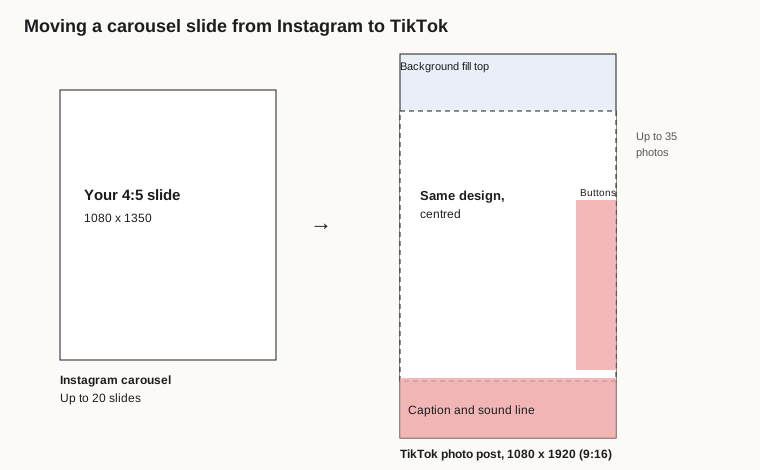
Original diagram; overlay zones are approximate, check them in TikTok's preview.
Original visual by Superdirector editorial team. Creation date not recorded.
What helps a slideshow get views
Be careful with any "slideshows get more views" claim. Modern Retail reported that TikTok told creators carousel posts get 2.9 times more comments, 1.9 times more likes and 2.6 times more shares on average than video posts. Those are TikTok's own figures, not an independent study, and the same article quotes one brand saying carousel performance had fallen off a little in the previous month. The skin care brand Youthforia told the outlet its carousels saw 11% higher reach than its videos.
What TikTok itself says about recommendations is more useful. Its explainer on the For You feed makes two points that matter for a new account. Your follower total is not itself an input, and neither is a past hit, so a first slideshow can still spread if viewers engage with it. And a For You feed generally won't show two videos in a row made with the same sound or by the same creator, so rotate your audio from post to post.
Post a few slideshows, then compare them with each other: how far people swiped, where your analytics show it, how many sent or saved it, and how many visited your profile. If one does well and you want to put money behind it, you can promote that exact post with Spark Ads, TikTok's format for paying to extend an organic post, with an optional button to a landing page.
Where Superdirector fits
Superdirector, the site you are reading, is our product. It follows what is working in your niche across Instagram, TikTok, YouTube and X, and rebuilds those formats as carousels in your brand, which you can then turn into a slideshow with the steps above. TikTok uploads stay with you: Superdirector does not post there. Its Growth plan publishes only Instagram carousels and single X text posts. AI video, video posting and full autopilot are coming soon. You remain the publisher and should label AI content where TikTok asks. See how it works.