How-To Guide
Google Play closed testing: explain the opt-in commitment and useful participation
Write a closed-test invitation that distinguishes continuous opt-in from useful task participation without promising production approval.
By the Superdirector editorial team.
Give prospective testers two clear commitments: how long you are asking them to remain opted in, and what useful activities you want them to try. Then record those things separately. An installation does not establish either a continuous enrolment history or a useful product test.
This guide supplies an original invitation and a hypothetical continuity exercise. No real cohort, app build or recruitment result has been inspected.
Check the account scope before inviting people
Google’s guidance, checked on 26 October 2026, applies to personal developer accounts created after 13 November 2023. It describes at least 12 testers continuously opted in for the preceding 14 days when applying for production access. Meeting that criterion permits an application; approval remains a separate decision. Do not assume this account-specific route applies to older personal or organisation accounts. Google Play testing requirements
Keep your proposed testing window separate from a public release announcement. A date in an invitation is not evidence that production access will be available then.
A public developer question describes inviting testers, seeing opt-ins and still being uncertain about the relationship between the count, activity and the testing period. It is one self-reported case, not evidence of a Console defect or a universal delay. It makes the communication problem concrete: “please install” does not explain what the founder needs from a participant.
Write the two commitments plainly
Describe the app’s intended task, actual compatible devices, known limitations and working access route. Seek people who can use that task, through relevant networks or communities that permit tester invitations. General task-led recruitment is covered in the English-practice beta guide; its example does not establish Android platform requirements.
Here is a shorter invitation to adapt after checking every bracket:
I’m testing [unfinished Android app] for [intended users and supported task]. Access, compatible devices and known limitations: [checked destination]. For this closed test, I’m asking participants to remain opted in continuously for at least 14 days. Separately, the activities I’m asking you to try are [real tasks and honest effort estimate]. Please report failures or unclear steps through [monitored private route]. A positive review is not required. If this commitment does not suit you, please decline. You can leave the test; I will record the resulting gap rather than pressure you to stay. Public release timing is unconfirmed.
Do not substitute “open it every day” for an explanation of the work. The cited page discusses engagement separately and states no universal daily-opening quota. That observation does not mean empty launches establish adequate testing.
Read continuity one person at a time
Google’s FAQ explains that separated opt-in periods cannot be combined into the required consecutive interval after someone opts out and rejoins. Continuous opt-in FAQ
Hypothetical exercise—not an observed cohort: consider these three records at one review point. They illustrate different evidence states, not a complete qualifying group or a production decision.
| Tester alias | Hypothetical enrolment evidence | Separate participation evidence | Bounded interpretation |
|---|---|---|---|
| A | Supports an uninterrupted preceding 14-day interval | Task activity unknown | Continuity component supported; engagement not established |
| B | Opted out during that interval and rejoined yesterday | Reported a specific confusing step | Useful feedback does not repair the interrupted interval |
| C | Says they joined earlier; continuity not established | No task report recorded | Both evidence gaps remain unknown |
Keep each person’s history intact when someone leaves. Assess the current qualifying group from the relevant individual intervals; do not invent a global reset of everybody’s history. Equally, B’s valuable report cannot be converted into continuous membership, and C’s missing evidence is not proof of inactivity.
Use only dated information your actual test process supports. If you cannot establish a history, mark it unknown. A spreadsheet does not replace Google’s assessment, and this exercise does not imply that every desired field is available in Play Console.
When enlarged, scroll horizontally to read the diagram.
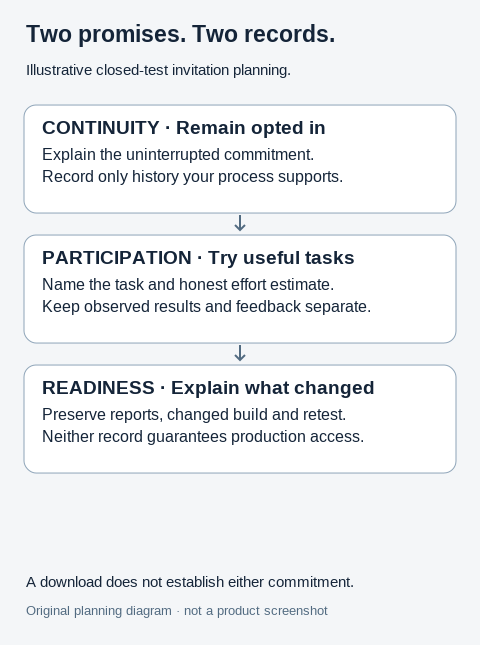
Original planning model: enrollment continuity and task participation are separate records.
Original visual by Superdirector editorial team. Creation date not recorded.
Pair continuity with a useful participation record
Choose tasks that fit the real app and cover its relevant features over the test. A fictional packing-list example could ask someone to add an item, mark it packed and check its state after reopening; that sentence illustrates task design, not verified functionality.
For each attempted task, record the build, device, action, observed result and any report. Keep “could not access,” “attempted,” “completed” and “unknown” distinct. A clear failure report may teach you more than a completed task with no explanation, but neither observation substitutes for enrolment evidence.
When an issue leads to a change, retain the original report, changed build and retest result. If the fix has not been checked, say so. Ask for follow-up work only after explaining what changed and what the tester should inspect.
Decide which gap the next invitation should address
Too few people with an established continuous interval is an enrolment problem. People joining but never reaching the intended task is a different investigation: check access, instructions and support before assuming more volunteers will solve it. Useful reports that remain unreviewed point to a follow-through problem.
These are editorial diagnostic branches, not platform approval rules. Leave unsupported explanations open and change one relevant part of the invitation or test plan at a time.
Google asks about engagement, feedback and changes informed by testing, and may require additional testing. Prepare an application summary from the actual record rather than inventing favourable answers. Application and review guidance
Start with one invitation that states both commitments and a record that keeps them separate. The useful result is an honest account of who remained enrolled, what was tried and what you learned—not a promised approval date.