How-To Guide
A six-week tester-recruitment plan for a GCSE maths app
Build a six-week GCSE maths beta calendar with checked question demos, separate parent and student copy, and clear tester tasks.
By the Superdirector editorial team.
At a glance
My math practice app is ready six weeks before GCSE revision season. What should I post each week to recruit UK parent and student testers?
Use the six weeks to show specific, supported maths tasks and recruit people who can give useful product feedback. Do not turn the account into a stream of predicted exam questions, promise higher grades, or advertise a complete GCSE course if your app covers only a few topics. Parents and students need different explanations of the same beta, not contradictory offers.
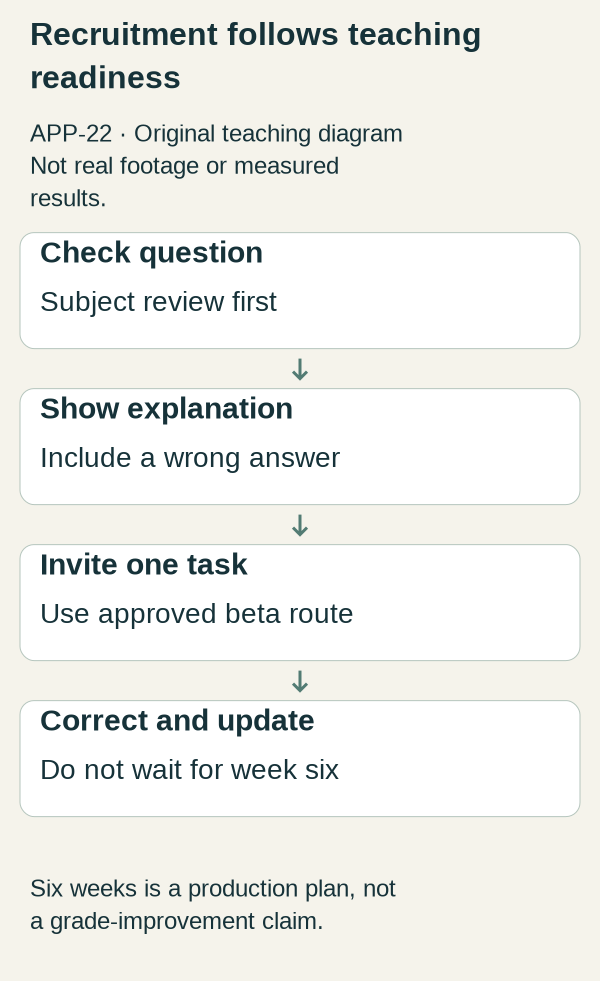
Original illustrative teaching diagram. Place subject review and an explanation with a wrong answer before beta recruitment and continuous correction. This is planning guidance, not product footage, customer evidence or measured results.
Original visual by Superdirector editorial team. Created 2026-10-20.
Use the six weeks to show specific, supported maths tasks and recruit people who can give useful product feedback. Do not turn the account into a stream of predicted exam questions, promise higher grades, or advertise a complete GCSE course if your app covers only a few topics. Parents and students need different explanations of the same beta, not contradictory offers.
The goal is a tester group you can manage before your chosen revision window. “Revision season” has no single universal date, so check the relevant exam board, year, qualification and school context before you add dates or curriculum claims to public copy.
Define the beta before writing the calendar
Our fictional app, StepCheck, contains founder-written practice on linear equations and percentages, with checked worked explanations and a way to report unclear wording. It is not endorsed by an exam board. It does not predict questions, provide tutoring, or cover every GCSE topic. The example assumes a small beta with a monitored support address; replace every assumption with your actual build.
For this worked example, assume a £200 spending ceiling. It is a limit, and you are not required to buy traffic. Put any necessary question review and basic accessibility checks ahead of distribution. Get real quotes before you allocate money, and keep a reserve instead of publishing a made-up cost breakdown. A rushed advertisement cannot fix an incorrect worked solution.
Some prospective testers are minors, so decide the appropriate recruitment, permission, privacy and support arrangements before you accept them. This article is a content plan, not a legal compliance checklist. Do not ask students to post school names, grades, contact details or learning difficulties in comments.
Week 1: Explain the exact study job
Student-facing opening: “Practising linear equations? Here is one question and the explanation you see after answering.” Show a checked original question in the real app, then reveal the explanation. Label sample answers as demonstrations. They are not results from actual students.
Parent-facing copy: “I am testing a small maths practice app covering linear equations and percentages. I need feedback on whether its questions and explanations are understandable. It is not a complete course or a promise of improved grades.”
Destination: a beta information page describing supported topics, devices, access status, contact route and the participation arrangements that apply. The week's task is to make that page and the post agree. Do not collect signups into a blank form that explains nothing about the test.
Week 2: Demonstrate an incorrect answer
Choose a common-looking error only after the subject reviewer checks that the example and correction are accurate. Do not claim it is the most common mistake without evidence.
Script: “In this demo I entered 8. The app shows why that answer does not follow from this step. Here is the explanation. Is the wording clear enough to follow?” Show the whole reasoning. A red cross and the correct number are not enough.
The feedback task is narrow: identify the first confusing line. Invite responses through the appropriate private beta route, not public sharing of academic records. If the explanation is confusing, revise it before promoting more questions.
Week 3: Show what a short practice visit involves
Record opening the app, selecting a supported topic, attempting a question and finding the explanation again. If the recording is edited, call it a walkthrough excerpt and do not claim a particular session duration.
Student-facing close: “The test is about whether this workflow helps you practise these topics. You can stop after the available questions.” Parent-facing close: “The beta is limited in scope; please read the participation details before registering.”
Use this week to check your notification and email promises as well. If you tell testers they will receive only access information and product questions, do not quietly enrol them in an unrelated promotional newsletter.
Week 4: Publish the coverage boundary
Make an original card with two lists: “Available in this beta” and “Not currently included.” List only checked topics and features. Include exam-board alignment only if someone has mapped and verified it against current official materials.
Script: “This is a focused practice beta, not everything you need for GCSE maths. These two areas are available now. These other areas are not.” Then show the topic selector so the boundary is visible in the product itself.
When someone asks “Does it cover my whole specification?”, answer with the precise limitation. Say “more coming soon” only if there is a genuine, supportable plan. Do not attach a delivery date to an unfinished topic merely to retain a lead.
Week 5: Invite one bounded tester task
Give approved participants a task they can complete without revealing private results: “Open one supported topic, attempt one available question, read the explanation, and tell us where you were unsure what to tap or read next.”
Use a feedback form with the minimum fields needed for that task. Offer an “I could not complete it” route so failures stay in your observations. Do not require a positive review in return for beta access.
For public recruitment, explain any real capacity limit honestly. “I can support five additional testers this week” is appropriate only if it reflects actual capacity. Invented urgency is especially unhelpful when families are trying to judge an educational tool.
Week 6: Close the loop, not just the signup form
Publish a factual status update: what is available, what remains limited, and whether new tester requests are open. Describe an improvement only after it exists. You can demonstrate “We clarified the wording on this explanation”; “students now learn twice as fast” needs evidence you do not have.
Send existing participants the next step promised in the beta terms. If testing exposed a substantive error, correct it and communicate appropriately before continuing recruitment. A seasonal deadline does not justify keeping an inaccurate teaching example in circulation.
Reusable calendar record
For each week, fill in:
Topic and exact product task ___; subject reviewer and review date ___; student-facing question ___; parent-facing explanation ___; capture/build date ___; access and participation conditions ___; destination checked ___; feedback route ___; decision after feedback ___.
Worked Week 2 record: linear-equation explanation; review completed before capture; question is “Which line becomes unclear?”; parent copy states limited beta scope; demo account shown; no student records displayed; beta information page checked; feedback received through the approved test route; revise unclear wording before recording another example.
Keep requests, approved participants, first completed tasks and useful feedback separate in your tracker. A request is not a completed test. With a small group, describe what you observed instead of calculating a supposedly universal conversion benchmark.
Common mistakes and your next action
Avoid using exam-board logos, copying protected questions, presenting founder-written material as official, or implying endorsement. Verify rights and wording before you publish. Avoid six nearly identical posts that merely change the topic name: each week above answers a different decision that a tester or parent has to make.
Start by recording one complete question-and-explanation flow. If you cannot show a checked answer and an explanation people can follow, you are not ready to recruit. Use the next work session to improve that flow, then use the calendar to invite the right feedback.
Supporting reference and scope
Rawcut's production guide distinguishes on-screen text overlays from captions generated from speech. The six-week recruitment sequence and beta examples here are original proposals, and no acquisition result has demonstrated them. Exam dates, curriculum alignment, safeguarding and permissions need separate current checks before you publish or recruit.