How-To Guide
What are the best influencer outreach tools for brands?
Eight outreach tools compared on send limits, personalisation, reply tracking and unsubscribe handling, from each vendor's own pages, read Nov 4, 2026.
By the Superdirector editorial team. Sources fetched November 4, 2026: vendor pages and Google and Yahoo sender guidance.
At a glance
What are the best influencer outreach tools for brands?
There is no single best, because three kinds of tool send creator outreach. Creator platforms (GRIN, Modash, Upfluence) add search, gifting and payouts to an inbox. Email sequencers (Instantly, Lemlist, Mailshake, Smartlead) give you mailboxes, send limits and follow-ups. Pitchbox is built for publisher outreach. We scored the eight on what each vendor publishes about send limits, personalisation, replies and unsubscribe handling, and tested none. We make Superdirector; it is not among the eight.
- Grouped by kind of tool and scored on five published checks, not on quality: Instantly, Mailshake, Modash, Pitchbox and Smartlead answer four; GRIN, Lemlist and Upfluence answer three. Nothing was tested.
- Sending math: at Instantly's recommended 30 emails per mailbox per day, 20 first emails a day needs 1 mailbox and 600 emails a month, 100 a day needs 4 and 3,000, and 1,000 a day needs 34 and 30,000, before any follow-ups.
- Google puts a bulk sender at 5,000 or more messages a day to Gmail and asks for List-Unsubscribe and List-Unsubscribe-Post headers on marketing mail; Yahoo asks for unsubscribes honored within 2 days.
Direct answer
Short answer, updated November 4, 2026: there is no single best tool, because three kinds of product send creator outreach and each fits a different brand. If you also need to find creators, track gifting and pay them, use a creator platform with its own inbox: GRIN, Modash or Upfluence. If you already have a list of creator emails and want to control mailboxes, send limits and follow-ups yourself, use an email sequencer: Instantly, Lemlist, Mailshake or Smartlead. If your outreach is PR or link building aimed at publishers, Pitchbox positions itself for that. This is a documentation-based shortlist, not a test result. For a small brand that already has a creator list, we would look at sequencers first: their entry plans list for $29 to $55 a month on the pages we read, against $199 for Modash's, and their pages say the most about mailboxes, limits and opt-outs. The trade-off is that Instantly, for one, is written for sales prospecting and nothing on the pages we read is specific to creators, so you give up creator search and gifting. All eight send email; this page does not cover Instagram or TikTok direct messages. Email reaches only creators whose address you have or can find, which the section on creator emails covers.
Our interest: We make Superdirector, which is not one of the eight and is not ranked here. Each tool fact below is taken from that vendor's pages or help center, or from Google's and Yahoo's sender guidance, fetched on November 4, 2026. We ran none of the tools. Prices change, so confirm on the vendor's page before you buy.
The eight tools at a glance
| Tool | Type | Pick for | Entry price as published | Send limit published | Unsubscribe handling published |
|---|---|---|---|---|---|
| Instantly | Email sequencer | Many mailboxes, one inbox for replies | Growth $47 a month billed monthly, 5,000 emails a month | Yes: 5,000 a month on Growth; 30 a day per account recommended | Yes: unsubscribe header setting |
| Lemlist | Email sequencer | Personalised sequences with reply-intent sorting | Email plan $55 a month on annual billing ($69 monthly), 50,000 emails a month | Yes: 50,000 a month; sending-limit management listed | Listed as a feature (unsubscribe link); no detail read |
| Mailshake | Email sequencer | A small team that wants simple sequences | Starter $29 a month, 1,500 sends; Email Outreach $49 a month for the named personalisation and unified-inbox features | Yes: 1,500 on Starter, unlimited on Email Outreach | Yes: reply-based opt-outs, one-click or two-click link |
| Smartlead | Email sequencer | Agencies running many client senders | Base $39 a month (billing period not shown on the card), 6,000 sends a month | Yes: 6,000 on Base, 90,000 on Pro; unlimited mailboxes | Yes: global and per-campaign unsubscribe, one-click header |
| GRIN | Creator platform | Brands that gift product and pay creators | Free ($0 plus a 20% fee on wallet deposits); Starter $200 a month plus a 10% fee on wallet deposits | No email send limit published | Not found on the pages read |
| Modash | Creator platform | Finding creators, then emailing from Gmail or Outlook | Essentials $199 a month | Yes: 100 personalised bulk emails a day; 150 unlocked creator emails a month | Not found on the pages read |
| Upfluence | Creator platform | Sending from your own Gmail or Outlook address | Custom-quoted, no price published | No email send limit published | Not found on the pages read |
| Pitchbox | Outreach CRM for links and PR | Publisher and PR outreach; positions itself for link building and digital PR | Pro $300 a month billed monthly on a one-year term ($210 a month billed annually); 2,000 outreach emails | Yes: 2,000 outreach emails a month on Pro | Yes: unsubscribe lists and a one-click header described |
Price columns compare plans, not cost per invitation, and each vendor counts differently (emails, sends, accounts, gifts). The daily volume section below works one example, and the next section explains how we grouped and scored the list.
Decide which kind of tool you need
The kind of tool decides most of what you have to check, so we grouped the eight by kind and then scored each on what its own pages publish. On November 4, 2026 we read each vendor's pricing page and home page. For the four sequencers and Pitchbox we also tried to fetch a help-center page on unsubscribing; we read those for Instantly, Mailshake and Smartlead, Pitchbox's returned 404 and Lemlist's was blocked by its robots.txt. We tried no help-center fetch for GRIN, Modash or Upfluence. We chose these eight to cover the three kinds of tool a brand might use to send creator invitations: the creator platforms appear in roundups from Hootsuite, Later and InfluencerFee, any general email sequencer can send the same invitations, and Pitchbox is included as the publisher-outreach tool so you can see where it differs. We did not find sending compared on the roundup pages we read; we therefore asked five yes or no questions of each vendor's own pages:
- Send limit published. Can you tell how many emails the plan sends from the vendor's own page?
- Personalisation described. Does the vendor say that a message is changed per recipient, through fields, templates or an AI step?
- Replies handled. Does the vendor describe a shared inbox, reply sorting or stopping follow-ups when someone answers?
- Unsubscribe handling described. Does a vendor page say how an opt-out is recorded or how the unsubscribe link or header works? A feature list that only names an unsubscribe link does not count.
- Built for creators. Does the tool find creators or keep creator records, gifting or payments?
A tool scores one point for each question its own pages answer. The sections below group tools by kind (sequencers, creator platforms, then the publisher tool), alphabetically within each group. Because every tool answers the personalisation and replies questions, the totals mostly differ on send limit, unsubscribe and whether the tool is built for creators. A "No" means we did not find an answer on the pages we read, or could not read the page; it does not mean the tool lacks the feature.
| Tool | Send limit | Personalisation | Replies | Unsubscribe | Built for creators | Total |
|---|---|---|---|---|---|---|
| Instantly | Yes | Yes | Yes | Yes | No | 4 |
| Lemlist | Yes | Yes | Yes | No | No | 3 |
| Mailshake | Yes | Yes | Yes | Yes | No | 4 |
| Smartlead | Yes | Yes | Yes | Yes | No | 4 |
| GRIN | No | Yes | Yes | No | Yes | 3 |
| Modash | Yes | Yes | Yes | No | Yes | 4 |
| Upfluence | No | Yes | Yes | No | Yes | 3 |
| Pitchbox | Yes | Yes | Yes | Yes | No | 4 |
This scores disclosure, not quality, and the totals are not a ranking: Modash's 4 includes being built for creators, while Instantly's 4 includes unsubscribe handling. Sequencers tend to score well here because sending mail is their whole product and their help centers explain the settings. A creator platform may score lower on these questions and still be the better buy if you need creator search, gifting and payouts in the same place. Read the pick-for line in each section before the score.
The checks describe disclosure across the reviewed pages and plans. A “Yes” does not establish that the cheapest tier includes that feature. In particular, Mailshake’s named personalisation, scheduling and unified-inbox features appear under Email Outreach, not the Starter feature list; choose the tier for the workflow you need.
When enlarged, scroll horizontally to read the diagram.
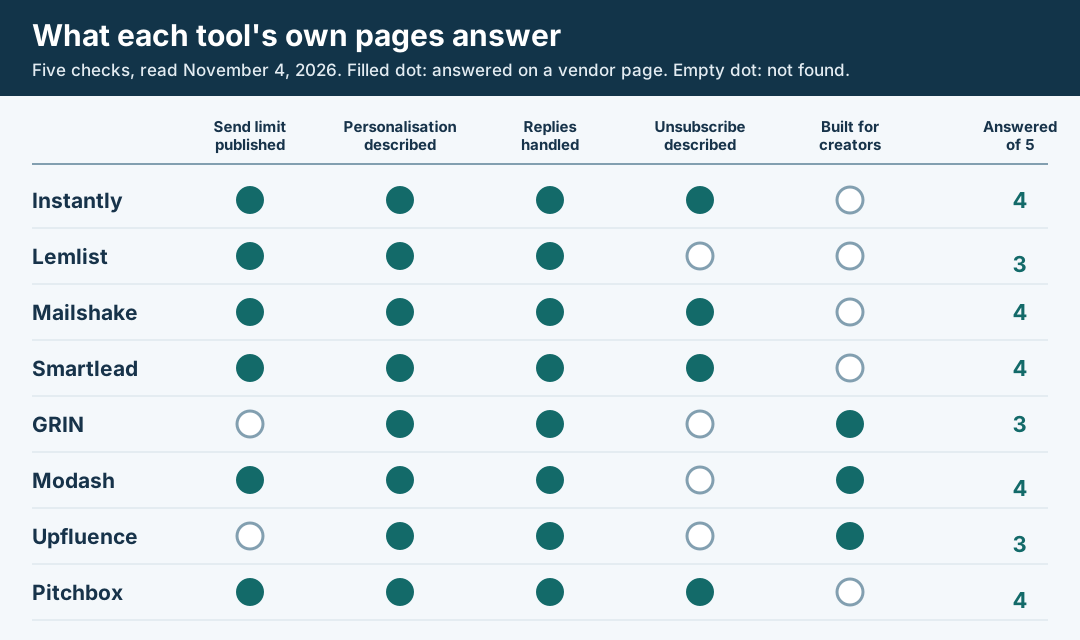
An original editorial diagram of what each vendor publishes. It measures disclosure, not output quality.
Original visual by Superdirector editorial team. Creation date not recorded.
Instantly: pick for many mailboxes and one inbox
Pick for: brands or agencies that send from several mailboxes and want one place to read replies.
Send limits and cost. Instantly's pricing page lists a Growth plan at $47 a month, billed monthly, with unlimited email accounts, unlimited warmup and 5,000 emails a month. We give only the Growth figures, because the page shows other plans with email counts that differ between blocks. Its campaign settings article recommends 30 campaign emails per day per email account, so you add mailboxes as volume grows. Its deliverability guide says to spread sending across several mailboxes.
Personalisation. Its home page says its AI will "craft and personalize outreach at scale". It is written for sales prospecting, and nothing on the pages we read is specific to creators.
Replies. The campaign settings article lists a setting that pauses follow-ups to any lead who replies, and the pricing page lists a Unibox for replies.
Unsubscribe. The same settings article lists an Insert Unsubscribe Link Header option that adds an unsubscribe link to email headers for providers that support one-click opt-outs. It does not name the List-Unsubscribe header. The pricing page also lists a global block list.
Watch for. The pricing page describes the header option only as an unsubscribe link in email headers, so ask whether it sets both List-Unsubscribe headers Google names. Its higher plans carry email counts we could not reconcile on the page, so read the plan card you click.
Lemlist: pick for personalised sequences with reply sorting
Pick for: a team that wants per-recipient fields in the message and software to sort the replies.
Send limits and cost. Lemlist's pricing page lists an Email plan at $55 a month on annual billing ($69 billed monthly) with 50,000 emails a month and unlimited senders, and a Multichannel plan at $87 a month on annual billing ($109 monthly). It lists sending-limits management, inbox rotation and a deliverability hub among its features. It also offers a free trial; see the free-option answer for the length it states.
Personalisation. The pricing comparison lists Liquid syntax and custom text and images under outreach automation.
Replies. The page lists AI reply-intent detection and out-of-office detection, and the home page describes a unified inbox for every conversation.
Unsubscribe. "Unsubscribe link" is a line in the pricing comparison. We found the address of a Lemlist help article about adding an unsubscribe link, but its robots.txt blocked our fetcher, so we read none of it and could not tell how opt-outs are recorded. Ask before you rely on it.
Watch for. It is built for sales outbound, with LinkedIn and calls beside email. Creator invitations use only the email part.
Mailshake: pick for a small team that wants simple sequences
Pick for: one or two people sending invitation sequences who want opt-outs handled by replies as well as links.
Send limits and cost. Mailshake’s pricing page lists Starter at $29 a month with one address and 1,500 sends a month. Email Outreach is $49 a month; its card lists two addresses and unlimited sends. The same page’s FAQ says each paid user may connect one mail account, which does not reconcile the card’s two-address wording. Ask which account and seat limits apply to the plan you buy. The FAQ says there is no free trial.
Plan features. Starter explicitly lists automated email sequences, A/B testing and AI email writing. Email Outreach adds named email personalisation, advanced scheduling and throttling, and a unified inbox. We did not establish those added features on Starter; confirm that tier if you need them rather than budgeting the complete workflow at $29.
Replies. Its unsubscribe help article says that when a recipient replies with "unsubscribe" or "remove me" in the first 15 or so words, the person is added to the unsubscribe list and skipped in later campaigns.
Unsubscribe. The same article says reply-based unsubscribes are on by default and links can go in a message or signature. A second article offers one-click or two-click links and recommends two-click, which asks the person to confirm. The articles are dated 2021, and neither mentions the List-Unsubscribe header Google asks of bulk senders.
Watch for. Check the header question with support if your volume is near the Gmail threshold described below.
Smartlead: pick for agencies running many senders
Pick for: an agency or in-house team sending for several brands from many mailboxes.
Send limits and cost. Smartlead's pricing page lists Base at $39 a month with 6,000 email sends and Pro at $94 a month with 90,000 sends. Its home page says it offers unlimited mailboxes and automated warmup. Mailboxes bought through its SmartSenders add-on are priced separately on the page.
Personalisation. The home page lists personalisation fields, mailbox rotation and spintax.
Replies. A master inbox auto-categorises replies by intent, takes notes and schedules follow-ups, according to the home page.
Unsubscribe. Its help center describes a global unsubscribe that marks a lead unsubscribed across all future campaigns, and a localized one for a single campaign. Turning on the unsubscribe message also adds the header tag that enables one-click unsubscribe, which the page ties to Google's requirements.
Watch for. A click on the unsubscribe link marks the lead unsubscribed everywhere by default, while the localized option is a separate choice that leaves the lead eligible for other campaigns, so choose the scope on purpose.
GRIN: pick for gifting and paying creators in one place
Pick for: brands that gift product, run affiliate or paid deals and want the invitation, the creator record and the payout in one tool.
Personalisation and replies. GRIN's home page says its AI teammate Gia "drafts outreach and keeps every creator thread in one inbox". The pricing page adds that Gia finds creators and drafts and sends outreach, and shows a pipeline from contacted to applied to enrolled.
Cost as published. The pricing page lists a Free plan at $0 plus a 20% fee on wallet deposits, with 2 live campaigns and 10 gifts in total, and a Starter plan costing $200 a month with a 10% management fee on deposits, after a 30-day trial. The fee applies to money you put in the wallet for creators, not to email. The pricing page also lists a Growth plan at $500 a month and a Scale plan at $1,500 a month.
Send limits and unsubscribe. We found no email send limit and no statement about unsubscribe links or headers on the pages we read. The limits that are published count gifts and creator search, not emails.
Modash: pick for finding creators, then emailing from your own inbox
Pick for: brands that start with creator search and want to send from a connected Gmail or Outlook account.
Cost and limits. Modash's pricing page lists Essentials at $199 a month, framed for campaigns of up to 100 creators, with 150 unlocked creator emails a month, a limit on contact details you can reveal. The same page lists bulk emails to send 100 personalised emails a day to several creators at once, which is the only send limit we found on its pages, plus sequences with timing and exit rules. It also says it does not take a volume approach and encourages semi-personalized outreach, so it is not the tool to size a 1,000-a-day plan on.
Personalisation. It says you can send personalised emails with all campaign details added automatically.
Replies. You connect Gmail or Outlook to an inbox that knows you are talking to creators, and the page lists shared inboxes with owners across the team.
Unsubscribe. No unsubscribe statement on the pages read. Ask how opt-outs are recorded and what happens above 100 emails a day.
Upfluence: pick for sending from your own Gmail or Outlook address
Pick for: brands that want invitations to arrive from a person's own address and want templates for gifting, paid and affiliate offers.
Personalisation. Upfluence's outreach page says it sends through your own Gmail or Outlook address and that its AI reworks one template for each creator's platform, language and niche. It lists ready-made templates for gifting, paid promotions and affiliate invitations.
Replies. It tracks opens, replies and conversions per template and sequence. Its pricing table lists CRM statuses, which the page says organize your programs, in the two higher plans and not in the entry plan, and the outreach page says statuses track who replied so nobody gets a follow-up they should not receive.
Cost as published. The pricing page describes its pricing as modular and custom-quoted and lists no plan prices, so there is no price to compare. Its plan table shows drip email sequences in the two higher plans and not in the entry plan.
Send limits and unsubscribe. No send limit and no unsubscribe statement on the pages read.
Pitchbox: pick for publisher and PR outreach
Pick for: teams whose outreach goes to publishers and websites for links and digital PR. Pitchbox positions itself for link building and digital PR. Its FAQ also says it can run any go-to-market campaign, but its home page and plan copy are written for link builders, and we found no creator gifting or payment feature on the pages we read.
Send limits and cost. The pricing page lists Pro at $300 a month billed monthly on a one-year term, or $210 a month billed annually, with 2 email accounts and 2,000 outreach emails; its comparison table shows 2,000 a month for Pro.
Personalisation and replies. The home page says AI reads each site and writes personalised outreach across thousands of prospects at once, and that every reply lands in one inbox with a CRM.
Deliverability and unsubscribe. The home page says deliverability monitoring is built in, powered by MXRight. The pricing page lists unsubscribe lists and a one-click unsubscribe that uses an email header under the RFC 8058 standard. Pitchbox's help pages returned 404 to our fetcher, so we read no detail beyond the pricing page.
Watch for. The workflow is organised around prospects that are sites, and the plan card describes the Pro plan as for link builders with a single website, so check how a creator list would fit before you buy.
Considered, not profiled
Aspire describes automated creator workflows and CreatorIQ describes creator communication at scale. We did not profile them because we found no outreach page from either that we could score on the five checks (Aspire's pricing page returned a 404). BuzzStream calls itself an outreach CRM for PR and link building on its home page, and its pricing page returned a 404, so we read only that home page. Our own list of platforms that find and pay creators is the influencer marketing platforms page.
Where creator emails come from
None of these tools helps until you have addresses. Modash's outreach guide says most creators show an email in their bio, that Instagram has an email tab, that TikTok bios often carry one and that a YouTube channel's address is in its About section. The same guide says doing this by hand is not scalable and that YouTube limits how many emails you can unlock per day per account. The guide is from a vendor that sells the fix, so treat that last part as its pitch.
Tools that reveal addresses are priced by the unlock. Modash's Essentials plan at $199 a month includes 150 unlocked creator emails a month, which is about $1.33 per unlocked email if you use all of them. The sequencers describe lead databases aimed at sales prospects: Instantly's pricing page says it provides leads through Instantly Lead Finder, and Lemlist's lists an email and phone finder and a 650M+ leads database. We did not check whether either holds creators, so test a sample of your own list before you pay.
Work out your daily volume
The figures below are our arithmetic using one vendor’s recommendation, not a delivery promise or a universal mailbox limit. Instantly’s campaign settings article says the daily campaign limit includes all emails across its sending accounts and recommends 30 campaign emails per account per day. Mailboxes = (scheduled first emails today + scheduled follow-ups today) ÷ 30, rounded up, when using that recommendation. Use the lower allowance if your own mailbox provider or settings require it. Replies and opt-outs should stop later steps, so a full sequence gives a ceiling, not a forecast. The table is limited to first emails with no follow-ups.
| First emails per day | Mailboxes at 30 a day | Emails per month (30 days) |
|---|---|---|
| 20 | 1 | 600 |
| 100 | 4 | 3,000 |
| 500 | 17 | 15,000 |
| 1,000 | 34 | 30,000 |
| 5,000 | 167 | 150,000 |
For a three-step sequence at steady state with no replies or opt-outs, 100 new creators a day can mean 100 first emails plus 200 scheduled follow-ups: 300 daily sends and 10 mailboxes at 30 each. The first-email-only table gives four mailboxes for those 100 new creators, which is not enough for that follow-up load. In a smaller illustration, 20 new creators plus 40 follow-ups means 60 daily sends and two mailboxes. Build the count from your actual send calendar when steps fall on different days.
Multiply the monthly column by your number of steps and compare it with the plan limits above: Instantly's Growth plan covers 5,000 emails a month, Mailshake's Starter 1,500, Smartlead's Base 6,000 and Lemlist's Email plan 50,000. Low case: 20 first emails a day is 600 a month, or up to 1,800 with a three-step sequence, which is over Mailshake's Starter and inside the other three. A brand sending 300 first emails a month with a three-step sequence needs up to 900 emails, inside all four. The 5,000 row matches the line Google uses to define a bulk sender, and the threshold counts all your mail to Gmail, so read the next section. We found no reply-rate or cost-per-signed-creator benchmark on the vendor pages we read, and we ran no tests, so these figures size mailboxes, not results.
These are capacity calculations, not an all-in budget. The software prices above do not include every mailbox subscription, sending domain, email-address lookup, verification add-on or setup cost. Price the actual plan and connected addresses you need, including follow-up capacity; an “unlimited accounts” software plan does not make the mailboxes free.
Ask each vendor about unsubscribe handling
Google's sender guidelines set stricter rules for anyone sending 5,000 or more messages a day to Gmail accounts: SPF, DKIM and DMARC, and one-click unsubscribe for marketing and subscribed messages, with a clearly visible unsubscribe link in the body. The guidelines name both a List-Unsubscribe and a List-Unsubscribe-Post header. Google's FAQ defines a bulk sender as one that sends close to 5,000 messages or more to personal Gmail accounts within 24 hours, counts every message from the same primary domain, and says a sender that meets the criteria once is permanently a bulk sender.
Spam rate matters at any volume. Google says to keep the user-reported rate below 0.10% and never reach 0.30%. Yahoo's bulk-sender page asks bulk senders for a working list-unsubscribe header with one-click unsubscribe, a visible unsubscribe link, unsubscribes honored within 2 days and a spam rate below 0.3%. Google's FAQ recommends fulfilling unsubscribe requests within 48 hours.
Two details change how you pick a tool. First, Google's FAQ says the one-click headers are what meet its one-click rule; a mailto link or a plain link alone does not. Yahoo's page recommends the RFC 8058 POST method and accepts the mailto method. Of the tools above, Pitchbox describes a one-click header under RFC 8058, Smartlead ties its header tag to Google's one-click rule, and Instantly describes an unsubscribe link header option without naming either header. Ask each vendor to confirm both headers. Second, the 5,000 threshold counts all mail from your domain, not only creator outreach, so a brand with newsletters and receipts can cross it without sending many invitations. Once Google has classified a sender as bulk, that status remains even if current volume falls. Senders that have never met the bulk criteria must still meet the all-sender requirements, including SPF or DKIM, valid DNS records, TLS and the spam-rate limits, and Google's FAQ says enforcement began ramping up in November 2025. Other laws on commercial email may apply too. Whether a creator invitation counts as a marketing message is a question for a lawyer. This page does not give legal advice.
Put three questions to each vendor in writing: does the tool add both the List-Unsubscribe and List-Unsubscribe-Post headers, how does it record an opt-out, and how soon does it stop sending to that person. Google recommends fulfilling unsubscribe requests within 48 hours and Yahoo asks for 2 days, so a tool that cannot answer the third question is a risk at any volume near the line.
Write the first message before you load a sequence
A tool sends what you write. Upfluence says a good outreach email should "mention their content, state what you are proposing, and make the next step easy". Our influencer outreach email template page has fill-in emails, so we do not repeat them here. Before you load any sequence, check that each first message does five things. If you have no list yet, see the section on creator emails above.
- Names your brand and the person writing, from a mailbox that can receive a reply.
- Refers to one specific post or video of the creator's, so it cannot be mistaken for a blast.
- States the offer plainly: product gift, paid post or affiliate commission, and the deliverable.
- Asks one small question that is easy to answer, such as their rate or whether they want the product.
- Gives an easy way to say no and stop the sequence, which is also what Google and Yahoo ask of bulk senders.
Decide before the first send how many follow-ups you will make and what ends the sequence. Our stop rule for unanswered creator outreach covers that, and the 100-point vetting rubric helps you choose whom to write to.
Send a small batch and read the replies
Send the first message to a few dozen creators before you raise the volume toward the mailbox count above. Check four things in that batch: replies reach the inbox where someone will read them, follow-ups stop once a creator answers (Instantly's campaign settings list a setting that pauses follow-ups to any lead who replies), an opt-out is recorded and that person gets no further mail, and the unsubscribe link or header works in a copy you receive yourself.
If any of the four fails, fix it in the tool settings or ask the vendor before you scale. If all four hold, raise the daily volume one step at a time and keep the spam rate under the 0.10% line Google names.
How to choose
- You send fewer than a few hundred first emails a month: a shared mailbox and a template may be enough. The tools above earn their cost when you manage follow-ups across many senders.
- You have a list and want control of mailboxes and follow-ups: pick a sequencer. Smartlead and Instantly describe a header setting; Lemlist lists an unsubscribe link without detail; Mailshake describes links and reply opt-outs. Shortlist Smartlead or Instantly first only if you value documentation: their pages say the most about mailboxes, limits and the unsubscribe header, which is not evidence that they work better.
- Your outreach is to publishers and journalists: Pitchbox positions itself for link building and digital PR, and BuzzStream's home page calls it an outreach CRM for PR and link building (we read no BuzzStream pricing). We found no creator features on the Pitchbox pages we read; confirm with the vendor before using either for creator invitations.
- You need creator search, gifting and payouts in one tool: start with a creator platform (GRIN, Modash or Upfluence), then ask each for its send limit, unsubscribe handling and header support in writing. We found no send limit on the GRIN and Upfluence pages and no unsubscribe statement on any of the three.
What we could not check
We did not sign up for, send from or test any tool, which means this page says nothing on deliverability, reply rates or support quality. Vendor testimonials on their pages are not evidence and we did not use them. We could not read Lemlist's unsubscribe help article (blocked by robots.txt), Pitchbox's help pages (404), BuzzStream's pricing page (404) or Aspire's and CreatorIQ's outreach details, and we tried no help-center fetch for GRIN, Modash or Upfluence, so their unsubscribe handling is unread. Prices are those shown on November 4, 2026 and some pages show a monthly and an annual figure, so confirm before you pay.