How-To Guide
Recruit beta testers for an ADHD-friendly task app without treatment claims
Create six task-app beta demos and a diagnosis-free feedback brief without treatment claims or inferred health targeting.
I built an ADHD-friendly task app as a solo founder. How can I recruit beta users without claiming it treats ADHD or using people’s diagnoses in ads?
Recruit around an observable planning task, not a diagnosis. Show the controls your app actually offers, such as breaking down a task or adjusting reminders, and invite people who want to try that workflow. Do not claim the app treats ADHD, improves symptoms or replaces professional care without appropriate evidence.
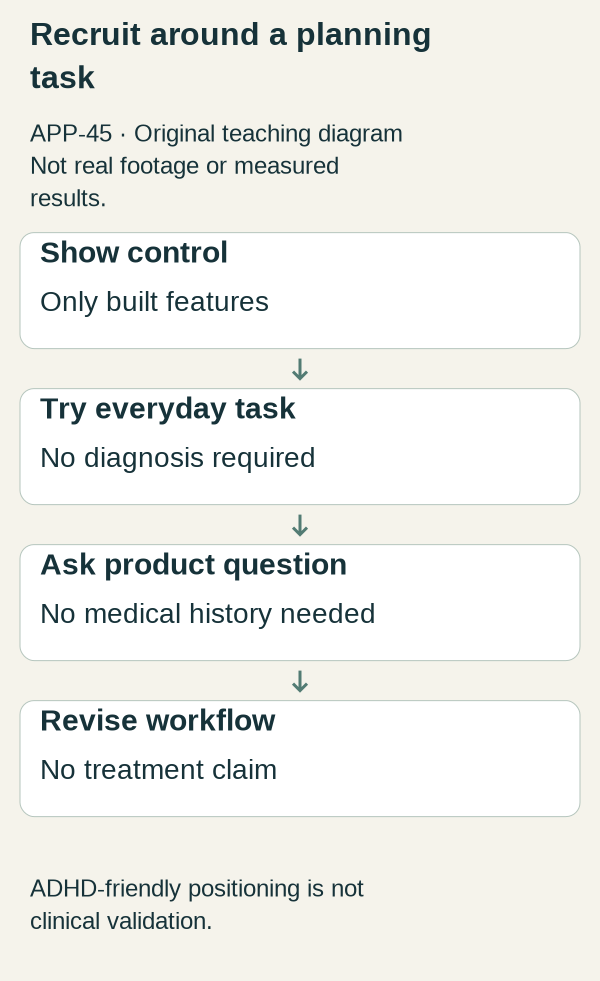
Original illustrative teaching diagram. Recruit around built planning controls and everyday tasks without requiring diagnosis, medical history or treatment claims. This is planning guidance, not product footage, customer evidence or measured results.
Recruit around an observable planning task, not a diagnosis. Show the controls your app actually offers, such as breaking down a task or adjusting reminders, and invite people who want to try that workflow. Do not claim the app treats ADHD, improves symptoms or replaces professional care without appropriate evidence.
“ADHD-friendly” is a positioning phrase, not a clinical validation. If you use it, explain the concrete design choices behind it and their limits. People vary in what helps them plan; a quieter interface or smaller task steps will not suit everyone.
 Superdirector
Make it work for your brand
Find it. Remake it. Post it. Superdirector turns the viral formats in your niche into your brand's carousels, X posts and video scripts, and keeps the calendar full.
Write the nonclinical offer first
Our fictional app, SmallNext, lets users divide a task into smaller steps, choose a reminder time and hide optional visual clutter. It has not been clinically validated. The example assumes those features exist and can be demonstrated; remove any that are still only planned.
The offer is: “Try a low-pressure way to organise one everyday task and tell us which controls were useful or confusing.” It is not: “Join because you have ADHD and we can fix your productivity.” The first describes a product test. The second makes assumptions about a person and implies an outcome the example cannot support.
Use fictional tasks that do not expose private health, employment or relationship information. “Pack a bag for tomorrow” or “organise a desk drawer” can demonstrate the interface without asking someone to disclose a difficult personal experience.
Six complete feature-led demonstrations
1. Make the next action smaller
First frame: “A big task can start with one visible step.” Enter the fictional task “pack tomorrow's bag,” then add “put the empty bag by the door” and “add the notebook.” Show the actual editing controls.
Narration: “This app lets you write smaller steps. You choose what belongs in them.” Avoid “This cures task paralysis” or any implication that the demonstration establishes a therapeutic effect.
Next, read the beta details. Do not disclose a diagnosis in comments.
2. Choose a reminder rather than accepting pressure
First frame: “Here is how the reminder is controlled.” Show the available timing, snooze or disable options only if they exist. Explain the real behaviour and do not invent an adaptive coaching system.
Narration: “You can set this reminder using the controls shown here.” If delivery depends on permissions or device settings, explain that in the complete walkthrough. Do not promise that reminders will prevent missed obligations.
3. Reduce optional clutter
First frame: “What changes when this display option is off?” Toggle a real setting and show the before-and-after interface with the same sample task.
Say: “This hides these optional elements. It does not change the underlying task.” Do not call the design universally accessible or neurologically optimised solely because you prefer it. Describe the visible change and let testers assess it.
4. Leave a task unfinished without a fake penalty
First frame: “What happens when you do not finish today?” Demonstrate the actual carry-over, rescheduling or unchanged state. If the product uses streaks or warnings, show them honestly and do not edit them out to make the app look gentler.
Narration: “Here is the current unfinished-task behaviour.” The useful question for testers is whether they understand and want that behaviour. Whether they feel guilty enough to keep engaging is not the question.
5. Revise the plan midway
First frame: “The plan changed. Edit the next step.” Change a fictional task and show the effect. If there is no undo, do not animate one into the video.
This example shows flexibility through a real interaction. Avoid a motivational transformation story about a fabricated user who suddenly becomes productive. One clear edit tells the truth better than an invented testimonial.
6. Invite a small test without collecting health details
First frame: “Would you test one planning workflow?” Explain the task, the current access and where to send feedback.
Suggested copy: “I am building a task app with adjustable reminders and editable small steps. I am looking for beta feedback on one everyday planning task. It is not a treatment for ADHD, and you do not need to share a diagnosis or medical history to take part. Read the beta details and decide whether the workflow interests you.”
Verify every feature in that copy. If participation has age restrictions or other conditions, state them accurately on the destination before recruitment.
Use feature interest, not inferred diagnoses
Share in relevant spaces only when their rules permit product-testing invitations. Do not scrape support-group members, infer diagnoses from posts or create a list of supposedly vulnerable prospects. A public conversation about planning does not make someone's health information a marketing asset.
If a moderator invites a product discussion, keep the invitation within that permission. Do not treat it as permission to contact members privately. Use a broad, respectful description of the workflow and let people opt in through the stated route.
For this worked example, assume a $150 budget. That is no reason to experiment with diagnosis-based targeting. Start with owned demonstrations, accessible text and a feedback process you can support. Any paid distribution needs its own review of the current platform and audience; this article gives no approved targeting recipe.
A completed feedback brief
Task: create one fictional or ordinary non-sensitive task, divide it into two steps, adjust the available reminder and revisit the task.
Questions: “Which control was unclear?” “Did the reminder setting match what you expected?” “Was anything visually distracting?” “What would stop you using this workflow?”
Do not ask: “What is your diagnosis?” “Which medication do you take?” or “How severe are your symptoms?” The product-comprehension task described here does not need those details.
Blank brief: tested feature ___; current build ___; everyday task ___; optional controls ___; access conditions ___; data actually needed ___; feedback route ___; claim boundaries ___; owner for responding to issues ___.
If a participant volunteers sensitive information, do not turn it into marketing copy. Responding helpfully to the participant and getting permission to publish a testimonial are separate matters. Obtain appropriate specific permission and review before any later use, and do not imply typical outcomes from one person's account.
Decide what to change after the first tests
If participants understand the controls but dislike the workflow, look into fit and do not escalate the promise. If they assume the app is treatment, revise the title, imagery and onboarding. If a feature is unreliable, fix it before making more promotional variations.
Record the unfinished-task flow next. It shows whether “low pressure” rests on actual behaviour or merely on soothing colours and copy.
Supporting reference and scope
The FTC's influencer guidance says you cannot make up claims about a product that would need proof the advertiser does not have, such as scientific proof that a product can treat a health condition. That principle matters if creators later promote this app; it does not validate the app itself. The six demonstrations and the feedback brief are original proposals for nonclinical product testing. They are neither medical advice nor a clinical recruitment protocol.