How-To Guide
Show mixed Hindi-English subtitles in one honest 20-second Reel
Show mixed Hindi-English subtitles with three original audio tests, raw-versus-corrected output and a complete 20-second shot sequence.
My subtitle app supports Hindi and English in the same video. How do I show that difference to Indian creators in a 20-second Reel?
Show the same short Hinglish recording moving from original audio to the app’s untouched transcript, through any correction, to the final captioned preview. That sequence demonstrates mixed-language handling better than a generic “supports Hindi and English” claim. Use three different clips because names, script choices and language switches can expose different limitations. A 20-second Reel can explain one example; it cannot establish overall transcription accuracy.
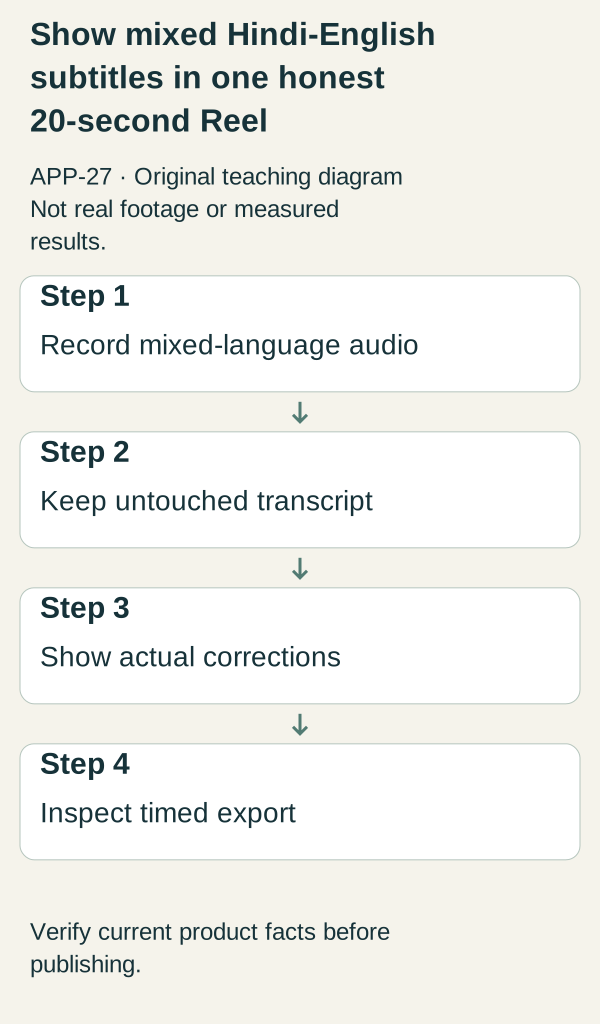
Original illustrative teaching diagram. Preserve the original mixed Hindi-English audio and transcript, show corrections and inspect the timed export. This is planning guidance, not product footage, customer evidence or measured results.
Show the same short Hinglish recording moving from original audio to the app’s untouched transcript, through any correction, to the final captioned preview. That sequence demonstrates mixed-language handling better than a generic “supports Hindi and English” claim. Use three different clips because names, script choices and language switches can expose different limitations. A 20-second Reel can explain one example; it cannot establish overall transcription accuracy.
 Superdirector
Make it work for your brand
Find it. Remake it. Post it. Superdirector turns the viral formats in your niche into your brand's carousels, X posts and video scripts, and keeps the calendar full.
Decide what “supports Hinglish” actually means
Hindi and English in the same audio is not the same as choosing a Hindi-only or English-only transcription mode. Romanized Hindi is also not interchangeable with Devanagari. Before writing the launch copy, test what the actual app does with your chosen input and what output choices it really offers.
This article uses fictional sample recordings. No subtitle app has processed them for this example. The text below is the intended spoken script, not an asserted machine transcript. Ask a native reviewer to confirm wording and intended meaning before recording. Keep the raw output from the real test even when it contains an error.
Create a simple test record: audio file; spoken reference; app version; selected settings; raw transcript; manual edits; final display; export check. “Corrected transcript” and “raw transcript” must be separate fields. Without that distinction, an attractive final caption can silently hide the work the creator had to do.
Three original clips to record
Clip A, the everyday switch: “Aaj ka plan simple hai: record the intro, then edit the captions.” Intended meaning: “Today’s plan is simple: record the intro, then edit the captions.” Use this to show a switch from Hindi into an English production task. Compare the actual words and punctuation with the intended script. Do not treat punctuation differences as equivalent to a missing phrase.
Clip B, the product name: “Is video mein main SampleDesk ka setup dikha rahi hoon.” Intended meaning: “In this video I’m showing the SampleDesk setup.” SampleDesk is an invented name. This clip makes a proper-name correction visible if one is needed. If the output is correct, show that result without claiming the app recognizes every brand. If the name is wrong, demonstrate the actual edit rather than substituting a new transcript before capture.
Clip C, the brief interruption: “Export ready hai? Wait, pehle last line check karte hain.” Intended meaning: “Is the export ready? Wait, let’s check the last line first.” Use it to inspect timing around a pause and a language switch. The goal is to see whether the displayed words match the speaker’s current phrase, not to prove a universal speed advantage.
Record in your ordinary production conditions. State whether the audio is clean voice, background music or another situation, rather than silently changing conditions between comparisons. Use a consenting adult speaker and material you have permission to publish. Do not repurpose a creator’s public clip merely because it is easy to download.
The complete 20-second storyboard
Seconds 0–3: play the start of Clip A with the opening “Hindi + English in one recording.” Show the actual audio source or a clearly labeled representation. Make the spoken switch audible; silent text alone cannot demonstrate transcription from mixed audio.
Seconds 3–7: show the raw transcript produced by the real app. Overlay “Raw app output” only if no one has corrected it. Keep enough context visible to distinguish the app interface from editorial captions. If the processing interval is omitted, label the omission; the runtime of the Reel is not a processing benchmark.
Seconds 7–12: compare the specific phrase being checked. The narration can say, “Here is the language switch, and here is what the app wrote.” If a correction is needed, show the real edit control and the change. If no correction is needed for that phrase, say “No correction to this phrase in this example,” not “perfect Hinglish accuracy.”
Seconds 12–17: play the captioned preview with its real timing. Use a split view only if both panels remain readable. Identify whether the output is Romanized text, Devanagari plus English or another actual format. Do not imply the user can select a format merely because an editor has manually changed it.
Seconds 17–20: close with “Check the words, names and timing before publishing.” Add the actual app name and verified destination. If the line cannot be read comfortably in three seconds, simplify it or extend the video. Twenty seconds is the creative brief, not a reason to hide essential information.
Make two follow-up versions that answer different questions
For Clip B, the opening becomes “What happens when the brand name is wrong?” The central action is the actual correction, including the number of fields or steps visibly required. Keep the raw mistake in view long enough to understand. End on the corrected preview, labeled as corrected.
For Clip C, use “The words can be right while the timing still needs a check.” Show the relevant pause in the audio and the actual caption timing. If timing cannot be edited in the product, explain the limitation; do not demonstrate another editor without identifying the switch. This version is about review control rather than language coverage.
These are separate buyer questions. Publishing the same successful phrase with three fonts would not reveal the work involved in real creator footage.
A practical comparison sheet
For each clip, record: intended phrase; raw result; issue type; actual correction; final preview checked; unresolved limitation. Issue types might include a missing word, wrong name, script mismatch or timing mismatch. Define the categories before comparing examples so that you do not count a punctuation preference as the same error as an omitted sentence.
With only three selected clips, report specific observations, not an accuracy percentage or ranking against competitors. “This name required a correction in this recording” is supportable if the recording shows it. “Works better for Indian creators” requires evidence this demonstration does not provide.
Errors, sources and next action
The most misleading edits are replacing the raw output, hiding a correction behind a cut, presenting a manually rewritten script as automatic language support, and using different audio conditions to imply a fair comparison. Review the exported Reel against the retained source before releasing it.
No exact APP-27 source-body study was supplied. The related DesiCMO guide provides context for code-switching, not transcription accuracy, subtitle timing or this app’s capabilities. This article’s recording protocol and storyboard are original editorial proposals. Current product behavior must supply the proof.
Your next action is to record Clip A, save the untouched output and identify the one phrase you will inspect on screen. If that process is not clear, do not move on to decorative caption styles yet.