How-To Guide
Eight parent-facing reading-app videos without filming children
Make eight parent-facing reading-app videos using adult demonstrations, original sample text and clear limits on learning claims.
How do I market a reading app to US parents without filming children or using testimonials I do not have?
Market the experience a parent can inspect: choosing a sample reading activity, understanding its purpose, seeing the actual session and checking what happens afterward. Use an adult demonstration account and an original passage instead of child footage or invented testimonials. Explain the product’s intended audience without claiming that a demo proves reading improvement.
Market the experience a parent can inspect: choosing a sample reading activity, understanding its purpose, seeing the actual session and checking what happens afterward. Use an adult demonstration account and an original passage instead of child footage or invented testimonials. Explain the product’s intended audience without claiming that a demo proves reading improvement.
The worked app in this article is fictional. Its proposed name, StoryStep, does not identify a real product. Every feature mentioned below is conditional on your actual build supporting it. The scripts are complete filming briefs, not claims that a particular app has already delivered these outcomes.
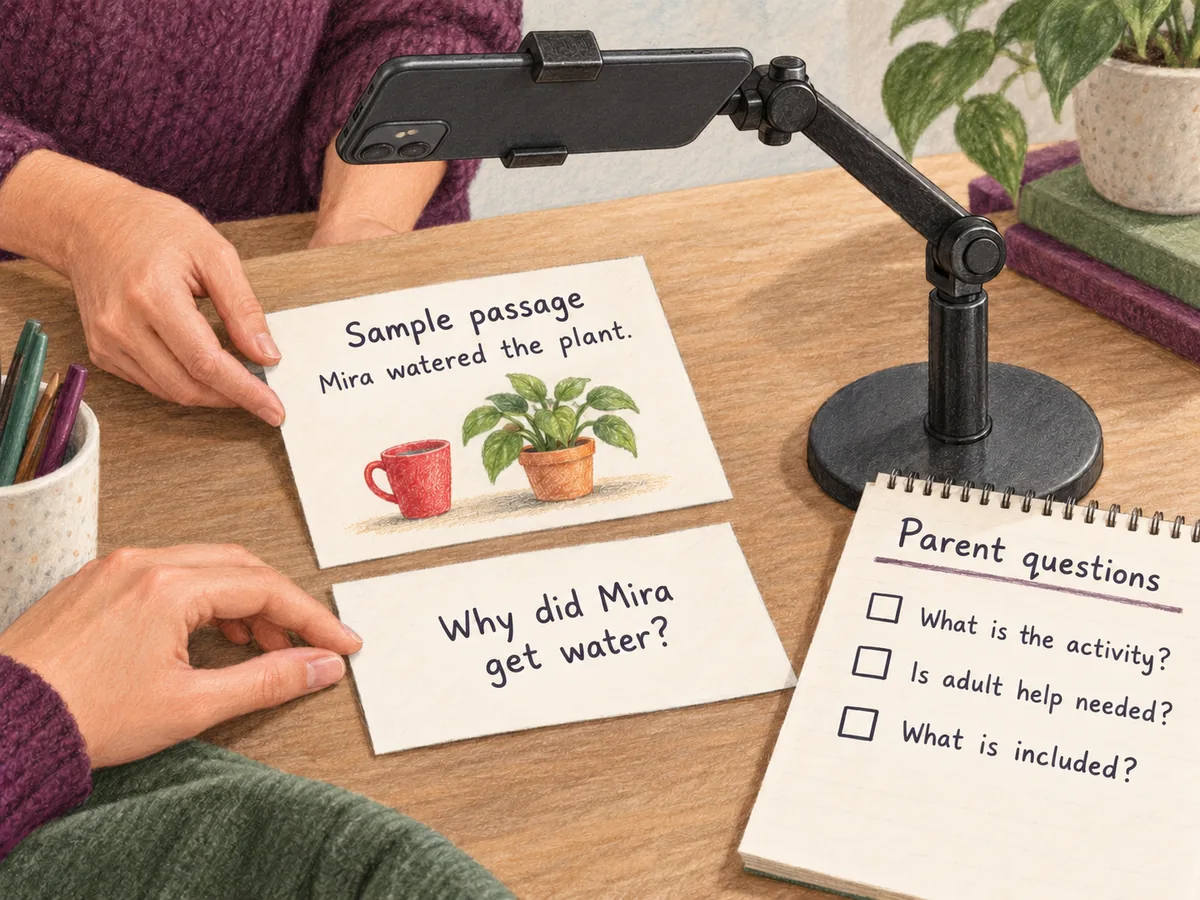
Original planning illustration: sample reading cards and parent questions help prepare an adult-only walkthrough. These paper props are not app captures or level-assessed reading material; film the real product flow separately.
 Superdirector
Make it work for your brand
Find it. Remake it. Post it. Superdirector turns the viral formats in your niche into your brand's carousels, X posts and video scripts, and keeps the calendar full.
Establish the parent’s decision before recording
Parents need to know what the app asks a reader to do, whether an adult is expected to help, how content is selected and what the purchase includes. A founder’s camera-free production constraint does not prevent you from answering those questions. It does mean that a staged child reaction would add risk without supplying useful product evidence.
Create a sample account with no real child’s name, age, voice, photograph, school or performance history. Use “Demo reader” on screen. If a feature depends on a profile field, enter demonstration data and label it. Review every account and notification screen, not just the passage itself.
Write one short original passage for the demonstration: “Mira put a red cup beside the plant. The soil looked dry. She filled the cup with water and poured a little into the pot. Then she moved the plant away from the hot window.” This is teaching material created for this article, not a level-assessed text. Do not assign it a reading grade or diagnose a reader from their response.
Eight complete walkthrough briefs
- What is a session? Opening: “Before you download a reading app, see what one activity asks you to do.” Show the real start screen, choose an actual activity and display the sample passage. Narration: “This walkthrough uses demonstration content and an adult account.” End by identifying the actual next step in the app. Avoid a montage that makes the session appear easier or shorter than it is.
- How do you choose content? Opening: “Can a parent see the activity before starting?” Record the actual browsing and preview process. If the app offers only assigned material, show that instead. Explain the visible labels in plain language, using the publisher’s accurate intended-audience wording. Do not invent age ranges to make the app easier to market. Close with “Check the current content details before deciding whether it fits your family.”
- What does adult help look like? Opening: “Here is where an adult may need to help in this example.” Show a real instruction and an adult reading it aloud. If the product expects independent use, say so only after checking its documentation. Demonstrate the interface, not a universal claim about what a child of a given age can do. End with a question a parent can use: “Would these instructions be clear in your household?”
- What happens after a question? Opening: “Watch the response, not just the question.” Use the sample passage and a demonstrative comprehension prompt, such as “Why did Mira get water?” Show only a question the actual app can present, or label the separate example as an instructional mockup. Record a sample response and the real next screen. If automated feedback is wrong or vague, keep the limitation visible. Do not fabricate praise from a teacher.
- What if you stop? Opening: “What happens when the session gets interrupted?” Start a demonstration session, use the real exit or pause action and return. Show whether progress is retained, reset or otherwise handled in that version. Do not claim automatic saving unless the recording establishes the behavior. This is a practical parent question that needs no child reaction or testimonial.
- What information is visible? Opening: “Here is what this parent screen actually shows.” Record the real adult-facing screen with sample data. Explain each demonstrated field without claiming it predicts ability. If the app has no parent dashboard, replace this with an honest account-settings walkthrough. A fictional progress chart must never be presented as a real child’s learning history.
- What does the price cover? Opening: “Before paying, check what is included.” Show the current offer and identify the actual purchase type, included access and any limits. Do not use placeholder pricing in a real promotion. If details vary by plan or region, point to the checked offer rather than flattening them into one promise. End with “Read the current purchase details before subscribing or buying.” This guide does not establish cancellation or refund rights.
- What is this app not claiming? Opening: “A product walkthrough is not proof of a reading result.” Show a brief recap of the actual activity and state the intended role accurately. If the product is practice material, do not call it a diagnostic assessment or replacement for professional instruction. End on the real product details page, where parents can inspect the content and limitations for themselves.
Package a sample session for an editor
The handoff should include the original passage, a source recording of the actual app flow, the current product description, the demonstration-data labels and a list of claims that cannot be made. Give the editor the whole sequence rather than isolated attractive screens. Otherwise, an innocent transition may imply a feature that does not exist.
Use this reusable brief: parent question; sample input; actual screen; adult action; visible response; required qualification; final destination. For example, the interruption brief should identify the version tested and the actual pause or exit control. “Resumes smoothly” is too vague; “returns to the second question in this recording” is inspectable if true.
Review for comprehension and privacy
Ask an adult unfamiliar with the product to explain what the app does after watching the clip. Do not ask them to simulate a child or predict learning gains. Check whether they understood the expected adult involvement, purchase model and demonstration status.
Inspect the export frame by frame for names, notifications and sample labels. If the app includes recordings or profile data, keep real children’s information out of the production files. This filming plan is not a legal compliance review of a children’s product. Product privacy, age-related obligations and educational claims need their own qualified review before publication.
Source limits and next action
The supplied study did not include an exact APP-21 cited-source body. Adjacent RawCut production guidance distinguishes footage ordering from captions and on-screen text; it does not validate educational claims or children’s privacy compliance. The eight briefs and original passage are editorial work created here, not evidence of learning efficacy.
Start with the first walkthrough using an adult demo account. If a parent cannot tell what the actual session contains, improve that explanation before seeking a testimonial or filming a child.