How-To Guide
What size and aspect ratio should Reels, TikToks and Shorts be?
One 1080 by 1920 file fits Reels, TikTok and Shorts. See each platform's published limits, which popular numbers are stale and where crops fall.
By the Superdirector editorial team. Platform pages and developer docs read November 7, 2026; Instagram Help Center figures as reported by shortshort on October 16, 2026.
At a glance
What size and aspect ratio should Reels, TikToks and Shorts be?
Export one vertical file: 1080 by 1920 pixels (9:16), H.264 MP4 at 30 frames per second, 180 seconds or shorter and under 300 MB. It fits inside every limit Instagram, TikTok and YouTube publish: Meta recommends 9:16 for Reels, TikTok recommends 9:16 for vertical ads, YouTube takes square or vertical Shorts at up to 1080p, and 3 minutes is the length all three treat as normal. Keep faces and text in the middle so crops and ad margins do not cut them.
- 1080 by 1920 is a convention inside published limits, not a rule any platform states.
- Popular guides still say Reels cap at 90 seconds or 4 GB; Instagram's Reels page says 20 minutes, and shortshort reports no organic file cap in its Help Center.
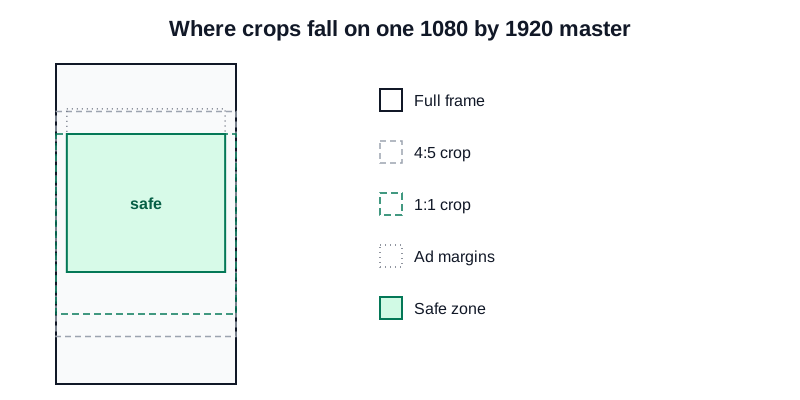
- Rows 420 to 1248 and columns 65 to 1015 of the frame survive a middle square crop and Meta's reported ad margins.

Where each crop falls on one 1080 by 1920 master. Original diagram; crop arithmetic is ours and the ad margins are Meta's reported guidance.
 Superdirector
Make it work for your brand
Find it. Remake it. Post it. Superdirector turns the viral formats in your niche into your brand's carousels, X posts and video scripts, and keeps the calendar full.
The size to export for Reels, TikTok and Shorts
Export one vertical file: 1080 by 1920 pixels (9:16), H.264 MP4 at 30 frames per second, 180 seconds or shorter. That single file sits inside every limit Instagram, TikTok and YouTube publish for Reels, TikToks and Shorts. Meta recommends 9:16 for Reels, TikTok recommends 9:16 for vertical ads, 1080p is the most YouTube accepts for a Short, and three minutes is the one length all three treat as normal: it is YouTube's Shorts cap, TikTok's length for every creator and the line past which Instagram stops recommending Reels to new audiences.
1080 by 1920 is a convention inside those limits, not a size any platform states as a rule. The table below gives what each platform publishes and where. Instagram's help pages did not load for our fetcher, so the Instagram app figures marked reported come from shortshort's dated reading of them (October 16, 2026). TikTok's help centre pages also did not render, so its figures come from its developer docs and an ads help page last updated June 2026.
What each platform publishes, and where
| Platform and surface | Aspect ratio | Resolution | Length | File size and codec |
|---|---|---|---|---|
| Instagram Reel in the app | 9:16 recommended; reported range 1.91:1 to 9:16 | Reported minimum 720 px, no maximum stated | Up to 20 minutes; over 3 minutes not recommended to new audiences | Reported: no organic cap stated; at least 30 fps |
| Instagram Reel through the API | 0.01:1 to 10:1 accepted, 9:16 recommended | Up to 1920 px wide | 3 seconds to 15 minutes | 300 MB; HEVC or H.264; 23 to 60 fps |
| TikTok video through the API | Not stated on the page | 360 to 4096 px on each side | 3 minutes for all creators, 5 or 10 for some | 4 GB; H.264 recommended; 23 to 60 fps |
| TikTok non-Spark in-feed ad | 9:16 recommended (540 by 960 or more), 16:9 or 1:1 also accepted | 540 by 960 or more for vertical | Up to 10 minutes | 500 MB |
| YouTube Short | Square or vertical | Maximum 1080p | Up to 3 minutes | General upload cap 256 GB or 12 hours, whichever is less |
Sources: Instagram's Reels page, Meta's developer docs, TikTok's developer docs, TikTok's in-feed ad spec, YouTube's Shorts upload page and YouTube's upload limits. The same figures, with a source and read date for each row, are in the spec sheet.
The table mixes three kinds of limit: what the app accepts, what the API accepts and what an ad accepts. They are different numbers for the same product, and that mix is why guides disagree. A creator posting from the app is held to the first row, a scheduling tool to the second.
Numbers you will read elsewhere, checked against the sources
Several pages that rank for Reel size repeat figures that no longer match Instagram's own pages. Dates are the pages' own.
| You will read | Where | What the sources say |
|---|---|---|
| Reels can be up to 90 seconds | Riverside, updated December 19, 2025; Postiz, July 9, 2025, which says 90 seconds recorded in the app and 15 minutes uploaded | Instagram's Reels page says you can record and edit up to 20 minutes, with Reels over 3 minutes not recommended to new audiences |
| Instagram has a 4 GB file size limit for Reels | Wayin and Postiz | 4 GB is a figure from Meta's Ads Guide for Reels ads, as shortshort reports. API-published reels are capped at 300 MB in Meta's docs |
| Reels run 3 seconds to 15 minutes from mobile, 60 minutes from desktop | Wayin | 15 minutes is the API cap in Meta's developer docs; Instagram's own page says 20 minutes |
| A Reel is up to 3 minutes | SocialPilot | This matches the Reels page hero text, but the Reels page's FAQ says 20 minutes, with the 3-minute line for recommendations |
| The profile grid shows a 1:1 square | Amplify 11, published 2021 | Meta's docs say a reel shared to the feed uses the middle 1:1 square as its feed cover. shortshort found no Help Center page that states the profile grid shape |
The pattern is stale copy. These pages carry limits that Instagram's own page no longer states, and a page last updated in 2021 still ranks. When a number matters, check the platform's own page and its date. Where the platforms disagree with themselves, as Instagram's Reels page does between its hero text and its FAQ, say which text you followed.
Export one 1080 by 1920 master at 9:16
Shoot and edit vertical. Meta's developer docs accept ratios from 0.01:1 to 10:1 for API reels and recommend 9:16 to avoid cropping or blank space. TikTok's ad spec recommends 9:16 for vertical video. YouTube classifies square or vertical uploads of up to three minutes as Shorts (for standard channels, uploads since October 15, 2024), which means a 16:9 clip of the same length stays long-form: YouTube says to use a wider ratio such as 16:9 if you do not want a video classified as a Short.
Do not add padding or black bars to reach 9:16. YouTube says to avoid padding or black bars in the file itself, and shortshort reports that Instagram's Help Center lists borders, logos and watermarks among the traits of reels it shows less often. Crop or reframe a wide clip around the subject instead. A clip exported from another app with its watermark still on is the same problem.
At 1080 by 1920 the frame is 2,073,600 pixels. YouTube accepts at most 1080p for a Short, so 1080 wide is also the top of what you gain on YouTube, and it sits inside TikTok's 360 to 4096 pixel range and Instagram's 1920 pixel width limit.
Keep the key action in the middle of the frame
Your video is cropped differently in different places. Meta's developer docs say a reel shared to the feed uses the middle 1:1 square as its cover for the feed post, and a cover that is not 9:16 is cropped to its middle 9:16 rectangle. Guides such as Amplify 11 and Riverside describe a 4:5 feed view.
Here is the arithmetic on a 1080 by 1920 frame. A middle 1:1 square is 1080 by 1080, rows 420 to 1500. A middle 4:5 crop is 1080 by 1350, rows 285 to 1635. For ads, shortshort reports that Meta's Reels guidance keeps 14 percent of the top, 35 percent of the bottom and 6 percent of each side free of text and key elements, which is 269 pixels, 672 pixels and 65 pixels, so rows 269 to 1248 and columns 65 to 1015 stay clear.
Put faces, the product and any text inside the overlap: rows 420 to 1248 and columns 65 to 1015. That survives the square crop and the ad margins. This zone is our arithmetic. Guides such as Amplify 11 suggest their own text-safe areas, but we found no safe zone that Instagram or TikTok publishes for organic posts, so treat it as a conservative default and move text up or down if a test upload shows it covered. The crop diagram shows the layers.
Keep each video under three minutes
Three minutes is the number the three platforms share. YouTube takes Shorts up to 3 minutes. TikTok's developer docs say all creators can post 3-minute videos, while some can post 5 or 10 minutes. Instagram's Reels page says you can record and edit up to 20 minutes, but Reels over 3 minutes will not be recommended to new audiences. The Reels page hero text still says 3 minutes.
So if one file has to go to all three, cut it to 180 seconds or less. Longer is possible on Instagram and, for some creators, on TikTok, but it breaks the cross-post. Length for its own sake, and what runs best at which length, is a different question from the size question here.
Set codec, frame rate and file size inside the limits
Export MP4 with H.264 video and AAC audio. TikTok's developer docs recommend H.264 and list H.265, VP8 and VP9; Meta's developer docs list HEVC or H.264 with progressive scan, a closed GOP and 4:2:0 chroma subsampling. Use 30 frames per second: both APIs accept 23 to 60, and shortshort reports a Help Center minimum of 30 for organic reels.
Keep the file under 300 MB. That is the smallest cap published for a reel, in Meta's developer docs, against 4 GB in TikTok's docs and 500 MB for a non-Spark TikTok ad. At 180 seconds, 300 MB allows about 13 megabits per second in total. A video bitrate of 8 megabits per second comes to about 180 MB over three minutes, before audio, which clears the cap and the 516 kilobits per second minimum for non-Spark TikTok ads with room to spare.
The settings to copy into your editor's export panel:
- Container: MP4.
- Video codec: H.264.
- Resolution: 1080 by 1920.
- Frame rate: 30 frames per second.
- Video bitrate: 8 megabits per second or lower.
- Audio: AAC at 128 kilobits per second. Meta's developer docs list AAC at 128 kbps for reels published through the API.
- File size: under 300 MB.
The chart below shows the file size those settings give at five lengths, from 30 seconds to three minutes. Even the three-minute file is about 183 MB.
The export check sheet lists each setting, the published limit it stays inside and the source.

Even a 180-second file is about 183 MB, well under the 300 MB cap. Original diagram; sizes are our arithmetic and the cap is from Meta's developer docs for API reels.
Check the first upload on a phone
Before you schedule a batch, upload one test post to each platform as a draft or private video, then look at it three ways: full screen, in the feed and on your profile. These are the faults that cost a re-upload:
- Caption text hidden under the buttons or the account name at the bottom of the screen.
- A face or the product cut off by the square feed cover.
- Black or blurred bars left from a padded 16:9 clip.
- Another app's watermark still on the export.
- A file over 300 MB, which Meta's API cap blocks for any tool that posts a reel through the API.
As shortshort reports, it found no Instagram Help Center page that states how the profile grid crops a Reel. Check your own profile after posting instead of trusting a figure from a guide.
Then keep the master. The same file, with the same safe zone, is the one you reuse next week.
Worked example: one landscape demo, start to finish
Here is every step above on one clip. Say you are a founder with a 75-second product demo filmed landscape, and you want it on Reels, TikTok and Shorts this week. The clip is hypothetical. It shows the arithmetic, not a customer's video or a result.
First, check what you filmed at. A 9:16 window cut from a 16:9 frame is as tall as the frame and nine sixteenths of that height wide. From a 1920 by 1080 file the window is 608 by 1080 pixels, so reaching 1080 by 1920 means enlarging it 1.78 times, and small detail such as text on a laptop screen goes soft. From a 3840 by 2160 (4K) file the window is 1215 by 2160 pixels, which is reduced to 1080 by 1920, so nothing is enlarged. If the demo shows a phone or laptop screen, film it in 4K or film it vertical.
Next, move the window with the subject. The 608-pixel window covers less than a third of the 1920-pixel width, so if your hands move from one side of the desk to the other, keyframe the crop to follow them in your editor. One fixed centre crop will lose them. In the vertical master, keep the product and hands inside rows 420 to 1248, and put a one-line caption near the top of that zone, around rows 450 to 600, where the square feed cover still shows it.
Then export with these settings:
- 1080 by 1920 at 9:16, with no bars or blurred fill.
- 75 seconds, inside the 180-second line all three platforms share.
- H.264 MP4 at 30 frames per second, video at 8 megabits per second and AAC audio at 128 kilobits per second.
- About 76 MB: 8.128 megabits per second times 75 seconds, divided by 8. That is about a quarter of the 300 MB cap.
- One private test upload per platform before the scheduled post.
If the demo was filmed at 1920 by 1080 and you cannot film it again, export at 1080 by 1920 anyway. The spec is the same either way. Filming again buys sharper screen text, nothing else.

A 4K source keeps the 9:16 window sharp, while a 1080p source must be enlarged 1.78 times. Original diagram; window sizes are our arithmetic for a hypothetical demo clip.
Where Superdirector fits
Superdirector, which publishes this guide, does not make finished video yet. Its line is "Autonomous social media growth.*", and the asterisk means AI video and full autopilot are coming soon. So the sizes above are for video you film and edit yourself.
Its main offer is $199 a month for one social account that its AI runs in the direction you set. It tracks accounts, competitors and keywords on Instagram, TikTok, YouTube and X, writes carousels, X posts and video scripts in your brand, and can publish eligible Instagram carousels or single link-free X text posts to a connected account under its standing posting permission, subject to account readiness and plan entitlement. A video script from it still has to be filmed and exported at the settings in this guide. The pricing page lists two connected account slots on that plan; a slot lets you connect an account, while the service we run is one account, so confirm which account it will be before you pay. The $29 a month plan is for hands-on work from Claude or ChatGPT, with limited script and video exploration. You remain the publisher and label AI content where a platform requires it. See what runs today.