How-To Guide
How do you build a swipe file of viral posts and use it to plan content?
Build a social swipe file that records each post's numbers on the day you save it, tag by problem, remake two entries a week and retire what stops working.
By the Superdirector editorial team. Platform help pages and vendor guides read November 6, 2026.
At a glance
How do you build a swipe file of viral posts and use it to plan content?
A swipe file is a private library of posts that worked, saved with enough detail to remake their format. For each post, record the link, the date, the post's views or likes and its age, and the account's typical numbers on that day, so you can see how far it beat its own normal. Describe the format in one line, add why you think it worked, and tag it by the problem it solves. Review the file weekly, remake two entries with your own material, write the results back, and retire entries you have not used in 90 days.
- The numbers on the day you save are what make a saved post evidence.
- Borrow the structure; never the words, footage or audio.
- Platform save buttons are an inbox, not the file.
What a social swipe file is, and what makes it useful
A swipe file is a private collection of work that caught your attention, kept so you can study and reuse what made it work. Copywriter Robert W. Bly, writing in Writer's Digest, describes it as a file containing ads, emails, and other copy and content you have collected and saved; the social agency Sculpt calls it a gallery of good ideas. For social posts the useful version has one more ingredient: the numbers. A saved post with no record of how far it beat its own account's usual results is a picture, not evidence.
Swiping means borrowing structure. Bly is blunt: you should not swipe copy word for word, that's plagiarism. Kontent.ai puts it the same way: the term doesn't mean stealing or copying directly. On social platforms the rule is now enforced by ranking as well, which the borrow-or-leave table below covers.
| Field | Why you need it | Example (fictional) |
|---|---|---|
| Link, platform, account | To find the original again | Instagram carousel from a skincare shop |
| Date saved and post's age | Numbers mean nothing without age | Saved Nov 6, posted 5 days earlier |
| Post's views or likes on the day | What it achieved | 48,000 views |
| Account's typical views or likes | What normal looks like for that account | About 9,000 |
| Outlier ratio | Post divided by typical; the signal | 5.3 |
| Format in one line | What you can reuse | Mistake on cover, five fix slides, summary slide |
| Why you think it worked | Your hypothesis to test | A specific number on every slide |
| Tags, status, remake result | To find it, act on it and learn from it | List; carousel; to remake |
When enlarged, scroll horizontally to read the diagram.
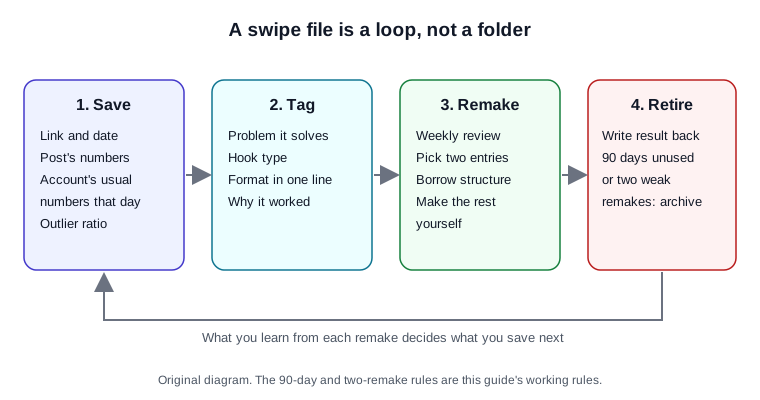
Original diagram of the routine in this guide; the 90-day and two-remake rules are working rules.
Original visual by Superdirector editorial team. Creation date not recorded.
Pick one home for the file
Most platforms have a save button, and none of them is a swipe file. They hold no notes, no numbers and no tags across platforms. Use them as an inbox you empty once a week into one place you control: a spreadsheet, a Notion database or an Airtable base. Sculpt offers a free Airtable template; our own swipe file template is a spreadsheet with the fields above and the ratios calculated.
- Instagram: saving a reel adds it to a collection, as Meta's Reels system card notes. Meta's Feed card adds a side effect worth knowing: saving can help the system show you similar content in the future. That makes your feed a better research tool and a worse judge of how common a format really is.
- YouTube: a playlist is a collection of videos, and if it's private, only you can view it. A private playlist per format works as an inbox for Shorts.
- Facebook: Social Media Examiner explains that saved items can go into collections, including a team collection that allows contributors to add items.
- Ads: Meta's Ad Library lets people search all active ads running across Meta's products, and shows active public branded content on Facebook and Instagram with a paid partnership label. TikTok's Top Ads holds only ads that advertisers authorised, each with a second-by-second engagement graph.
Record the numbers on the day you save
This is the field that turns a saved post into a signal. On the day you save, write down three numbers: the post's views (or likes, if views are hidden), the account's typical number for recent posts of the same type, and how many days old the post is. Then divide the first by the second.
- Open the account's grid and look at its last ten or so posts of the same type.
- Write down a typical number. The middle value is better than the average, which one hit can distort.
- Divide the saved post's number by it. A ratio of 3 or more is worth saving as a format; below 2, save it only if the idea is new to you. These cut-offs are our working rule.
Age matters because numbers keep growing. A post at 40,000 views after two days and one at 40,000 after two months are different signals. Record the age so you compare like with like.
Describe the format in one line
Write what you would reuse, in one line: how it opens, the order of the beats or slides, the length, how the text sits. "Question on screen, three quick answers, reveal, 20 seconds" is a format; the jokes and the product are not. Add one sentence on why you think it worked. That sentence is a hypothesis, and the remake is how you test it.
Keep the hook as a few words for your own notes, not the full caption. Your file is for studying structure, and a short note is all you need to remember the opening. For ways to classify openings, see how to write scroll-stopping hooks.
Review weekly and remake two entries
A swipe file nobody opens is clutter; Social Mafia's line is that a swipe file consulted monthly is a tool; one consulted never is a hobby. Make it weekly and short: thirty minutes, sort by outlier ratio, pick two entries that fit what you need this week, and plan your version of each.
| Borrow | Leave | Why |
|---|---|---|
| The opening move, beat or slide order, length, pacing | Their words, footage, photos, voice and original audio | Instagram defines original content as work that you wholly created or reflects your unique perspective |
| The topic angle, applied to your product | A repost with a border, watermark, subtitles or a credit | Instagram says those additions alone do not make a post original, for reels, photos and carousels |
| The way the text sits on screen | A re-upload of their video | TikTok says it does not recommend duplicated content |
Instagram's originality update of April 30, 2026 extended its reels rules to photos and carousels, and TikTok's recommendation explainer says it does not recommend duplicated content. On copyright, the U.S. Copyright Office says fair use is decided case by case, with no formula for a safe amount of someone's work. Building from structure and making every element yourself keeps you far from copying a post, but this guide is not legal advice. Our guide to analyzing competitor content covers what to notice in a saved post.
Write the result back and retire old entries
After a remake has been up seven days, write its views next to the source entry, with your own typical number for that type of post. Two results a week is enough to learn which hypotheses hold for your account.
- Keep formats whose remakes beat your own typical number. Save more examples of them.
- Retire entries you have not used in 90 days, and formats that missed twice. Mailchimp's advice is the same in general terms: delete outdated or less relevant content.
- Archive, do not delete, so you can see later which formats faded and when.
The 90-day and two-miss rules are our own; no source measures them. Change them once your log shows what works for you.
Where Superdirector fits
Superdirector, which publishes this guide, gives you one place for saved references with a note on why each matters, and does the watching too: it tracks the accounts, competitors, keywords and hashtags you choose on Instagram, TikTok, YouTube and X, with posts, comments and metrics, picks the posts and formats taking off, and remakes them with the same hook and structure in your brand. Carousels and X posts are made today, and on Growth it posts Instagram carousels and single X text posts; finished AI video is coming soon. You remain the publisher. See how saving references works in Superdirector.