How-To Guide
Family Sharing is not a shared calendar: explain both permissions before launch
“Share with your family” can mean paying once for eligible app access, inviting someone into a calendar, or letting them edit an event.
“Share with your family” can mean paying once for eligible app access, inviting someone into a calendar, or letting them edit an event. For a household organizer, those are different promises. Your launch page should not collapse them into one sentence.
Start with a two-part demonstration: who can use the paid features, and who can see the calendar data. This guide proposes a proof workflow for a family calendar app. It does not assert that your app already supports either behavior.
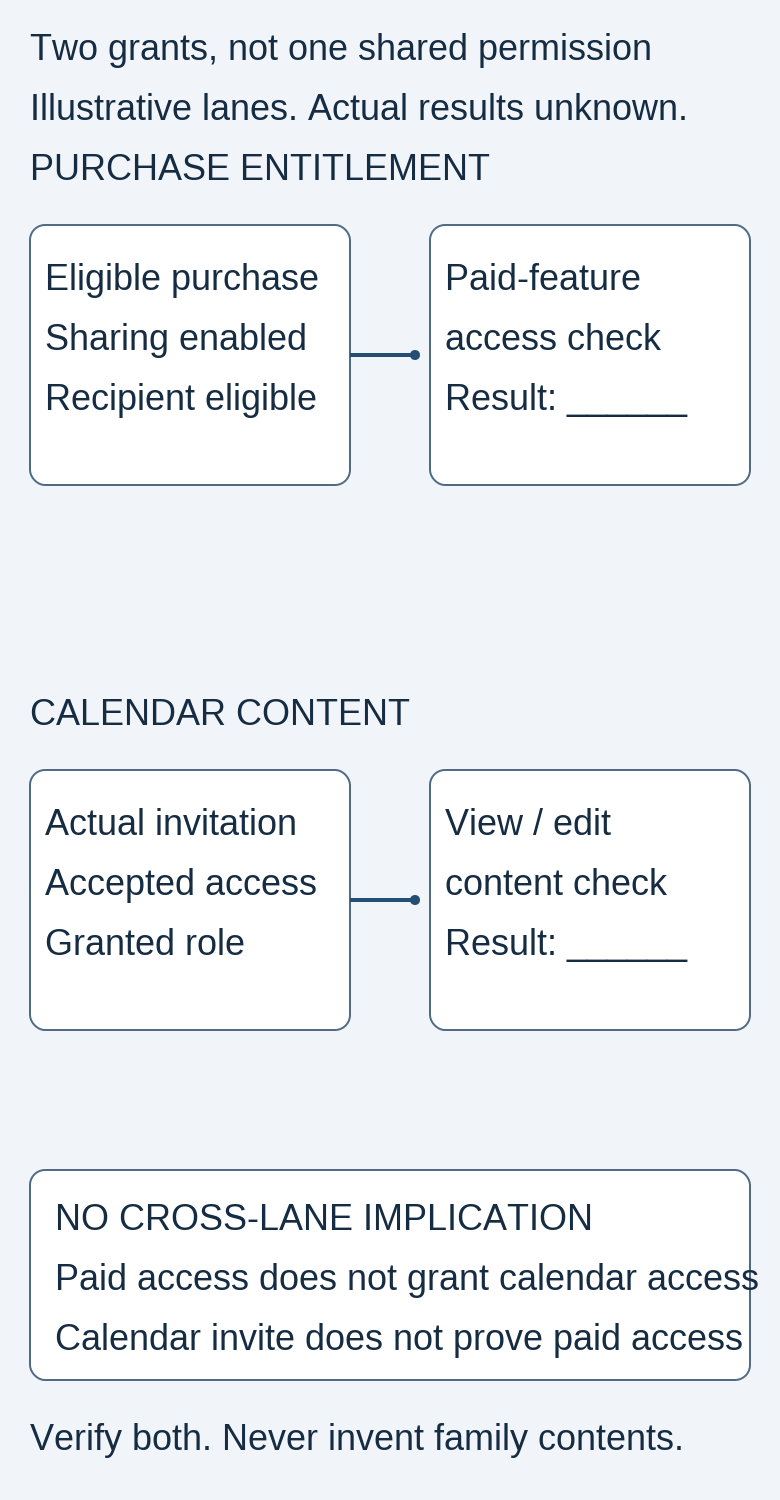
This diagram is a product-verification model, not a description of any particular calendar app’s implementation.
 Superdirector
Make it work for your brand
Find it. Remake it. Post it. Superdirector turns the viral formats in your niche into your brand's carousels, X posts and video scripts, and keeps the calendar full.
Check the exact purchase, not just the app label
Apple supports Family Sharing for eligible auto-renewable subscriptions and non-consumable In-App Purchases, with up to five additional family members. Sharing behavior depends on the purchase type, purchaser preferences and whether the purchase predates enablement. For subscriptions purchased before developer Family Sharing enablement, existing purchasers must opt in through subscription management. Apple developer configuration guide
Apple also warns that not all subscriptions and in-app purchases are shareable. Consumables and purchases not billed by Apple are excluded from its sharing mechanism. Apple customer eligibility guide
Build a plan-level checklist before writing “included for your family.” Record the product identifier, purchase type, billing route and observed sharing configuration. A broad app-level banner cannot replace that evidence. If only one tier qualifies, name that tier and do not imply that every plan has the same behavior.
For a read-only check, open the app in App Store Connect, then its In-App Purchases or subscription group, select the exact product and inspect its Family Sharing section. Record the state without changing it.
Do not toggle the developer setting as a reversible experiment. Apple says enabling Family Sharing for an In-App Purchase in App Store Connect cannot be undone. Inspect the current setting and obtain the appropriate decision before changing it. Apple developer configuration guide
Draw two layers of access
Layer one is paid access. The question is whether the intended family member can use the eligible features without an unexpected second purchase. If the flow includes Restore Purchases, check what that action can recover separately; it does not establish Family Sharing or calendar access.
Layer two is calendar access. The questions are which calendar appears, which events are visible, and what the other person can change. These answers depend on your product’s actual identity, invitation and permission design. Apple’s purchase-sharing documentation is not evidence that your private event data becomes shared or remains private in your implementation.
Keep both layers in the verification worksheet. Assign an evidence location to every claim that will appear on a pricing page, onboarding screen or tutorial.
Film one honest example with synthetic data
Use authorized test accounts and invented calendar entries, not a real family’s schedule. A harmless sample might be “Practice planning session,” with no home address, school details or personal appointment.
First, show the purchaser’s plan and the family member’s actual access state. Record whether the second account reaches the paid feature, sees a purchase screen, or encounters an unresolved error. Do not hide a failed step with a cut in the recording.
Next, demonstrate the calendar-sharing interaction that your app actually provides. If your design uses an invitation, show what is visible before acceptance and what changes afterward. If it uses another model, describe and verify that model instead. Do not invent an invitation step merely to match a script.
Finally, test the claimed permissions. Can the member view only, or edit? Does a separate personal calendar remain outside the demonstrated sharing scope? What happens when access is withdrawn? These are questions to answer through the build, not assumptions to borrow from the purchase system.
If a test cannot be completed, retain that as a visible gap in the internal production packet. A working purchaser screen is not proof of the family member experience.

Original AI-generated editorial illustration. Shared household coordination involves both access to paid features and separate choices about calendar data. This is not a product capture, customer scene or completed test.
Write copy that preserves the distinction
An illustrative explanation might say: “Eligible Apple purchases can share access to paid features. Calendar invitations separately control which calendars another person can view.” Use that wording only after it matches your actual product and purchase configuration.
Avoid “Buy once and everyone automatically sees your family calendar.” It combines a payment claim with a data-access claim and may be wrong about both. It also leaves a privacy-conscious reader wondering whether personal appointments become visible without an intentional step.
Place the conditions close to the promise. A clear plan comparison is more useful than an optimistic headline corrected by a distant support article. Do not tell people to start a second trial or purchase again merely to diagnose a sharing problem.
Use customer questions as a warning, not a benchmark
In one public purchaser conversation, the question was whether annual and lifetime tiers differed in sharing eligibility. A separate household-access conversation described a mismatch between a listing expectation and purchase screens.
These distinct accounts support the need for precise eligibility language. They do not establish the current behavior of those products, the prevalence of the problem or demand for a particular calendar feature. Their exact dates and identities are not independently verified; comments inside one thread do not become extra independent customer samples.
Release the explanation only after the proof
Your completed packet should include the exact eligible plan, both account observations, the calendar-permission demonstration, approved wording and remaining exceptions. Review the smaller-screen rendering as well as the desktop layout so the eligibility condition is not hidden below a crop.
After an approved release, track support questions about unexpected charges separately from questions about missing calendars or edit access. That distinction helps identify whether the explanation or the implementation needs work. It is not evidence of reduced support cost until you have a comparable measurement.