How-To Guide
Compare YouTube creators without mixing up view metrics
Compare creator evidence by metric, content scope, format and reporting window. Use a blank worksheet to record missing analytics and qualify your shortlist.
By the Superdirector editorial team.
A creator shortlist should let an agency or in-house team explain why each person fits the brief, what the numbers actually describe, and what still needs checking. A large public view count cannot answer all three questions.
Start with five labels on every metric: the exact metric name, the content scope, the video format, the reporting window and the evidence source. Keep missing creator analytics visible. Then make a recommendation that the evidence can support.
This matters when reviewing older media kits alongside current channel pages. YouTube’s current counting guidance says that, beginning August 24, 2026, public views count when a video starts playing across Shorts, long-form videos and live streams. A playback count is not a count of distinct people, a completed product demonstration or a purchase.
Decide what the creator must help your buyer understand
Write the job before collecting numbers. For example: “Find a creator who can explain our team’s scheduling problem to operations managers and show the relevant workflow clearly.” That gives a reviewer something concrete to inspect in the creator’s work.
Look at subject relevance, the audience being addressed, the clarity of demonstrations and the kind of sponsorship placement proposed. Keep the reason beside the actual video URL. A general entertainment hit and a detailed product demonstration may serve different jobs, even when their public counts look similar.
The creator-vetting rubric covers broader screening. This worksheet focuses on one narrower decision: whether the metrics attached to a shortlisted creator are comparable enough to inform the next conversation.
Keep three kinds of evidence separate
When enlarged, scroll horizontally to read the diagram.
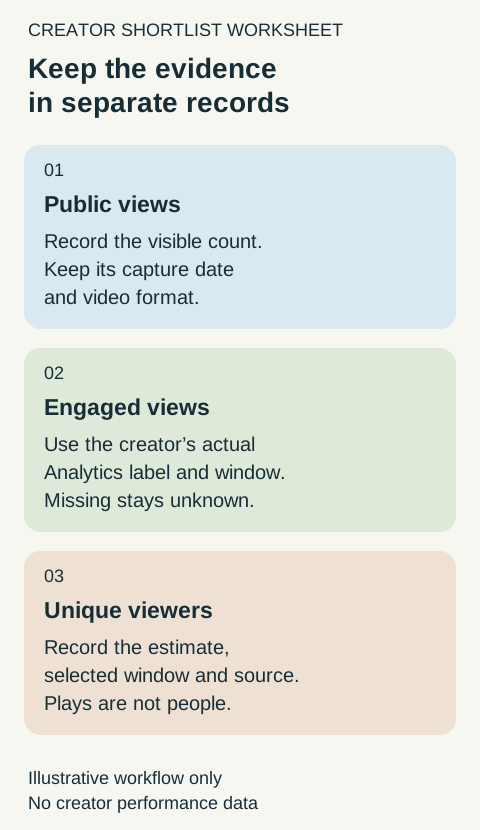
Illustrative evidence records; no creator performance data is shown.
Original visual by an unrecorded creator. Creation date not recorded.
| Evidence | What to record | How to use it |
|---|---|---|
| Public video page | Exact URL, format, visible count, publication date where available, and capture time | Establish what you could actually observe. Preserve rounded labels such as “123K” rather than implying an exact count. |
| Creator-supplied Analytics | Exact metric label, selected content, date range, filters and the supplied report or screenshot | Assess the specific report the creator chose to share. Record missing fields and redactions. |
| Your own campaign outcomes | Defined landing visits, leads or purchases, with the measurement window and limitations | Evaluate your campaign after it runs. Another creator’s historical views do not establish these outcomes for your brand. |
YouTube’s content-performance reference defines Engaged views as times viewers stayed beyond the initial seconds, excluding loops. Copy the label from the actual report rather than renaming every number “views.” Do not assume that a public page exposes this creator-side metric.
YouTube also describes Unique viewers as an estimate calculated using engaged views and corresponding watch time in its metrics reference. Do not replace that estimate with a public play count. For a fuller explanation of the underlying distinction, see reach versus impressions.
If a supplied report instead says Unique reach or Views (Co-viewed), preserve that different label too. YouTube’s content-performance reference lists these separately. A worksheet should not merge differently defined estimates just because they all appear to describe an audience.
Build one record per content scope and reporting window
Download the blank creator-comparison worksheet. It contains field names only, with no example creator performance.
For each piece of evidence, retain:
- Creator handle and exact video URL.
- Format and the buyer task the video demonstrates.
- Metric label and value exactly as supplied.
- Whether it covers one video, a named selection of videos or the whole channel.
- Reporting start and end dates, or an explicit “lifetime” or “unknown” label.
- Capture time and whether the evidence came from a public page or the creator.
- Relevant filters, such as country or traffic source, when actually supplied.
- Missing information and the next question it would change.
Keep a second row when the same video has another metric or date window. Keep a channel aggregate in its own row rather than attaching it to a single video. This avoids silently replacing a public count with an Analytics figure and losing the original evidence.
Choose the pieces you intend to review before selecting only their most flattering results. Record exclusions, such as a different format or a video that cannot be inspected. An unavailable or deleted video leaves a coverage gap; it is not a zero-performance result.
Compare like evidence, and explain the exceptions
Before ranking two rows by a number, ask whether their metric labels, content scopes, formats, windows and filters describe sufficiently similar observations. A whole-channel estimate does not describe the same scope as one proposed video. YouTube’s Analytics guidance recommends comparing content of the same type because audience behavior differs across formats.
When enlarged, scroll horizontally to read the diagram.
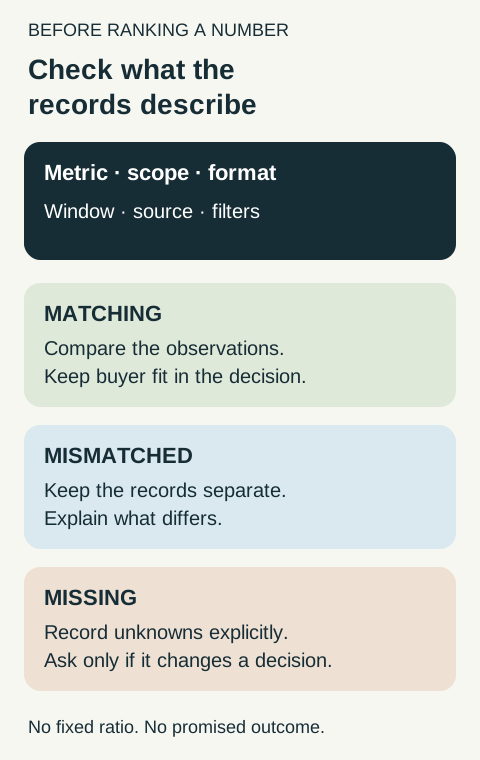
Illustrative comparison guide; no fixed conversion ratio or campaign outcome is claimed.
Original visual by an unrecorded creator. Creation date not recorded.
Two public lifetime totals can still describe videos with very different ages. A recent screenshot and an older media-kit number can also reflect different capture dates. Record those differences instead of treating the larger total as a clean ranking result.
There is no universal conversion factor from public views to engaged views, unique viewers or sales. Do not estimate a missing private metric by applying another creator’s ratio. If a creator supplies matching evidence, you can describe that observed sample; its ratio is not a rule for the rest of the shortlist.
Metric changes also make older screenshots harder to compare. Retain the date and definition available for each record. Do not assume that a lifetime count or an older media kit has been recalculated into the definition you want to use today.
Ask for the smallest useful clarification
Request information because it would change a decision. If your concern is whether the proposed format reaches the intended audience, ask whether the creator can share a report for comparable content with its date range and relevant audience information visible. A cropped number without the metric label or selected window does not resolve the question.
The creator can choose what to share and redact. You do not need their password, account access or an unredacted screen full of unrelated information. If the needed report is unavailable, retain a public-evidence-only assessment and state its limit.
For example: “The creator’s demonstrations fit the buyer problem. Public counts are recorded, but comparable creator-supplied audience and engagement evidence is unavailable. Next action: clarify the proposed placement and the evidence the creator is comfortable sharing.” This is a useful handoff without turning uncertainty into a rejection or a performance promise.
Give the client a decision they can inspect
End each shortlisted creator’s note with four short fields:
- Fit: the buyer problem and observed content that support inclusion.
- Evidence: the exact records behind the recommendation.
- Unknowns: missing analytics, unmatched windows or unverified audience claims.
- Next action: the clarification, brief or bounded campaign decision that follows.
Keep a forecast, an agreed deliverable and an observed result in separate fields. A metric-comparison worksheet does not establish a guaranteed view count, an appropriate sponsorship price or expected sales. Existing agreements need their own explicit measurement terms; do not silently reinterpret them because a platform label changes.