How-To Guide
YouTube agency offboarding: prove client control before removing access
Offboard a client YouTube channel with proof of client publishing access, permission control, unfinished uploads and connected tools before agency removal.
By the Superdirector editorial team. Official YouTube and Google Account Help sources reviewed October 29, 2026.
At a glance
What should an agency verify before removing its access to a client’s YouTube channel?
Verify the exact channel and access model, the client’s own ability to do its continuing content and permission tasks, the owner of each unfinished upload, and the state of outgoing human and connected-app access. If Brand Account primary ownership must change, treat it as a separate authorized process. Read back the actual access result and keep unverified items with named client owners.
- A YouTube Studio Editor can publish but cannot manage permissions; a Studio Owner role is not a Brand Account primary-owner transfer.
- A saved schedule is not proof that the video became public, and a Studio task does not prove an API-connected app works.
- Record the exact outgoing role and observed result rather than calling a sent removal request complete.
A client can watch their public YouTube channel and still lack the access needed to run it. An agency can upload videos and still lack authority to change who controls the channel. An accepted invitation, a working draft and a completed ownership transfer describe different states. End the relationship with evidence of the client's own access, assigned unfinished work and reviewed connected tools, rather than a message saying that access was sent.
Before removing the agency’s access, identify the exact channel and its permission model, have the client demonstrate the tasks they will own, and assign every unfinished upload. Keep any ownership transfer separate from removing an individual’s working role. Use the blank YouTube channel handoff card and CSV register to hold these observations privately; both downloads contain no account or credential data.
This procedure is for an agreed operational handoff. It does not establish legal ownership, resolve a contract dispute, recover an unavailable Google account or make a channel transfer on the client's behalf.
Direct answer: hand off four different things
Verify the exact channel, the client's own ability to perform its continuing tasks, the owner of each unfinished video, and every obsolete human or application access path. Do those checks in that order, then have the authorized person remove the agency's working role and read back the result. A YouTube Studio role and a Brand Account primary-owner position answer different questions; a successful Studio login does not test a third-party publishing app. YouTube's channel-permissions table, Brand Account guidance and Google's linked-app controls describe the separate surfaces.
| Handoff item | A useful observation | Still unresolved if missing |
|---|---|---|
| Correct channel and access model | Exact channel ID/URL, observed Studio role, and whether Brand Account ownership is involved | A public channel name or invitation email alone. |
| Client continuity | Client-side publishing and permission-management tasks checked separately | One person can see a dashboard but nobody owns the next action. |
| Unfinished work | Named owner and next check for each draft, schedule or public correction | An agency task remains silently attached to an account being removed. |
| Obsolete access | Dated role and connected-tool readback from authorized surfaces | A removal request was sent but its result is unknown. |
When enlarged, scroll horizontally to read the diagram.
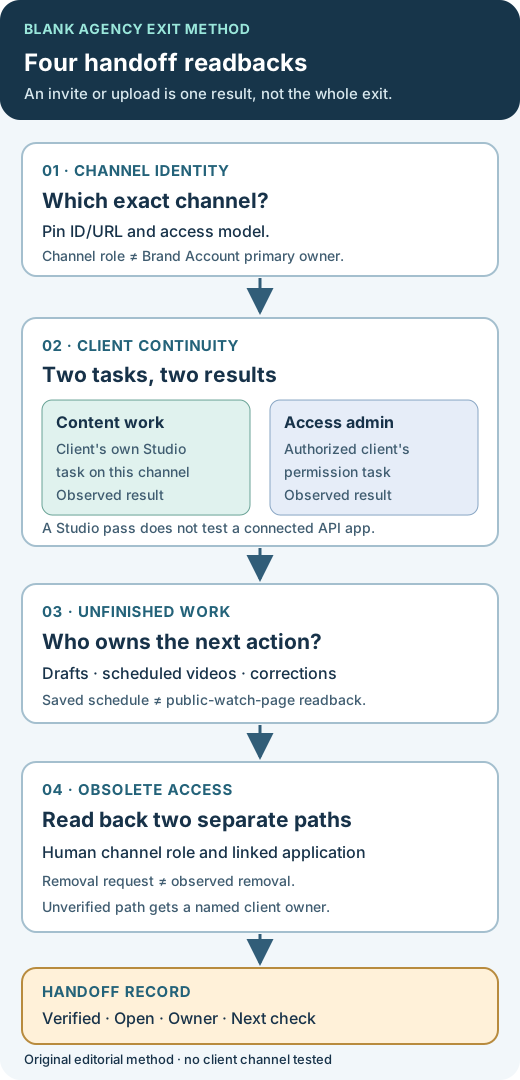
Original editorial method. Four distinct readbacks support a truthful handoff; no real client account or ownership transfer is depicted.
Original visual by Superdirector editorial team. Created 2026-10-29.
Make one record for the correct channel
Start with the exact channel URL or channel ID. A display name, logo or email subject can refer to the wrong account. Record the client representative, the outgoing operator and the agreed handoff time, including its time zone. Keep passwords, recovery codes and authentication tokens out of the worksheet.
Then have the authorized channel owner identify how access is managed. YouTube Studio channel permissions and Brand Account ownership are related arrangements, but the word *Owner* in one interface does not necessarily convey the authority represented by *primary owner* in the other. Have the client name the person responsible for future channel administration before changing the agency's access.
For example, a person called an Owner in channel permissions cannot transfer ownership to another user. An Editor can upload and publish content but cannot manage permissions. A Manager can manage channel permissions in Studio, but that Manager role is not a Brand Account ownership transfer. Use the current YouTube channel-permissions table for the actual role and task; do not grant a broader role merely because its name sounds more permanent.
| What the team needs to establish | Evidence to record | What that evidence does not establish |
|---|---|---|
| The client can continue content work | Client’s own authorized account can reach the correct channel and perform an agreed, nonpublic task | Actual publication of the next video, or authority to manage other users |
| The client can administer channel access | Authorized client can inspect relevant permissions and demonstrate who can change them | A completed Brand Account primary-owner transfer |
| A Brand Account ownership change is complete, where required | The authorized owner reads the actual Brand Account ownership state after the approved process | That scheduled content and third-party tools have been handed over |
Google recommends channel permissions for day-to-day delegated access. Its Brand Account guidance describes the separate primary-owner arrangement and a seven-day owner eligibility period. A transfer may require the authorized owner to opt out of channel permissions; Google's migration guide says to do that only if a channel transfer is needed. This is a different job from routine agency-role removal. If the client already controls the channel, do not delete accounts, move the channel, or change the permission model merely to complete a checklist. YouTube warns that an incorrectly executed Brand Account channel move can delete the wrong channel.
Ask the client to demonstrate continuity from their own account
An accepted invitation is a useful intermediate result. The handoff result is that the intended person can perform the intended task on the correct channel from their own account. Make one task card for content work and another for access administration; do not collapse them into a generic “client has access” row.
Begin with a read-only task: the client opens the correct channel in Studio and locates a named existing upload or schedule. If an agreed next action requires them to upload, they can use an owned asset to create an unpublished draft in the normal work process. Record the observer, exact task, time and outcome. That draft proves the narrower upload task; it does not prove a future public video will publish. There is no need to publish a dummy video for this worksheet.
If the client can upload but cannot inspect or manage permissions, describe exactly that state. They may have the intended Editor role; the unresolved question is which client-side person will administer access after the agency leaves. Have that administrator perform an authorized permission check from their own account. Giving every participant Owner access is not a substitute for naming the actual administrator and checking the role against YouTube's current matrix.
YouTube states that invited channel-permission users cannot access YouTube APIs. A successful Studio task therefore does not validate a connected publishing application. If an authorized tool must continue, have its owner inspect the actual app connection and run its next permitted action through the normal workflow. If that cannot be observed before exit, mark the tool path unverified and assign a named owner; do not infer it from a Studio login. YouTube channel-permissions limits and migration guidance.
Give each unfinished upload an owner
Before changing access, list the work that could still affect the channel after handoff. Keep a stable video ID, draft reference or file name beside each item, its current observed state, the next person and the next check:
- Unpublished drafts, with their current location, cut revision and person responsible for the next edit.
- Scheduled videos or live streams, with the saved date, time zone and responsible publisher and public-readback owner.
- Pending corrections to a public video’s title, description, captions or other agreed surface.
- Source files and approved assets the client needs to continue the work, with their storage location and recorded usage scope. Keep private file links in the client's authorized system, not a public worksheet copy.
Keep agreed, uploaded, scheduled and publicly verified separate. A calendar row is not a public video. An upload confirmation is not the client’s acceptance of the final edit. YouTube says a scheduled private video is set to go public at the selected time, but a Community Guidelines strike can stop that transition during the penalty period. Do not assume that changing a person's role cancels or preserves a schedule; inspect the saved item and agree who will verify its outcome from the public watch page.
Fictional case: a draft task passes while the tool path remains open
All names and circumstances in this example are invented.
Harbour Studio is ending its work for Cedar Workshop. These names, accounts and outcomes are invented to teach the record; no real channel was inspected. The client's content lead opens the correct channel and creates an unpublished draft from a client-owned asset. Their Editor role permits that task, so the draft task passes. The operations lead separately checks Studio permissions from a Manager account and becomes the named client access administrator. Neither observation establishes Brand Account primary ownership, and no transfer was requested.
One product video remains scheduled. The record names its video ID, saved time zone, client publisher and later public-readback owner. A third-party scheduling tool is listed as unverified because the client has not checked its own connection. The agency does not write “all paths transferred” merely because two Studio tasks passed. Its working access can then be reviewed according to the agreed cutover while the scheduled-publication and tool checks retain named owners.
If the operations lead could not establish who controls access, the open item would be “client to identify an authorized access administrator.” It would not be “send us your password” or “give the outgoing agency permanent ownership.” This invented case does not predict whether the scheduled video or tool will work after the handoff.
Review people and connected tools as separate access paths
Once the client's responsibilities are established, the authorized person can remove or adjust obsolete channel roles using YouTube's supported permissions controls. Name the specific outgoing role, the person who removed it and the later state read from the permissions list. An invitation expiry, a revocation request and an observed absence are different facts.
Review connected tools separately. A channel role and an application connection are different records. Google's linked-app guidance distinguishes Sign in with Google, Access to your Google Account, and other linked-account paths. Removing a sign-in link does not delete data already held by the application; removing data access may make its features unavailable. Have the client or another authorized account owner identify the actual connection and pending jobs before changing it. This article cannot say that a particular tool will stop posting merely because the agency's Studio invite was removed.
Do not record access as removed merely because someone sent the request. Keep a dated readback from the appropriate permission list or application. If the agency cannot see that surface after removal, identify the authorized client verifier rather than asking for shared credentials or regaining access just to capture proof. If a required app check is incomplete, leave tool path unverified, name its owner and state which scheduled or future action depends on it.
The original channel handoff map shows the four paths and their distinct readbacks. It is a decision aid, not an account screenshot or evidence that any client access was actually removed.
Leave a usable handoff record
Use the blank channel handoff card and CSV register to record the account model, client-side task checks, unfinished work and final access review. The HTML has no built-in submit or save feature; move completed observations into the client's agreed private workspace. Both downloads contain no real channel, account or credential data.
The useful closing sentence is specific: “On channel [ID], the client content lead completed [observed task] at [time]; the access administrator confirmed [observed role]; video [ID] remains scheduled for [time zone] with [owner]; the outgoing role was [observed state]; tool [name] is [verified/unverified] with [owner].” The bracketed line is a blank template, not a real result. Change each field to match the evidence and keep unknowns visible. A handoff can be operationally usable with a named open item; it should not be falsely labeled complete.
Sources and limits
Official YouTube channel-permission roles, Brand Account owner guidance, permission migration guidance, channel-move risk guidance, scheduled publication guidance and Google linked-app controls were reviewed October 29, 2026. The four-path record and Harbour Studio case are original editorial examples. No Superdirector client access, scheduled video, connected tool or completed ownership transfer was inspected for this article.