How-To Guide
Sell a backup app with a restore demonstration and an exclusions list
A green cloud icon is not the same evidence as a restored, usable document.
A green cloud icon is not the same evidence as a restored, usable document. Before a backup app's first release, build the acquisition demonstration around one safe recovery example and an equally visible statement of what it does not cover.
The useful deliverable is a coverage map connected to a restore record. This guide proposes that record; it does not report an executed backup test or promise recovery after every deletion.
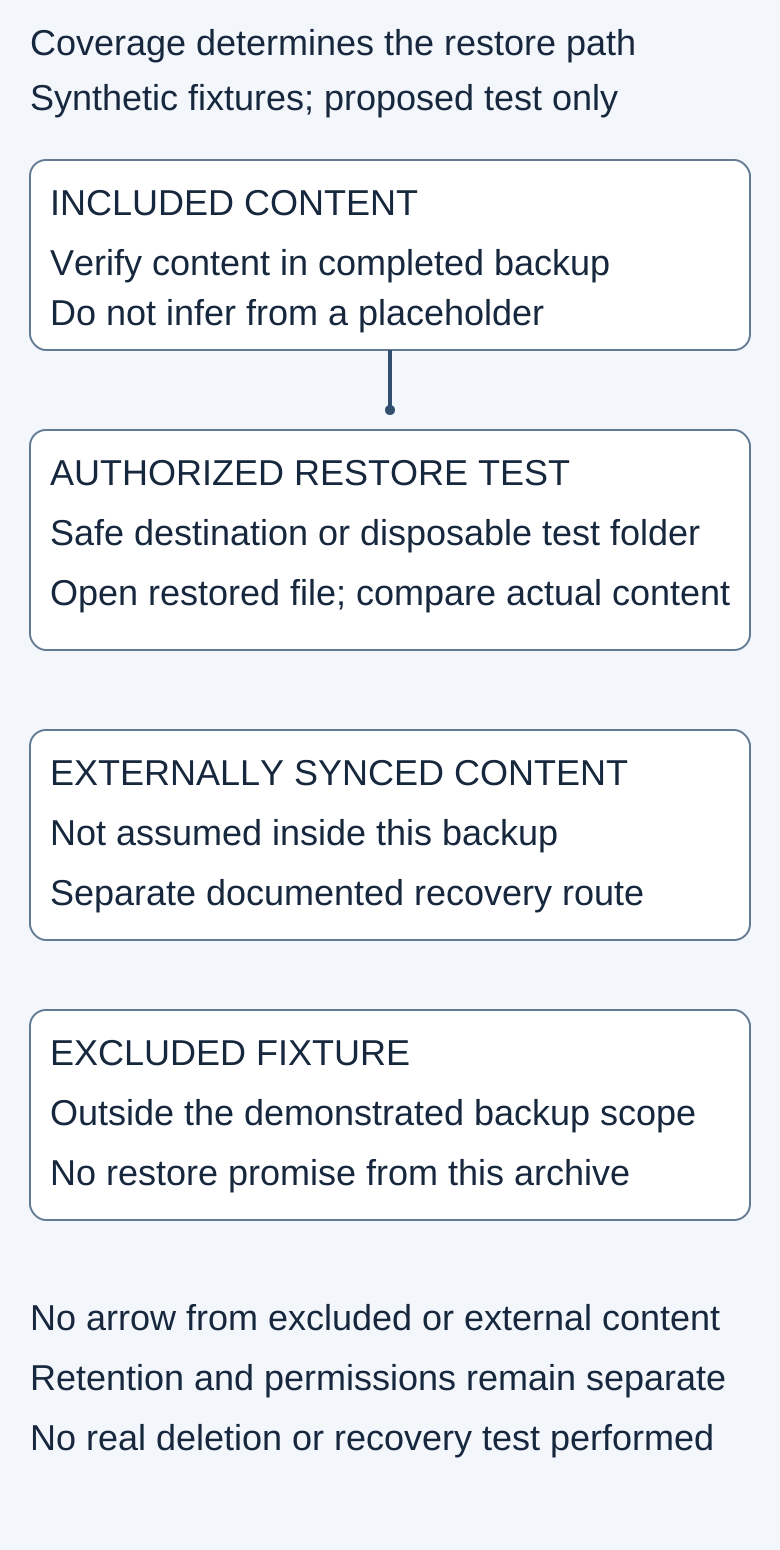
The arrow represents the proposed test path, not a successful restore. No real document or account information appears in the diagram.
 Superdirector
Make it work for your brand
Find it. Remake it. Post it. Superdirector turns the viral formats in your niche into your brand's carousels, X posts and video scripts, and keeps the calendar full.
Define the boundary of the copy
Start with the actual product and backup method. Write down what source content it is meant to copy, which account or device owns that content, and where the recoverable version is held. A folder visible in a file browser may refer to content held elsewhere. Do not treat a placeholder or an empty directory as proof that the file's contents are in this backup.
Apple's backup-method comparison, published October 22, 2026, distinguishes iCloud and computer backups and lists exclusions. For example, data already synced to iCloud is treated differently from data contained in the device backup. The lesson for a new app's demo is to document the actual boundary, not to transplant Apple's inclusion rules into a different product.
A professional operator's public report describes files missing from a workstation backup in an online-only setup. This is one unverified account in an adjacent professional context, not a proven defect in any service or a measure of consumer search demand. It is a useful reason to inspect content rather than rely on icons.
Build included and excluded fixtures
Use a small synthetic document containing an unmistakable test phrase and a second synthetic file deliberately outside the demonstrated backup scope. Keep a protected original copy outside the exercise. Do not delete real working files, empty trash or alter a live retention policy to make a marketing clip.
Before starting, record the build, source path, destination, time and timezone, and the inclusion/exclusion settings. If the app only supports particular file types or locations, choose an example within that boundary and say so. An intentionally excluded fixture should remain visible in the explanation, not disappear from the final edit.
The test should answer a narrow question: can this specific included content be recovered from this specific completed backup using the documented procedure? It cannot establish that every device file, cloud service or historic version is protected.
Check completion and recovery conditions separately
Record whether the backup operation completed and what evidence supports that status. Then inspect the conditions governing recovery: relevant plan or feature, retention/version window, required permissions, and whether the intended restore action is available. Do not replace missing information with a generic “forever” claim.
Dropbox's deleted-file recovery guide, updated September 25, 2026, makes recovery dependent on factors including plan, time and permissions. It also distinguishes permanent deletion from normally recoverable deleted files. Those are product-specific conditions, not a universal recovery policy. A demo should never imply that support can always retrieve content outside the documented recovery scope.
A successful upload and an eligible restore are different observations. Keep both in the record even if the interface presents them close together.
Restore without damaging the source
Prefer an authorized test environment and a separate restore destination when the product supports that workflow. Open the restored document and compare its test phrase and expected content to the protected original. Record whether it opens, whether expected content is present, and any mismatch. A filename appearing in a restore list is not enough.
Do not assume every service permits a different restore destination. Dropbox's documented deleted-file action restores to the folder the file came from. If the product's procedure writes back in place, use a disposable test folder or an isolated account specifically approved for the exercise. Stop if the test would overwrite valuable data or expose files to unintended people. A safer storyboard is better than a destructive proof attempt.
The excluded fixture should not be described as a failed restore from the backup if it was never supposed to be included. Instead, show that it sits outside the claimed coverage. Likewise, externally synced content needs its own documented recovery route; do not draw a restore arrow from an archive that does not contain it.

Original AI-generated editorial illustration. Storage hardware and a backup indicator are not evidence that a restored document is usable. This is not a product capture, customer scene or completed test.
Turn the evidence into a clear acquisition asset
Film the source fixture, the completed-backup evidence and the reopened restored content as separate beats. Keep the backup date/version and coverage limit readable. If a step is mocked, label it as a concept rather than blending it with observed footage.
Use the blank restore worksheet to retain the original settings, actual result and unresolved questions. Ask an independent practitioner to follow the authorized procedure before approving the asset. Show the exclusion statement in both the longer tutorial and the short social version; cutting it away expands the promise.
After publishing the demonstration, verify the delivered page and measure useful restoration work separately from clicks, backup starts or purchases. A single restore example cannot establish universal recovery or customer-loss prevention. Keep the promise narrow enough to verify.