How-To Guide
Recover an expired invitation without confusing account access with the link
An invitation email can arrive successfully and still leave its recipient unable to enter your app. That is not one failure state.
An invitation email can arrive successfully and still leave its recipient unable to enter your app. That is not one failure state. The email, authentication link, account, permission to use the product, and first useful task are different records. Your recovery message should help someone reach the next supported step without destroying an account that already exists.
For a B2C founder launching invite-based onboarding, the useful deliverable is a recovery decision sheet: what the recipient sees, what an authorized owner can verify privately, and which existing route is supported. It is not another “check your inbox” screen or a promise that sending the same invitation again will work.
The examples below are synthetic planning scenarios, not observed recovery results.
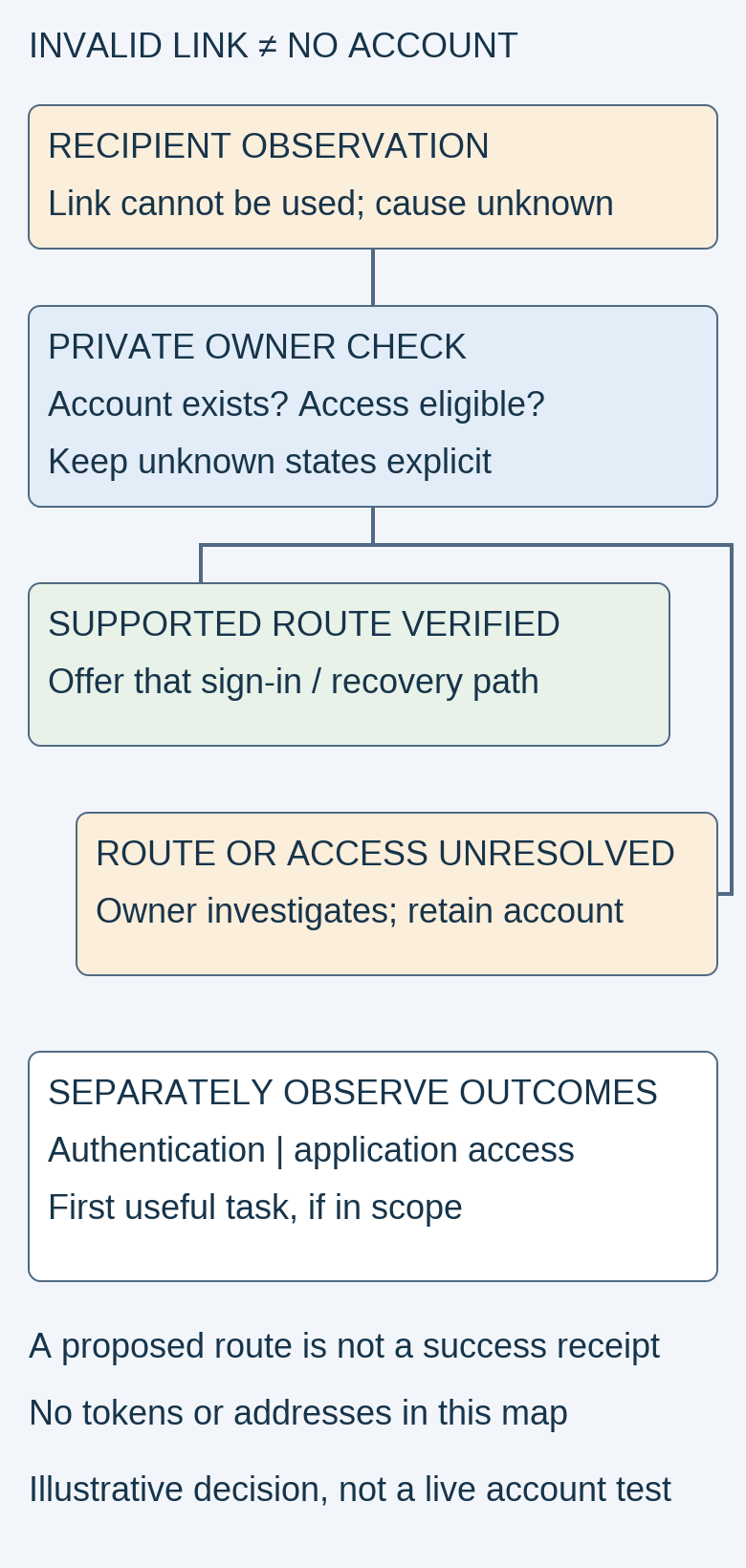
Original decision map. The branches describe evidence to collect, not a tested recovery implementation. Account information stays private; missing evidence remains unknown.
 Superdirector
Make it work for your brand
Find it. Remake it. Post it. Superdirector turns the viral formats in your niche into your brand's carousels, X posts and video scripts, and keeps the calendar full.
Why an invitation error needs a narrower explanation
In a historical Supabase issue, an operator described invitation links being consumed before the intended click and later reported reproducing the behavior through a preview. That September 2022 report supports investigating a possible mechanism, not asserting its prevalence now or diagnosing a particular user's error.
A separately authored invitation-recovery question describes an expired invitation followed by an existing-user error. The author asks whether deleting the user is necessary. Treat that as evidence of a confusing recovery decision, not permission to copy a destructive workaround. Its relative publication dates conflict across views, so it is not a precisely dated demand measurement.
These are operator contexts, not a measured sample of B2C customers. Search popularity and conversion impact remain unknown.
Separate five records before changing the message
Start with a blank worksheet, not an assumed cause:
- Email record: what was prepared or accepted by the sending service, and when? A sending receipt does not prove the intended person read the email.
- Link result: what error did the recipient actually see? Record a safe error category, not the secret URL or token.
- Account record: does the relevant account already exist? This is an authorized owner's private check, not information to expose in a public lookup screen.
- Application access: is that account currently eligible for the intended workspace, invitation, or product capability? Authentication and application access need separate evidence.
- Useful work: after access, can the person complete the task the invitation promised?
These are proposed acceptance distinctions. Your implementation may store or expose them differently. Do not invent a database field or infer application permission from a successful sign-in.
Example one: the link fails but the account already exists
Suppose synthetic invitation I1 produces an invalid-link message. An authorized owner privately confirms that account A1 already exists. Application access has not yet been verified.
Do not change this into “the account failed to create.” Do not delete A1 simply to make another invitation request succeed. The existing account may have history or permissions that the invitation screen does not explain.
Instead, the owner records the existing account, checks the intended access separately, and identifies the product's supported recovery route. That might involve an existing sign-in or recovery flow, or an internal access investigation. Which route is correct must come from the actual implementation, not this example.
Candidate user-facing wording is: “This link cannot be used. Continue with the available sign-in or recovery option below. If you still cannot reach your invitation, contact support.” Use it only when the named options really exist and the support destination is staffed. Avoid revealing whether a particular email address has an account.
The done-when is not “new email requested.” It is a separately observed authentication outcome and the intended application access, followed by the first useful task when that is in scope.
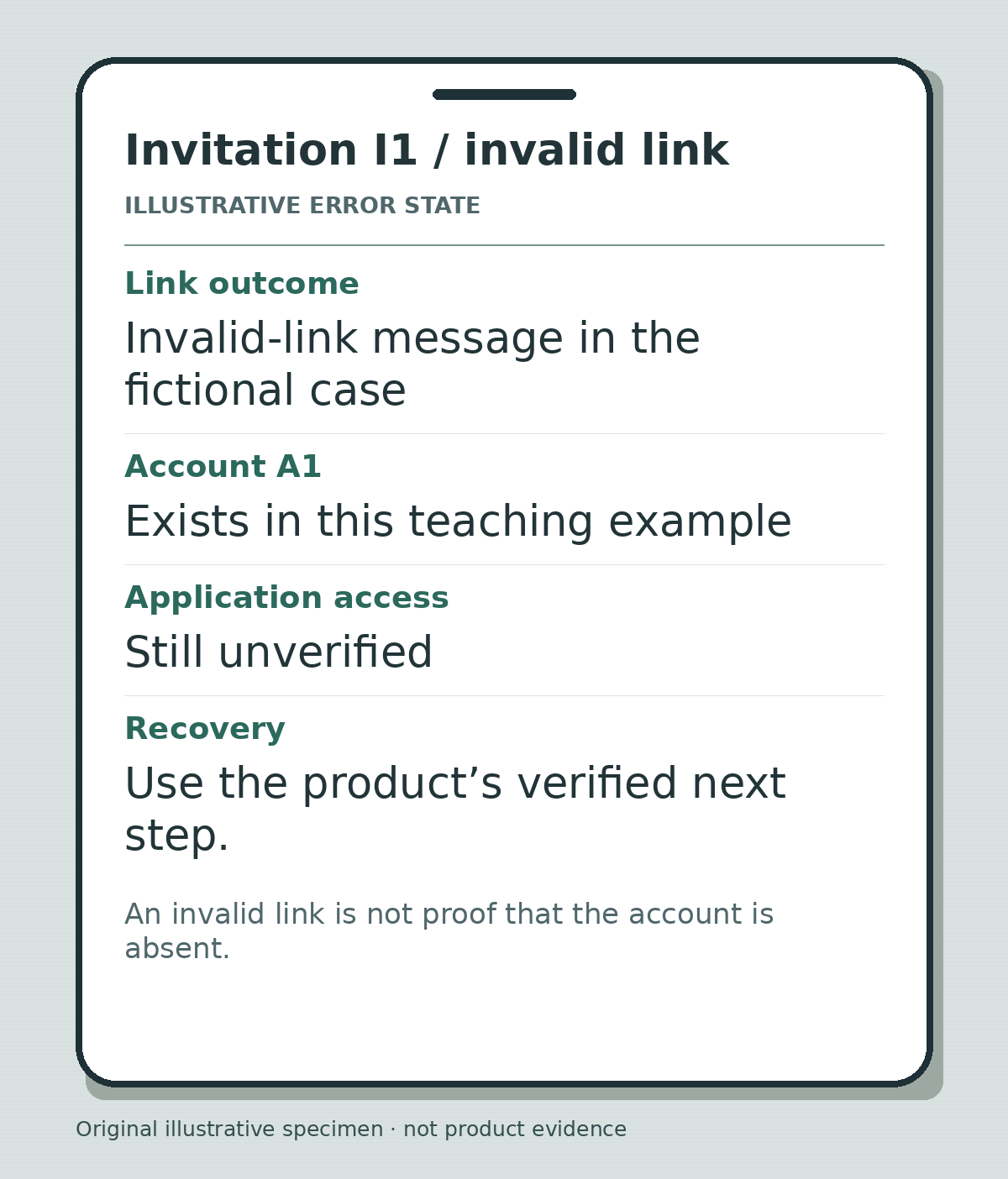
Original fictional error-state concept. It contains no live invitation or token and does not establish a real account’s status or a completed recovery.
Example two: sending succeeded, activation is still unknown
Suppose synthetic email receipt E2 exists, but there is no successful verification, session observation, or first-task record. A recipient reports that the link is invalid.
Supabase's email-template guidance documents that security prefetching can consume a one-use confirmation link. It also describes implementation alternatives such as a confirmation step or an OTP flow. Those alternatives require technical and security review; they are not instructions to disable an email scanner. Availability also depends on the project: Supabase’s June 3, 2026 change prevents new Free projects using its default email provider from editing authentication templates. Projects created before that date, paid plans, and Free projects using their own SMTP provider have different scope. Check the actual project rather than assuming a template-based alternative is available.
Record prefetching as one possible explanation until evidence supports it. Do not tell the recipient their mail provider caused the problem merely because the sending service accepted the message. Likewise, do not announce an outage, expiry interval, or successful recovery without the corresponding evidence.
For a demonstration, show the safe error state and the next supported action. If you cannot verify that action, label the scene as a proposed flow and stop before a fictional success screen.
“Resend” and “generate” are not interchangeable contracts
The current Supabase resend reference lists signup confirmation, email change, SMS, and phone-change cases. It does not establish a universal invitation-recovery action. A button labeled “Resend invitation” therefore needs its own verified implementation contract.
The admin generate-link reference describes generating email links or OTPs for use with a custom email provider. Generation is not the same event as sending, receiving, or completing authentication. This article does not supply an admin implementation recipe, invoke that method, or imply that it solves every existing-user condition.
Use precise labels in internal evidence: generated, send accepted, recipient action observed, authentication observed, access confirmed, task completed. Each label requires its own receipt. Never put administrative credentials in browser code, or include secret links in public bug reports or an article's screenshots.
Review the recovery path without causing another problem
Use the blank recovery worksheet to prepare a small authorized test. Name the build, invitation configuration, intended access, safe fixture identity, and expected route before testing. Keep real addresses and authentication artifacts out of the editorial packet.
Include at least an invalid-link state, an existing-account state, and an unresolved-access state in the review plan. The purpose is to check whether each message offers a truthful next action, not to force every scenario through a universal reinvitation sequence. Do not erase data, weaken security controls, or reset eligibility just to obtain a clean demo.
Ask a reviewer to explain what they believe the button will do. If they interpret “send accepted” as “account ready,” or “signed in” as “invitation granted,” revise the labels and repeat the comprehension check.
Close the loop with useful outcomes
Track recovery starts, observed authentication, verified application access, and first useful tasks separately, using privacy-appropriate identifiers and actual available events. Investigate discrepancies between those events and direct observations before treating a funnel as evidence of success.
Compare the revised flow with its own prior baseline only when the sample, instrumentation, and observation window support that comparison. No conversion lift, recovery success rate, or publication outcome has been measured here.
A good invitation recovery experience preserves the existing account, explains the next supported action, and proves access through observed behavior. It does not manufacture certainty from the word “Sent.”