How-To Guide
Promote a keyboard-only browser game to people scrolling on phones
Plan social clips and a mobile landing-page handoff for a keyboard-only browser game, with compatibility checks and a return-to-desktop route.
By the Superdirector editorial team.
At a glance
My browser game needs a keyboard. How do I promote it on mobile-first social without sending people to a game they can’t play?
Tell people that the game needs a keyboard before asking them to play, then give phone visitors a useful way to return on a compatible computer. Your mobile landing page should explain the experience, not launch an unusable game and hope the visitor works out the problem.
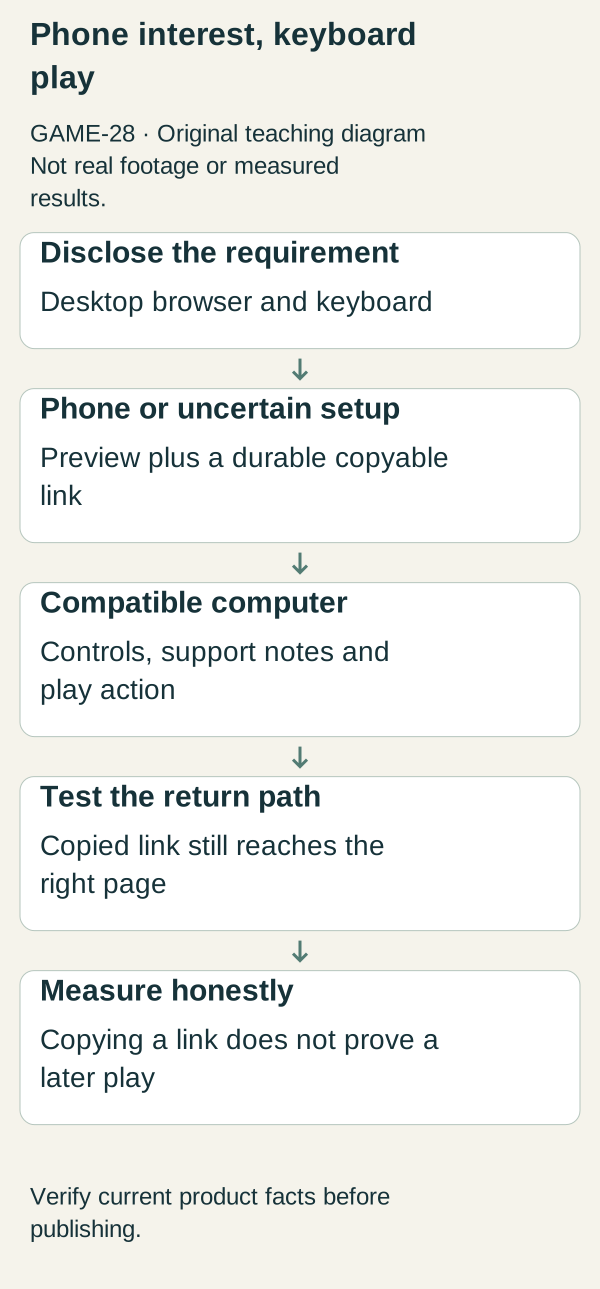
Original illustrative teaching diagram. Explain keyboard/desktop requirements, offer phone viewers a copyable return path, and separate copying a link from a later play. This is planning guidance, not product footage, customer evidence or measured results.
Original visual by Superdirector editorial team. Created 2026-10-20.
Tell people that the game needs a keyboard before asking them to play, then give phone visitors a useful way to return on a compatible computer. Your mobile landing page should explain the experience, not launch an unusable game and hope the visitor works out the problem.
This does not require rebuilding the game for touch before you can talk about it. It requires an honest invitation and a tested handoff. The worked example is an invented browser puzzle called Switchyard, played with arrow keys and a spacebar on supported desktop browsers. No touch version or mobile compatibility is assumed.
Define compatibility in terms a player can act on
“Browser game” says where software runs, not which controls work. State the actual requirement in the clip and beside the primary action: “Desktop browser and keyboard required.” If particular browsers or operating systems are supported, list the ones your team has tested. Do not use “works everywhere” simply because the game loads a page.
Separate three checks: can the page open, can the game render and can the person complete the controls? A phone may pass the first two and fail the third. A desktop browser can still have unsupported input or a blocked key focus. The landing experience should not treat screen width as conclusive proof of playability.
For Switchyard, the compatibility sheet says: arrows move the signal cursor; spacebar switches a track; supported desktop environments listed on the real help page; touch controls absent; mobile visitors can watch a preview and save the destination. These are teaching facts. Replace them with the behavior tested in your own game.
Use two landing states without trapping either visitor
Phone-oriented or uncertain-device state
Headline: “Save this puzzle for your keyboard.”
Body: “Switchyard currently needs a desktop browser and keyboard. You can watch the short preview here, then open this same page on a supported computer when you want to play.”
Primary action: “Copy game link.” Secondary action: “Watch preview.” Compatibility note: “Already using a compatible setup? See controls and try the game.”
This is proposed copy, not a claim that a functioning copy button has been built. Implement and test the actual control before using the label. A visible, selectable destination is a useful fallback when copying fails. Do not require an email address merely to show a link the person already visited.
Compatible-desktop state
Headline: “Ready to route the next train?”
Body: “Use the arrow keys to move and spacebar to switch a track. Check the supported-browser notes if controls do not respond.”
Primary action: “Play Switchyard.” Secondary action: “See controls and compatibility.”
Do not silently redirect every narrow window to the phone state. Allow people to inspect compatibility and choose the relevant route. Device detection is a convenience, not a substitute for working controls and honest text.
Choose the lightest return mechanism
A copyable link, recognizable game name and optional bookmark instruction may be sufficient for a small launch. If you already have a user-requested email reminder feature, describe what it sends and use the address only for that stated purpose. Do not turn “send me this link” into newsletter enrollment without a separate clear choice.
Avoid creating several competing calls to action. On the phone-oriented page, saving or copying the destination should be the obvious next step. On desktop, playing should be obvious. An optional preview helps people decide whether returning is worth it; it should not autoplay loudly or hide the compatibility notice.
Make the URL stable if possible. A link that expires before someone reaches their computer defeats the handoff. If the game moves, preserve a useful destination or clearly explain the new location instead of abandoning old social links.
Completed test worksheet
Scenario A: phone browser, no keyboard. Expected: compatibility notice visible before game launch; preview readable; link can be copied or selected; no forced registration. Failure example: page opens a canvas with “press space to start” and no explanation. Correction: show the landing state before the canvas.
Scenario B: supported desktop browser and keyboard. Expected: play action reaches the game; controls work after the documented focus step; help is reachable. Failure example: spacebar scrolls the page rather than activating the game. Correction: investigate focus and input behavior, then retest before promoting the path.
Scenario C: narrow desktop window. Expected: the visitor can still choose to play if the actual requirements are met. Failure example: a screen-width rule blocks all narrow windows. Correction: avoid treating width as the sole eligibility test.
Scenario D: returning visitor using a copied link. Expected: destination remains recognizable and gives the correct action for the current setup. Failure example: campaign URL redirects to a vanished preview. Correction: use a durable landing route.
These are hypothetical test cases, not reported defects in a real product. The reusable record is device/setup; entry link; expected state; observed state; controls checked; handoff checked; fix owner; retest result.
Measure a handoff without pretending it is one session
A phone visit, a copy action and a later desktop play are different events. Without a legitimate connection between them, do not call their aggregate ratio a measured cross-device conversion rate. A copy click does not prove a return, and a direct desktop visit may have come from a friend rather than the original clip.
Record what your existing analytics can actually observe. Combine that with small usability checks: can a visitor explain the device requirement and find the return option? Clear qualitative findings can justify fixing a broken path even when attribution is incomplete.
Your next action is to test the current page on a phone. If it asks for an unavailable input, change the invitation and landing explanation before producing another video.
References and scope
The source study inspected a web-game accessibility guide and a browser-versus-app explainer. They provide interaction and distribution context, not evidence that this handoff increases plays. No accessibility certification, universal browser-support claim or mandatory touch rebuild is inferred. The landing copy and test cases are original recommendations for the stated keyboard-only constraint.