How-To Guide
Promote a cozy iPhone game before release using TestFlight footage
Turn TestFlight recordings of a cozy iPhone game into five clip briefs and a beta invitation that reflects current tester access.
By the Superdirector editorial team.
At a glance
How do I promote my cozy iPhone game before release if all I have is a TestFlight build and screen recordings?
Use your screen recordings to explain the real game, and make the invitation match the access you can actually provide. A TestFlight beta is not an App Store release. If the beta is open to external testers, invite suitable people to test it; if it is not, show the development footage and offer a truthful way to follow progress instead.
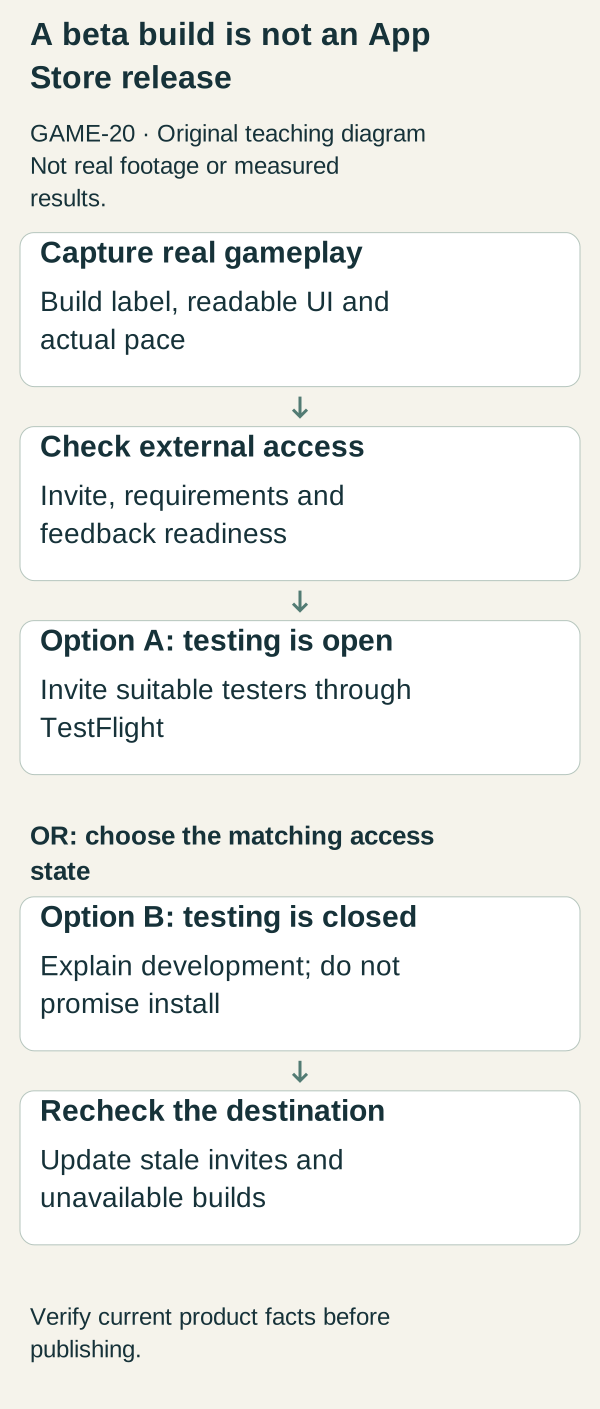
Original illustrative teaching diagram. After checking actual gameplay and external access, choose either open TestFlight testing or closed-development messaging, then recheck the destination. This is planning guidance, not product footage, customer evidence or measured results.
Original visual by Superdirector editorial team. Created 2026-10-20.
Use your screen recordings to explain the real game, and make the invitation match the access you can actually provide. A TestFlight beta is not an App Store release. If the beta is open to external testers, invite suitable people to test it; if it is not, show the development footage and offer a truthful way to follow progress instead.
The worked example is an invented iPhone game, Pebble Kitchen, where players arrange ingredients and prepare small illustrated meals. It has a functioning TestFlight build and recorded gameplay, but no public App Store release. The campaign below is a production and recruitment plan, not a claim that a fictional beta is accepting testers.
Choose one of two honest campaign states
Testing open: the correct external build is available, the invitation works, eligibility is clear and someone can respond to feedback. The message is “Try the beta through TestFlight,” with a concise explanation of what testers will do.
Testing closed or not ready: the team has an internal build but cannot currently admit the public. The message is “In development,” with a verified follow-up destination if one exists. Do not send people to an empty invite or say “download now” because a recording looks finished.
Apple describes TestFlight as a beta-testing route. External testing requires the relevant review and setup; testers install through the TestFlight app. Public links can have device and OS criteria, and their availability must be managed. Apple's TestFlight overview.
For Pebble Kitchen, the initial campaign stays in the second state until an external invitation has been checked. Recording clips can proceed while access is being prepared. Recruitment cannot be described as open merely because a build exists in the developer account.
Build a capture sheet from the current game
Record the build, device, orientation, gameplay action, known limitations and final destination. Disable personal notification previews before capture and avoid showing account identifiers. Capture real interaction at its actual pace before making edited versions. If you speed up a sequence, label that edit so viewers do not mistake it for the game's timing.
Completed capture sheet: Pebble Kitchen, beta build PK-B4, portrait iPhone recording, ingredient arrangement followed by one completed dish, known issue some plate labels clip at larger text sizes, intended footage status “Beta gameplay,” recruitment destination pending. Because the destination is pending, exported clips may explain the game but cannot yet invite people to install it.
Use five clips with different informational jobs. They can share a visual style without repeating the same promise.
Five complete screen-recording briefs
Clip 1: what you do
First frame: the empty preparation board with the caption “A tiny meal, one choice at a time.”
Show: choose two ingredients, place them and trigger the actual preparation interaction. Preserve enough interface context to show that these are player actions, not a prerecorded animation.
Voice or caption: “In Pebble Kitchen, you arrange ingredients and make small illustrated meals. This is footage from our current iPhone beta.”
End: “In development” while testing is closed; replace with the verified beta invitation only after access is open. Do not use an App Store download badge for unavailable public access.
Clip 2: one understandable decision
First frame: two available ingredients. Caption: “Which would you add next?”
Show: one real choice and its result. Do not imply recipes, combinations or consequences that the build does not contain.
Follow-up: “Here is what this choice changes in the current build.” Use the actual effect, such as the illustrated dish appearance. Do not invent strategic depth simply to make the clip more dramatic.
End: the same access status as clip 1. This clip's job is comprehension, not a second announcement.
Clip 3: how it feels to control
First frame: a clean screen with the touch action indicated by a restrained annotation.
Show: an uninterrupted interaction, including the time needed for the game to respond. Caption: “An ordinary turn at normal speed.”
Explain: “We are checking whether this interaction is clear on an iPhone screen.” This is a useful tester question if testing is open; otherwise it is a truthful development topic.
Avoid showing a hand that obscures key controls or adding fake responsiveness through cuts. A screen recording can demonstrate the interaction without requiring lifestyle footage or an actor.
Clip 4: what testers should examine
Use only when external testing is actually open. First frame: “Help us check ingredient labels.”
Show: the relevant labels and the path to the interaction. Caption: “Play one meal and tell us where a label was hard to read. Please include your device model and iOS version in the feedback, not in a public comment.”
End: “Beta access through TestFlight; see requirements before joining.” Use a monitored feedback route and request only information needed to investigate. Do not invite screenshots containing unrelated personal information.
Clip 5: a real feedback change
After an actual fix exists, show before and after footage from identified builds. Caption: “We enlarged the plate labels after testing.” This sentence belongs only to the fictional example until the real project has corresponding evidence.
If no feedback-driven fix exists, do not manufacture one. Replace the clip with “What we are still checking,” showing the unresolved interaction and a precise question. Development honesty is more useful than a fictional testimonial.
A completed beta invitation card
When the example's external access has been verified, its card would read:
“Pebble Kitchen iPhone beta. Arrange ingredients and prepare a small illustrated meal. This is an unfinished test build, not the public release. Check the listed device and iOS requirements before joining through TestFlight. We are currently asking testers to report unclear labels and confusing ingredient choices. Current known issue: some plate labels may clip at larger text sizes. Feedback instructions are included with the beta.”
The live version must include the real invite and actual requirements. Do not invent an OS minimum, tester capacity, release date or promise that progress will transfer to launch. If progress persistence is unknown, say so where testers decide whether to join.
Connect interest to feedback rather than vanity metrics
Keep three stages separate: people interested in the clip, people able to accept the invitation and people who played enough to give relevant feedback. A person who cannot meet the device criteria is not evidence that the creative failed. A tester who installs but never reaches the meal interaction has a different problem from someone who reaches it and finds labels unclear.
Your working record is: clip and build; audience; access state; invitation checked; eligible participation information available; feedback topic; reproducible finding; next build action. Never fill missing analytics with estimates and present them as observations.
Test the whole route from a viewer's perspective before making recruitment public. If capacity closes or the build stops being available, change the invitation copy and destination promptly. A popular old post should not continue implying access that no longer exists.
Next action and limits
Make clip 1 from the actual build, then decide whether you are explaining development or recruiting testers. That decision determines every end card. No paid creator campaign, cinematic footage or invented customer story is required to produce a useful first batch.
Apple's documentation supports the access distinction, not a promise that this creative plan will attract testers or improve retention. The example briefs and feedback worksheet are original. Any later claims about platform requirements should be checked again against the current TestFlight setup before publication.