How-To Guide
Printable wall art: show what changes when the buyer changes the aspect ratio
A list of supported print sizes does not show what happens to the artwork. If a buyer chooses a different proportion, something must give: content is…
By the Superdirector editorial team.
A list of supported print sizes does not show what happens to the artwork. If a buyer chooses a different proportion, something must give: content is cropped, space is added, or the composition is redesigned. Stretching the image is not a neutral fourth option.
Show that consequence before the buyer purchases. Start from the files you actually supply, and skip any standard size chart copied from another listing.
Keep three questions separate
Ask these in order:
- Shape: what is the width-to-height ratio?
- Data: how many pixels are in the exported raster file?
- Output: has that version been checked at the intended print size?
Adobe treats pixel dimensions, resolution and physical size as three linked values, and physical inches equal pixels divided by pixels per inch. Changing resolution without resampling leaves the pixel dimensions as they were and adds no detail. Adobe image-size guidance.
That arithmetic guarantees nothing about quality. Paper, printer, original artwork and viewing conditions still matter. The examples below are original illustrations and have not been validated as print products.
Show the crop on one composition
Take a fictional botanical drawing in a 2:3 portrait rectangle, with a long stem reaching toward the bottom edge and a small signature near the top. A 4:5 version at the same width is a shorter rectangle, so cropping equally from the top and bottom can cut the signature, the stem or both.
A comparison built from the actual master tells the buyer more than the phrase “multiple sizes included.” Show three views:
- Original composition: show the entire 2:3 artwork.
- Proposed 4:5 crop: mark exactly which strips would be removed.
- Final supplied 4:5 composition: show the exported result, including any deliberate repositioning.
If you choose a different crop anchor, show that decision. A centered crop is not automatically the best crop; it is simply an easy one to describe.
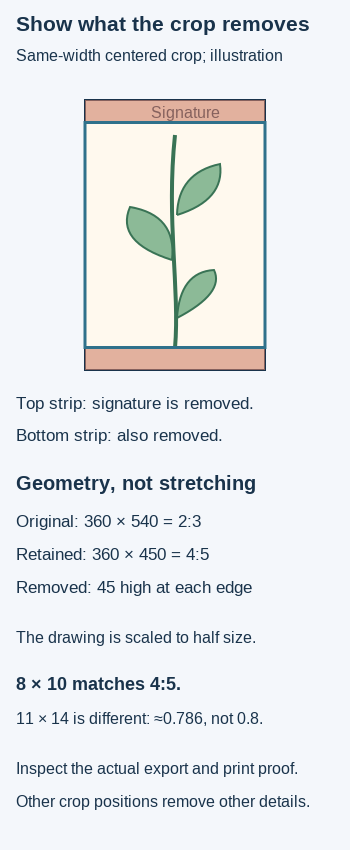
The diagram uses an original schematic drawing, not an excerpt from a seller's artwork. The shaded areas illustrate one crop choice, not a universal amount removed from every design.
Original visual by the Superdirector editorial team. Creation date not recorded.
Adobe's crop controls support fixed ratios and an overlay showing excluded areas. Keep a revisable master, because a destructive crop can leave you with no other copy. Crop options.
Decide between cropping, padding and redesign
Cropping removes part of the composition. It can work when the edges contain expendable space, but check more than the focal subject. Captions, signatures, thin borders and visual balance can fail first.
Padding keeps the original content inside a differently shaped canvas, which changes the amount or distribution of background around it. If the result includes a border, show that border in the preview; a borderless mockup would misstate it.
Redesign moves or reworks elements for the new shape. It can be the right answer for an illustration you own, but it makes a distinct version. If you moved a detail, do not imply that it sits in the same relative position at every size.
Choose the method on purpose for each supplied version. The buyer needs the result, and the software steps matter less.
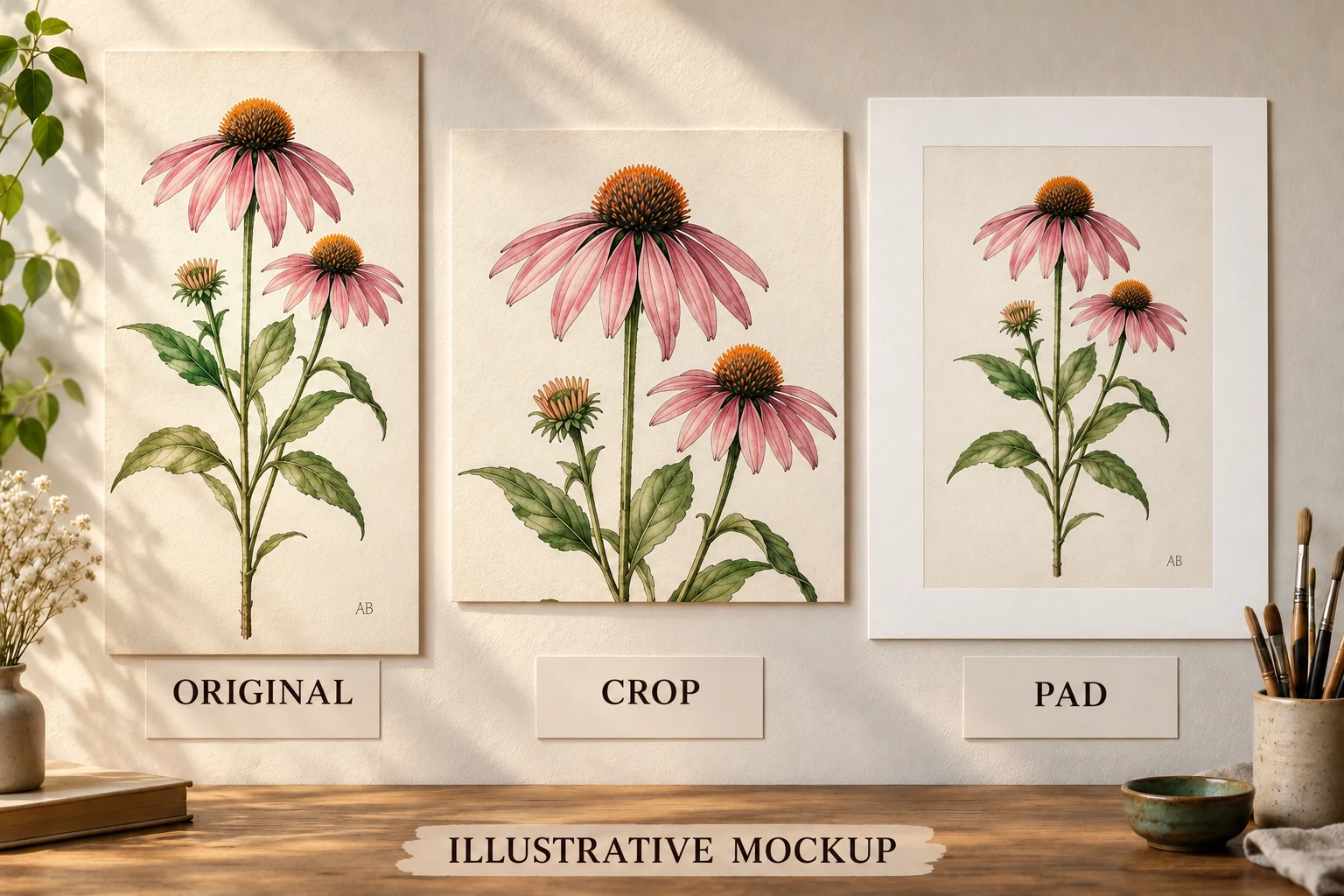
AI-generated illustrative mockup of crop and padding choices, not validated print files or measured paper ratios. Inspect the actual exported composition and dimensions before making a size promise.
Illustrative mockup by OpenAI image generation, editorial direction for this article. Created 2026-10-24.
Check the size arithmetic yourself
A 2400 × 3000 pixel file has a 4:5 ratio. At 300 pixels per inch, its dimensions correspond to 8 × 10 inches. That calculation gives a size relationship and says nothing about whether the print will look acceptable.
An 11 × 14 print is not exactly the same shape. Its width divided by height is approximately 0.786; 8 divided by 10 is 0.8. The difference is small enough to overlook in a size list and large enough to require a decision about crop or border.
Do not label both sizes as an unchanged fit until you have inspected the exported versions and the intended printing setup. Also separate the image area from the paper dimensions: a print service may apply its own fit or fill setting, so a correct file does not settle what its preview will show.
For every advertised version, record filename, pixel width, pixel height, ratio and intended output size. Calculate from the file, not from its name. A file called 8x10 does not prove its contents have that shape.
Build a buyer-facing comparison that stays readable
Use one consistent artwork across the comparison. Changing the subject as well as the ratio makes it hard to see what the buyer is choosing.
Put the ratio and the relevant size examples directly beside each preview. Make removed areas identifiable by both shading and text, so the explanation does not depend only on color. If you show a frame mockup, state whether the visible white area is part of the file, a mat or the surrounding scene.
A video can animate the crop boundary over a static master and pause on the final supplied versions. Avoid a smooth stretch animation, which makes distortion look like the intended resizing method.
Validate the exports before expanding the size list
Open each exported file separately. Check edge content, text, line quality, background and the actual dimensions. Compare it with the preview used in the listing. If you have a printed proof, record the size, print settings and medium; if you do not, mark physical output quality as unverified.
Then ask an unfamiliar reviewer which version they would choose for a particular frame and what would change in the artwork. A correct answer shows that the reviewer understood the explanation. It says nothing about market demand or sales.
A small verified set of files with honest previews is the useful deliverable. Adding size labels without inspecting the matching compositions makes a bigger promise on the same evidence.