How-To Guide
Keep a printed product-help code useful when the manual changes
A QR code on a physical product cannot be edited like a web page.
A QR code on a physical product cannot be edited like a web page. If it points directly to a file that later moves, changing the manual in an admin screen may leave existing customers at the wrong destination. The useful design question is how to maintain the help route while the printed object stays the same.
A product-help page can serve as an intermediate destination that an owner maintains. That is a proposed architecture to test, not a promise that any URL lasts forever. The domain, page, links and correct manual still require ownership and verification. References were checked on October 24, 2026; no store page, file or printed code was changed.
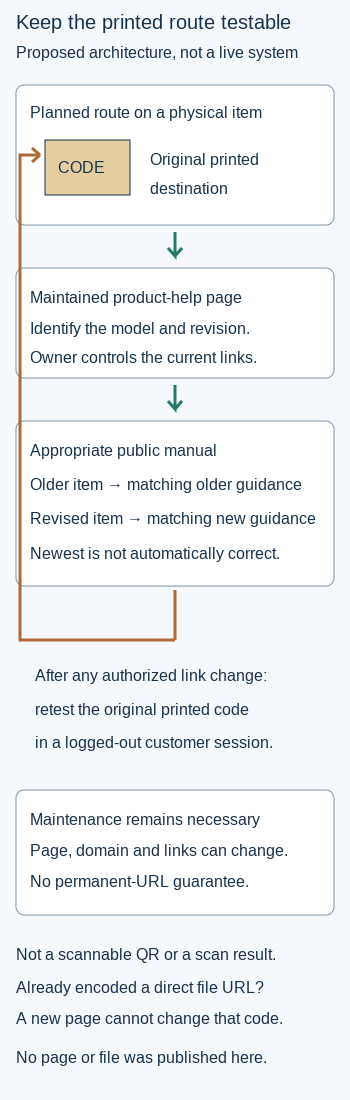
The diagram is not a scannable code or proof of a functioning destination. Its loop represents a required test, not an automated monitor that has been installed.
 Superdirector
Make it work for your brand
Find it. Remake it. Post it. Superdirector turns the viral formats in your niche into your brand's carousels, X posts and video scripts, and keeps the calendar full.
Begin with the code that customers already have
Record the exact destination encoded in a real printed sample, the product model and the packaging or manufacturing revision. Do not start from a new design file and assume it matches the code already shipped.
Identify what the customer expects after scanning. Is it installation guidance, a care page or a downloadable manual? Keep that purpose narrow. A help code should not unexpectedly become a signup funnel or unrelated promotion merely because the seller wants more leads.
If the code is visible on the product, show its position and purpose before purchase where relevant. An Etsy seller discussion describes a disagreement about an installation-help code on a birdhouse; the seller later reported adding a photograph showing it. That is one person's account, not evidence about typical buyers or permission to repeat accusations from the thread.
Separate the durable reference from the changing file
An illustrative route has three parts: the code printed on the item, a product-help page controlled by the seller and a link from that page to the appropriate manual. The page can explain the model and revision before the customer opens a file.
For a fictional desk organizer, the code could lead to a help page identifying its model. If the public manual changes, the responsible owner updates the link and tests the original printed sample again. This does not require claiming that the PDF's own address stayed unchanged.
For an already printed code that points directly to an old file, creating a new help page does not change what the code encodes. First establish whether you control the old destination and can support a tested route from it. If not, continuity is unresolved; a replacement label, corrected insert or separate customer-support plan may be needed through the authorized owner. Do not describe a newly generated code as a repair for items already shipped.
The intermediate page introduces responsibilities too. It can be hidden, renamed, deleted or edited incorrectly. A domain can stop serving it. The design reduces one kind of coupling; it does not create a permanent service without maintenance.
Read provider wording carefully
Shopify's page guidance supports creating pages, controlling their visibility and editing links in their content. That provides a basis for the proposed help-page approach. It does not prove that a particular store page is accessible to a logged-out customer or that a printed code reaches it.
The Files documentation says download links can be added to pages. Its replacement table describes keeping the file name and URL handle, while a later note says the file's link changes on replacement. A retained handle is not necessarily the same as a retained complete URL. Treat this as a reason to verify the actual behavior, not as proof of either universal permanence or a definite contradiction.
That same guidance warns that Files should contain only material intended for public access. Do not place private customer documents, account details or internal material behind a public manual link. The help route should expose only the information approved for that audience.
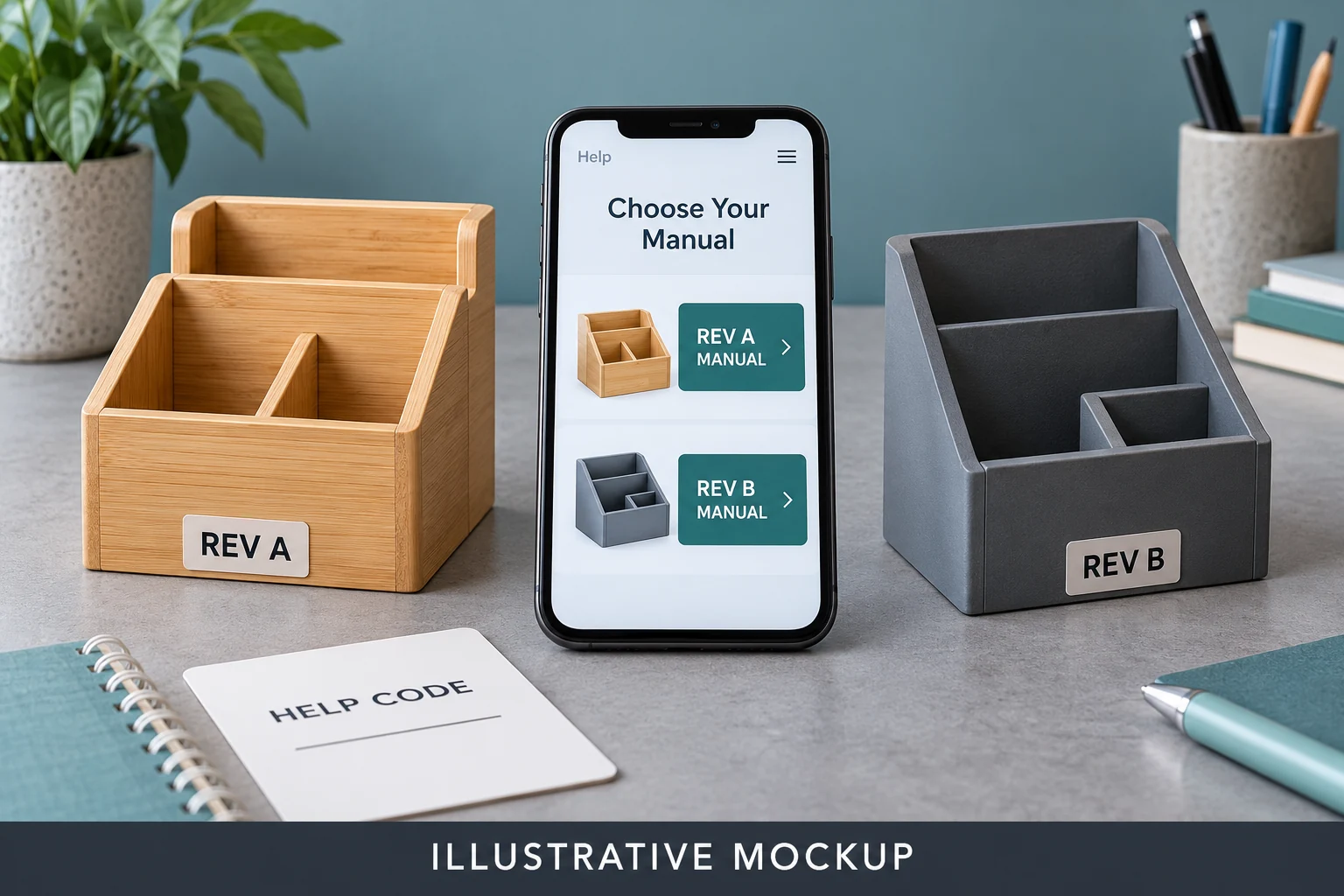
AI-generated illustrative mockup. The help route must identify the physical revision before opening the appropriate manual. The mockup contains no working code, URL or verified redirect and is not assembly guidance.
Keep the manual matched to the physical revision
A new document is not automatically the right document for every item already sold. If assembly, parts or operating guidance changed between versions, identify which manual belongs to each revision. Use a clear selection or explanation rather than silently replacing all history with the newest file.
For the fictional organizer, an older fastening arrangement may need its original instructions while the current model uses a revised sequence. The help page should help customers identify their version using an observable identifier, not a guess about purchase date.
This example explains recordkeeping, not real assembly instructions. Product safety guidance must come from the responsible product owner and the correct documentation; an editor should not improvise missing operating steps.
Test the complete route as a customer
After any authorized implementation, scan the actual printed sample on a phone. Use a logged-out session so an owner's existing account does not hide an access problem. Record the destination, product identity, manual revision, observation time and result.
Check more than whether a page opens. Can the customer tell which product it covers? Does the download work? Is the relevant text readable on the device? Does an unexpected login, form or unrelated page interrupt the task?
If a link is changed, repeat the test using the original printed object rather than a newly generated code. That is the key acceptance check for customers who already own the product. A successful admin preview or a freshly copied file link is not equivalent evidence.
No such scan or device test was completed for this article. These are the checks needed before describing a real route as working.
Make the change record small but specific
Keep the encoded destination, help-page identifier, applicable model, manual revision, link-change date and test result together. Assign an owner for corrections. Preserve the earlier document where required for existing products, without exposing private information or misleading customers about which version applies.
If the page address must change, investigate the supported routing behavior and test it before claiming continuity. Do not promise that a redirect will work indefinitely or assume every service treats existing paths the same way. A broader migration is a separate implementation task, not a reason to improvise in the creative brief.
The merchant question that motivated this workflow concerns a manual link engraved on a product. Its dated exact problem is useful; later vendor replies and permanence claims are not independent proof. The article uses a testable design rather than adopting those guarantees.
Explain the route in the product story
A short demonstration can show where the code is located, what kind of help it opens and how the customer identifies the correct model. Do not hide the code's appearance if it is part of the delivered object. Do not show a private owner session as if every buyer sees the same result.
Start by testing one existing printed code through to the correct public manual. Record where the route succeeds and what still needs correction; a working scan alone does not establish customer or commercial outcomes.