How-To Guide
How to show multipack quantity without confusing packages, pieces and marketplace fields
“Ten-pack” is not always enough information for a buyer. It could mean ten individual pieces, ten sealed packages, or a package containing ten pieces.
“Ten-pack” is not always enough information for a buyer. It could mean ten individual pieces, ten sealed packages, or a package containing ten pieces. A product image can make the ambiguity worse when it shows loose items beside unopened packs without explaining whether both are included.
Before photographing an identical-item multipack, define the unit being sold. Then show the nesting: how many packages arrive, how many pieces are inside each, and how many pieces the buyer receives in total. Keep that buyer explanation separate from the platform fields used to describe the offer.
This guide proposes a creative-production and verification method for a seller preparing a multipack listing. It does not report a tested listing, a conversion gain, or an accepted catalog update. Platform references were checked on October 24, 2026.
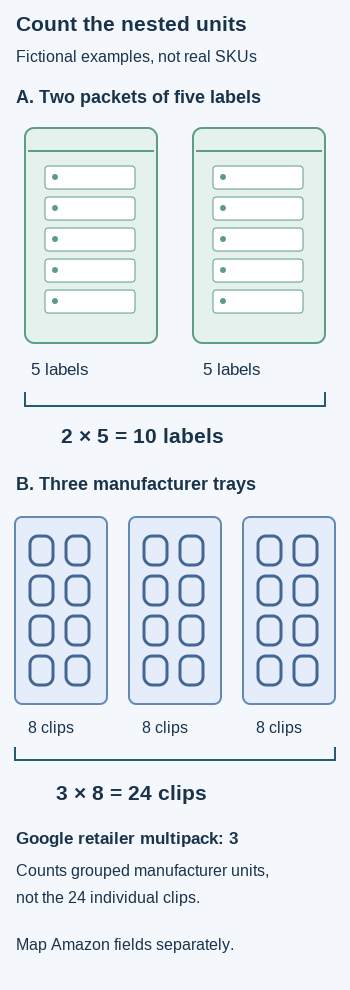
Illustrative quantities, not an actual product photograph or a verified feed submission. Replace the example with measured SKU facts before using it in a listing.
 Superdirector
Make it work for your brand
Find it. Remake it. Post it. Superdirector turns the viral formats in your niche into your brand's carousels, X posts and video scripts, and keeps the calendar full.
Count the actual fulfillment unit first
Choose one SKU and place a complete, representative order on a clean surface. Do not begin with a supplier's promotional composite or a photograph from a different quantity option. Ask the person responsible for fulfillment to identify exactly what leaves the warehouse when the order quantity is one.
Record three facts: the number of sealed packages, the number of individual items in each package, and the total number of those items. Identify any packaging or accessory that is shown but is not an additional item. If the package counts differ, do not force them into a simple multiplication formula; explain the actual contents instead.
Keep the count record with the SKU and revision. If a supplier changes the package size, the old photograph and arithmetic need another review even when the product name stays the same.
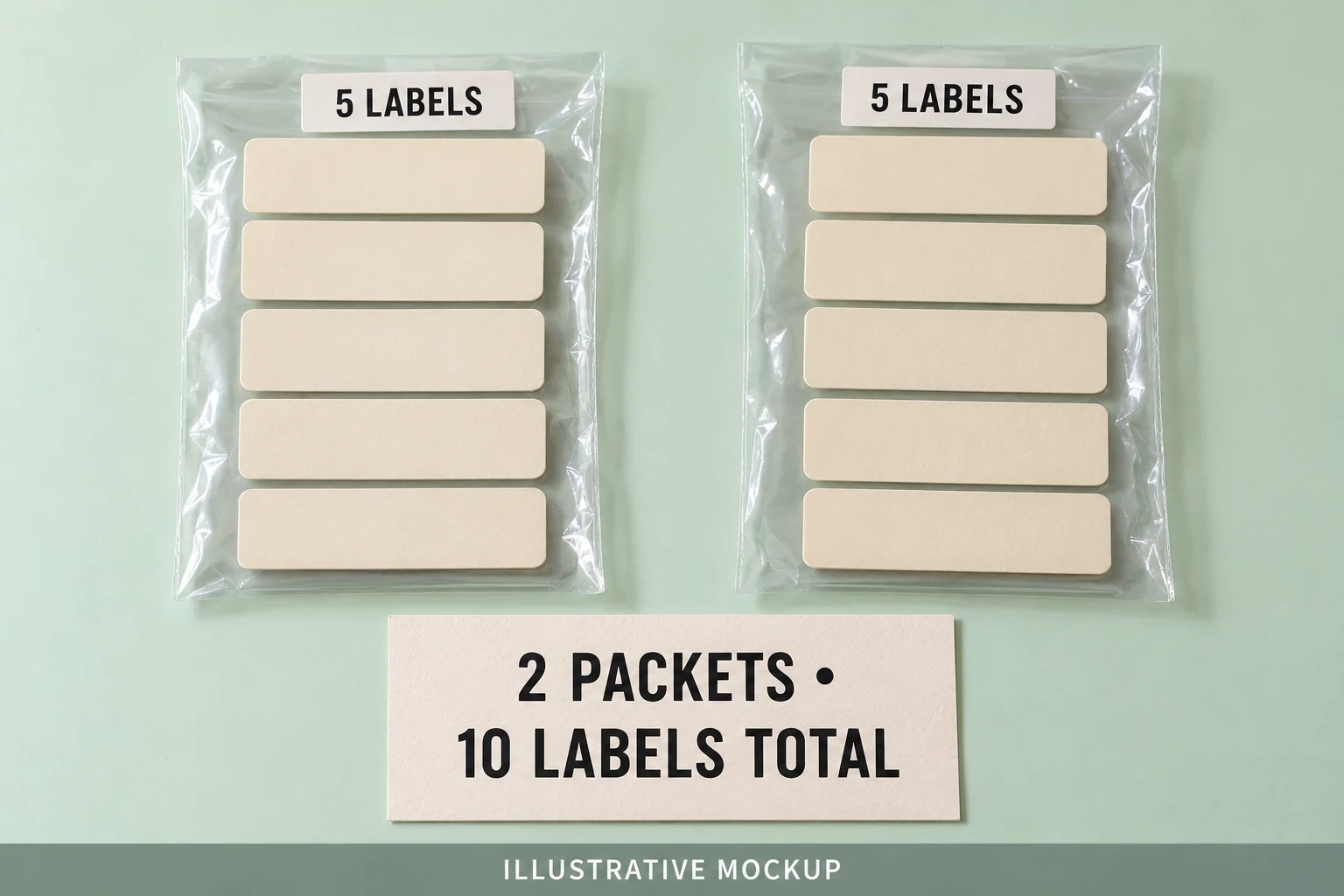
AI-generated illustrative mockup. The nested count is fictional and describes the same ten labels, not ten loose labels plus extra packet contents. Marketplace fields still need their own applicable definitions.
Use one nested view rather than an attractive pile
Consider a fictional craft-label offer: two packets, each containing five blank labels. The buyer receives ten labels, not ten loose labels plus two extra packets. Photograph the complete packed order. In a separate explanatory image, show what one opened packet contains and label it as a view of those same contents.
An original diagram can make the relationship easier to read. Draw a boundary around each packet and put exactly five label shapes inside it. Place the total beneath the grouped packets rather than next to a separate pile of ten shapes. This keeps the visual count consistent with the written count.
A short video can follow the same logic: show the complete order, open one packet, count its contents, then return to the complete-order view. Do not silently introduce a second sample while narrating the total. If you use another sample for filming, label it and keep it outside the quantity demonstration.
Do not copy one marketplace's number into another field
Amazon's optional total-product-quantity variation announcement distinguishes total individual units from separately packaged groups. Availability is product-type dependent. The announcement is not proof that every category supports the theme, or that every quantity child displays a particular image. A visible seller reply asks about child-image behavior, but the retrieved discussion does not establish the answer. Amazon quantity-theme announcement
Google's multipack attribute describes identical manufacturer-defined products grouped by the retailer. It is not simply the total count of every small item inside those products. Google also distinguishes a single manufacturer-created pack from a retailer-created multipack. Google multipack guidance
For an illustrative second example, suppose a manufacturer sells one sealed tray containing eight clips and a retailer groups three of those trays into one offer. The buyer total is twenty-four clips. Under Google's retailer-multipack definition, the grouped manufacturer units are the three trays, not the twenty-four individual clips. Confirm the actual package structure and applicable feed requirements before entering data.
The same physical offer can therefore need different descriptions in different fields. Create a mapping note with the field name, platform, definition, intended value, source date, and verification state. A spreadsheet column titled only “quantity” is too ambiguous for a reliable handoff.
Match the caption to the selected offer
A clear caption for the fictional label example would identify both nesting levels: two packets, five labels per packet, ten labels total. Avoid using “pack” to mean a packet in one sentence and the complete offer in another.
Next, inspect the selected quantity option on the actual destination where you are authorized to review it. Does the visible title, image and description refer to that offer? If the platform shares an image across quantity options, do not pretend a child-specific image has been verified. Use the supported presentation and keep the unresolved behavior on the review list.
Also distinguish listing quantity from cart quantity. Two orders of an offer containing ten labels are not the same catalog definition as one offer containing twenty labels. Whether a platform displays that distinction clearly must be observed, not inferred from a correct source image.
Run a count-back review
Give a reviewer the proposed image and caption without explaining the intended answer. Ask them to state what arrives for one order: packages, items per package, and total items. Then ask whether any loose item or opened packet is an additional included unit.
Record the answer and the source of confusion. If the reviewer counts the display sample twice, change the composition or caption. Repeat the review after the revision. This is a local comprehension check, not evidence that returns will fall or sales will rise.
Finally, have the fulfillment owner compare the approved creative with the actual packed SKU. Save that approval separately from any catalog-processing receipt. Prepared artwork, submitted data, accepted data and the live buyer experience are different stages.
The useful outcome is a listing explanation that a buyer can count correctly and a catalog record whose fields mean what the platform expects. Neither one alone proves the other. Keep both under review when the pack structure, selected offer or platform presentation changes.