How-To Guide
Explain an App Store pre-order without confusing it with a waitlist or a download
Your meditation app’s waitlist may contain people who want an update, people who already placed an App Store pre-order, and people who will never…
By the Superdirector editorial team.
Your meditation app’s waitlist may contain people who want an update, people who already placed an App Store pre-order, and people who will never install. A single “you’re all set” message blurs those states. Before launch, make the next action match what the person has actually done and what their storefront currently offers.
This guide is a communication rehearsal and release checklist, not a report of a real launch. Use one actual product page and one verified feature from your build when applying it. Until those observations exist, keep the corresponding fields blank rather than manufacturing a successful example.
Use three different state names
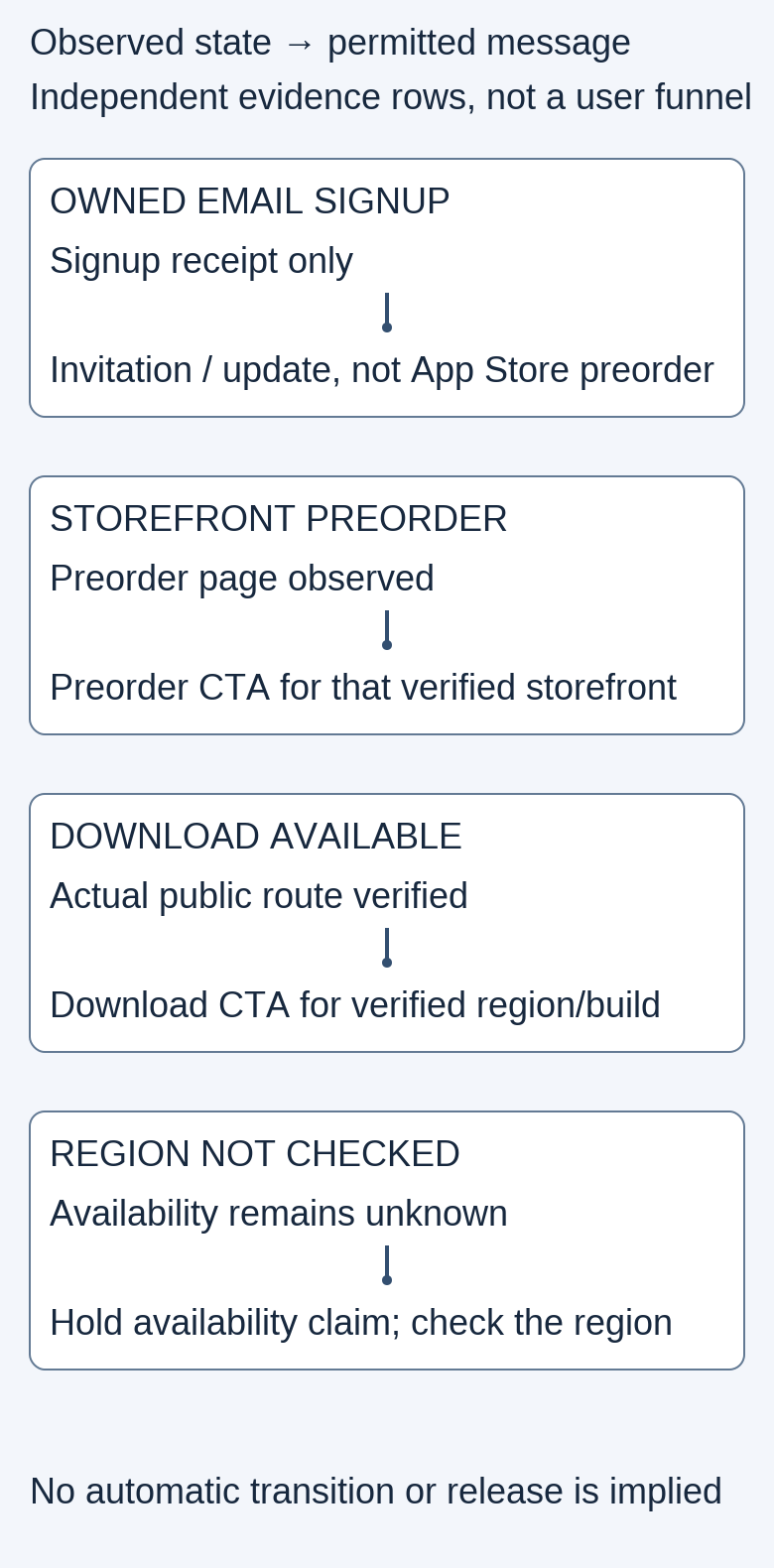
These are distinct observations, not proof that a particular subscriber moved through all three.
Original visual by the Superdirector editorial team. Creation date not recorded.
An email waitlist records an expression of interest through your channel. An App Store pre-order is an action in Apple’s store. Download availability is the later condition you must verify before saying “download now.” Do not infer a person’s store activity from their email signup alone.
Apple permits pre-orders in countries or regions where the app has not previously been released. The pre-order page and the later download release are different stages. For paid apps, payment occurs at release at the lower of the accepted pre-order price and release price. Customers can cancel pre-orders. Apple pre-order reference
Avoid inventing a price in your draft. If the app’s pricing or subscription model is unsettled, resolve that before preparing customer-facing purchase language.
Create a storefront sheet, not one universal launch checkbox
Use the blank storefront and communication worksheet. Record each intended storefront’s observed state, expected release date, page URL, build/version and last verification timestamp. Add the current call to action and the owner who may change it. An unknown row stays unknown; do not copy the first storefront’s result across the rest.
Apple’s marketing guidance allows region-specific release dates and notes that the displayed date is expected. It recommends avoiding a date in marketing if it may change, and says Apple does not notify pre-order customers about date changes or removal. Apple pre-order overview
For an illustrative meditation app, the sheet might distinguish:
- Storefront A: pre-order observed; retain a pre-order call to action.
- Storefront B: download availability not checked; do not announce availability there.
- Owned email list: signup known, App Store pre-order status unknown.
These are sample labels, not an account report. Replace them with your observations before any external message is sent.
Rehearse the copy before release day
Prepare two clearly labeled drafts so the team does not edit a live campaign under time pressure.
Pre-order draft: explain the one real feature a person can expect, identify that the destination is a pre-order page, and link directly to the verified listing. Do not say the app is ready to use today.
Availability draft: name the verified storefront scope and describe the same real feature without suggesting every subscriber has already downloaded it. Switch the call to action only after the public route has been checked.
For example, the product demonstration could be a real guided-session selection screen. That shows what the app contains. It does not justify claims that the session improves sleep, reduces anxiety or produces any other unmeasured outcome. Keep marketing statements within the evidence you actually hold.
Before approving either draft, have someone unfamiliar with the release plan answer: “Can I use this now, what action am I being asked to take, and what happens next?” If their answer differs from the verified state, revise the message.

Original AI-generated editorial illustration. The eventual meditation task is different from joining a waitlist, placing a pre-order or downloading the app. This is not a product capture, customer scene or completed test.
Original visual by OpenAI image generation directed by the editorial assistant. Created 2026-10-24.
Inspect regional consequences before pressing a release control
The button label alone is not a safe description of its effect. Apple warns that “Release This Version” can release immediately in regions already marked Available or Available on App Release, while pre-order regions remain scheduled for their pre-order date. Release timing varies by region. Apple pre-order reference
Capture the relevant region states and intended effect in the release approval. This article is not authorization to press the control. If the observed state differs from the plan, stop the dependent announcement and have the release owner resolve it.
A first-time developer’s public question about finding the pre-order release control illustrates the confusion. It is one operator question with an unresolved exact date, not evidence of widespread search demand or proof that a particular button is missing in your account.
Handle a changed date as a communication change too
Apple says the pre-order release date cannot be changed once it has passed in the relevant country or region. Verify that state before proposing a date adjustment. Apple pre-order reference
Updating an account setting does not prove subscribers have been informed. Inventory the website, queued emails, social drafts, tutorial descriptions and any other channels you actually own. Identify the old claim, the new approved wording, the responsible owner and whether the change was merely prepared or actually made.
Do not assume you can individually reach everyone who pre-ordered. Separate the people you can lawfully contact through your own list from store customers whose contact details you do not have. Keep any outreach within its existing authorization.
On release, Apple describes automatic download to the device used for the pre-order; downloads on other eligible devices depend on the automatic-download setting. Apple pre-order reference Do not turn that into a promise of one exact clock time on every subscriber’s phone.
Close the loop with observed use
Save the approved copy, actual page state, release receipt and resulting public link check together. Then distinguish downloads from completed sessions, repeated useful work and payment. None can be inferred solely from waitlist size or a pre-order announcement.
A useful launch report says which storefronts were checked, which messages were actually sent under approval, what users could do, and what remains unknown. It does not convert a scheduled release into a successful customer experience by changing the label.