How-To Guide
Demonstrate a subscription CSV import with a rejected row and a verified retry
A clean import animation can hide missing records.
A clean import animation can hide missing records. For a subscription-tracker launch, the useful demonstration is not “upload finished.” It is “I can find my subscriptions, understand what did not import, and retry without silently creating duplicates.”
Build that demonstration around a small synthetic fixture. Keep private bank statements and real customer exports out of the recording. The method below is an editorial test plan, not evidence that a particular tracker already passes it.
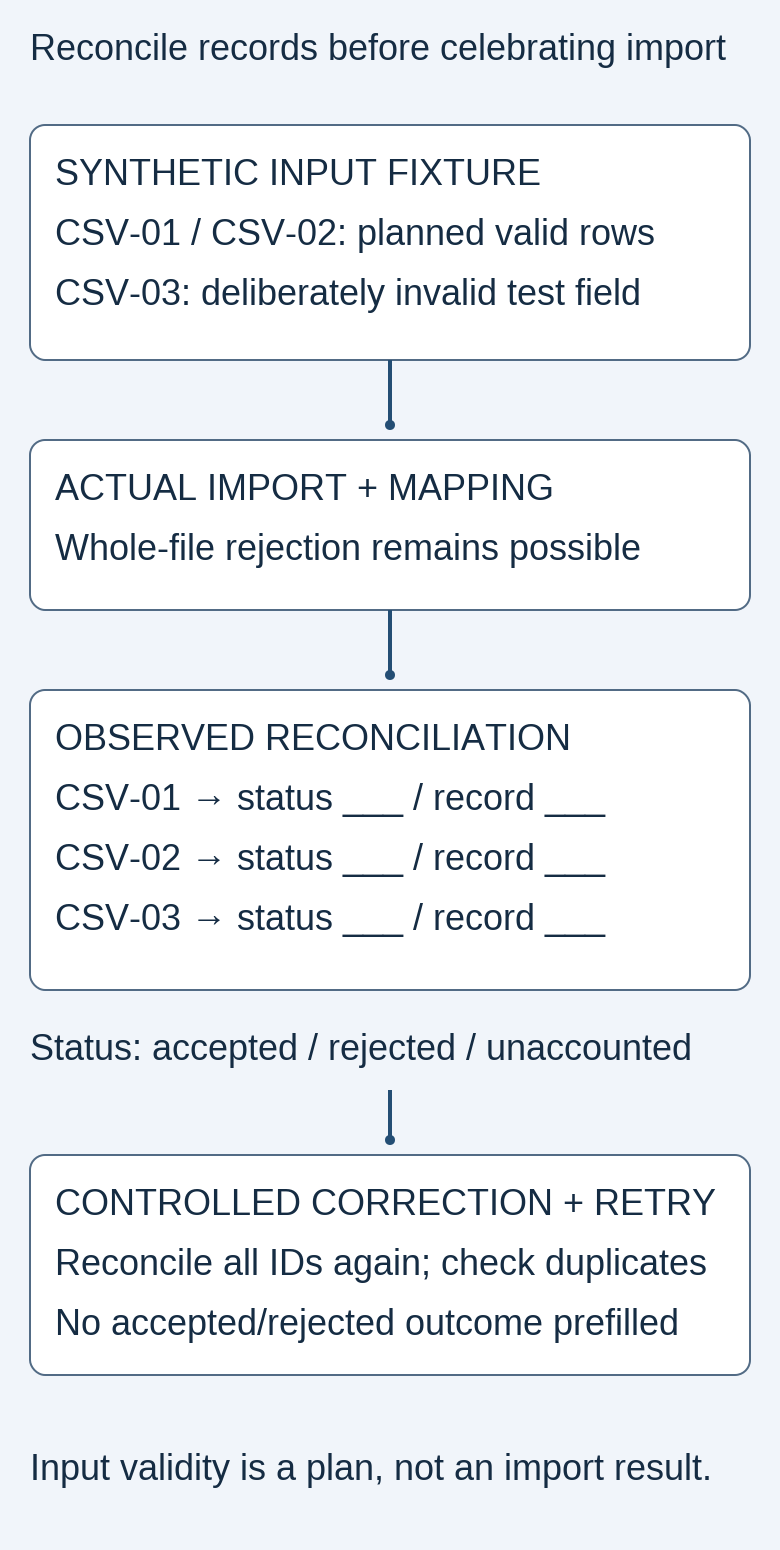
These are planned inputs. The expected split must not be shown as an observed result until the target app has been tested.
 Superdirector
Make it work for your brand
Find it. Remake it. Post it. Superdirector turns the viral formats in your niche into your brand's carousels, X posts and video scripts, and keeps the calendar full.
Start with the migration the buyer actually needs
A Renewlet discussion includes a user asking for CSV import when moving from an iOS subscription app, and another commenter asking for a documented export. These are useful migration questions inside one vendor-led thread. They are not independent market-size measurements, and the vendor's announcement is not customer demand evidence.
Before filming, distinguish two jobs. A subscription-list import brings across records the user has already curated. A bank-statement importer tries to infer recurring expenses from transactions. They need different inputs and different acceptance criteria.
The SubTracker README describes the latter: it looks for date, description and amount columns, identifies candidate recurring charges, and requires confirmation before saving. That documentation is not a universal CSV schema, a live test, or proof that another tracker supports the same behavior. Do not use a three-service migration fixture to claim a recurring-charge detector has been validated.
Write the supported schema before the script
For the target product, obtain its actual documented import format and supported version. List required columns, permitted date and amount formats, currency handling and the meaning of an empty value. If the product does not document them, flag the gap instead of inventing a format for the video.
Prepare a synthetic subscription-list file with three fictional services only if that is the supported import job. Give each a recognizable test identifier. Make two records valid and one deliberately invalid in a controlled field, such as a renewal date. The values are test inputs, not customer data or measured results. Keep an untouched copy so each rehearsal starts from the same state.
If the product imports bank transactions instead, use an appropriately documented synthetic transaction history. Do not reuse the small subscription-list fixture and pretend it exercises recurrence detection.
Film mapping and the first outcome
Show the file's relevant headers, the import mapping, and the target product's response. Explain which input is intended to become which field. A well-framed mapping shot is more useful than a rapid upload followed by a generic success toast.
Then open the resulting records. Compare service name, amount, currency and renewal date with the source fixture where those fields are supported. Keep a count of accepted, rejected and otherwise unaccounted-for records. If the importer rejects the entire file, record that behavior rather than editing the demonstration to imply partial acceptance.
Microsoft's Outlook import troubleshooting illustrates why reconciliation matters: source data can be missing, and malformed rows can leave an import incomplete. This is adjacent contacts guidance, not a subscription-tracker specification. The proposed check is to compare the actual source and output, not to copy Outlook's duplicate-handling options into an unrelated app.
Correct the rejected input without hiding it
If the app identifies the bad row, keep its error message visible long enough to understand. State the field that needs correction and show the changed synthetic value. If it offers no useful explanation, that is a product finding, not a filming inconvenience.
Check the product's supported retry method before proceeding. Does it accept only rejected rows, replace records using a stable identifier, or append every row? Do not assume idempotence. In a disposable test dataset, follow the documented approach and compare the before-and-after records. Never experiment with retries against a customer's only copy.
The successful outcome is not automatically “three rows.” It is the expected set of distinct records with correct fields and no unexplained additions or omissions. If a whole-file retry duplicates the two valid records, keep that result and fix the process or product before advertising a safe retry.
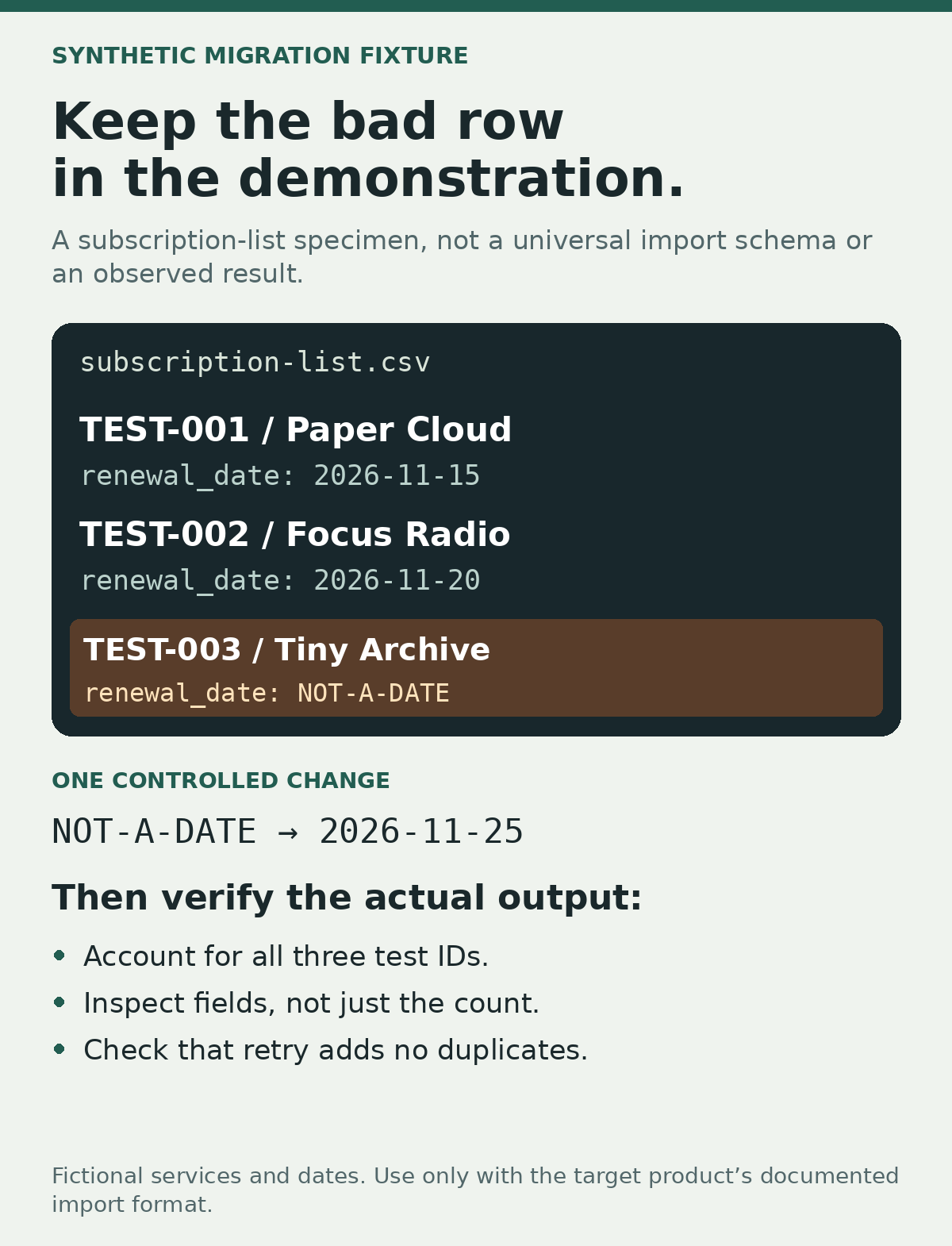
Synthetic subscription-list fixture: one deliberately invalid date makes error handling and retry visible. The pictured field names are illustrative and must be adapted to the target product’s documented schema. No import result is claimed.
Synthetic input with one invalid dateSynthetic corrected input
Prove the data remains usable
Reopen the imported records after leaving the import screen. Where an export exists, export the synthetic dataset and inspect its documented format and key values. An export button alone does not establish portability. Record which fields survive, which do not, and whether a user could understand the output without the original app.
Keep financial actions separate. Importing a record does not cancel a subscription, contact its provider, prove a charge is recurring, or guarantee a future reminder. Do not turn those into implied benefits through captions. Verify reminder configuration separately before showing it as part of the accepted journey.
Turn the rehearsal into honest launch material
Use the blank import checklist to retain the schema version, fixture, build, mapping, observed counts, retry behavior and unresolved fields. Capture a readable sequence: supported file, mapping, observed error, correction, retry and final reconciliation. A useful caption names the tested format and build and avoids “imports any bank file” or “never loses data.”
Give a practitioner the same synthetic fixture and instructions without coaching through each click. Record whether they can identify the rejected input and recover using the documentation. If they cannot, improve the error or guidance and repeat the bounded test. This is a proposed validation step; no practitioner result is claimed here.
After publishing the demonstration, keep page availability, indexing, qualified visits and completed imports as different observations. Completion rate requires a defined denominator and a clear distinction between test fixtures and real use. Do not claim conversion or retention improvements from the demonstration alone.
Evidence and limits
The technical references concern one open-source tracker and Outlook contacts. They inform distinctions and test design but do not verify another product. Test the documented schema, rejected-row handling, retry behavior and export output before making migration claims.