How-To Guide
Custom stationery proofs: make approval a clear production decision
A proof is not just a picture sent to a buyer. It is a proposed version of the item and a request for a specific decision.
A proof is not just a picture sent to a buyer. It is a proposed version of the item and a request for a specific decision. Label the version, explain what to check, and keep production waiting until the approval condition you actually promised has been met.
This guide proposes a practical workflow for custom physical stationery. It does not establish that silence counts as approval, that a shop policy is legally enforceable, or that a message automatically changes a platform dispatch deadline.
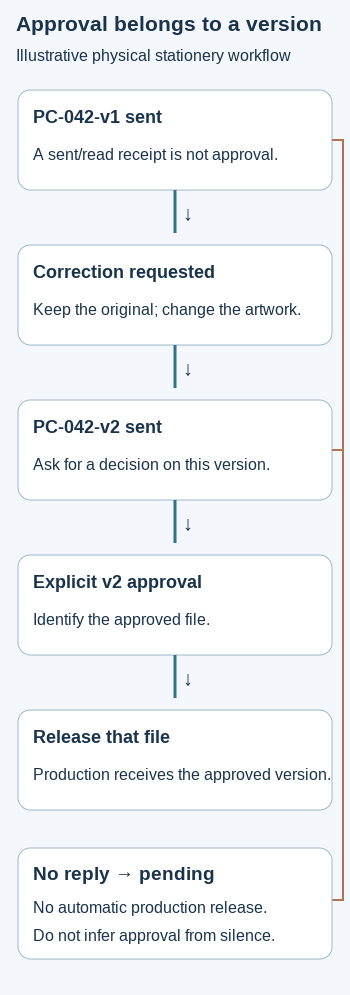
This original diagram demonstrates the state changes. It is not an order record or proof of approval from a real customer.
 Superdirector
Make it work for your brand
Find it. Remake it. Post it. Superdirector turns the viral formats in your niche into your brand's carousels, X posts and video scripts, and keeps the calendar full.
Explain the sequence before the order
A buyer should know whether the purchase includes a proof, what kind of corrections are included and when production begins. Those details belong in the offer before purchase, not in a surprise message after payment.
Write the sequence in plain language: submit details, receive a proof, request corrections or approve the named version, then move to production. If your actual service does not include unlimited design changes, do not use “revise until perfect” as a reassuring phrase. State the genuine scope and route for additional requests without inventing prices or promises.
Etsy recommends specific personalization instructions and visual labels that match the available choices. Use that principle to collect the correct information before designing the proof. Personalization guidance.
The form should gather production inputs, not attempt to solve every possible approval dispute.
A worked example: wedding place cards
Imagine a made-to-order set of place cards. The names and event details below are fictitious examples. A proof labeled PC-042-v1 might show the type style, card size and three representative names, with the full name list handled through the seller's agreed process.
Before sending it, decide what the proof can and cannot demonstrate. A screen image can help check spelling and layout. It does not by itself verify paper feel, exact printed color or the final physical finish. Do not let a polished digital mockup imply those qualities have been tested.
Keep an internal record of the inputs used to create the proof. If the buyer later changes a name, you need to know whether the approved artwork already contains that change.
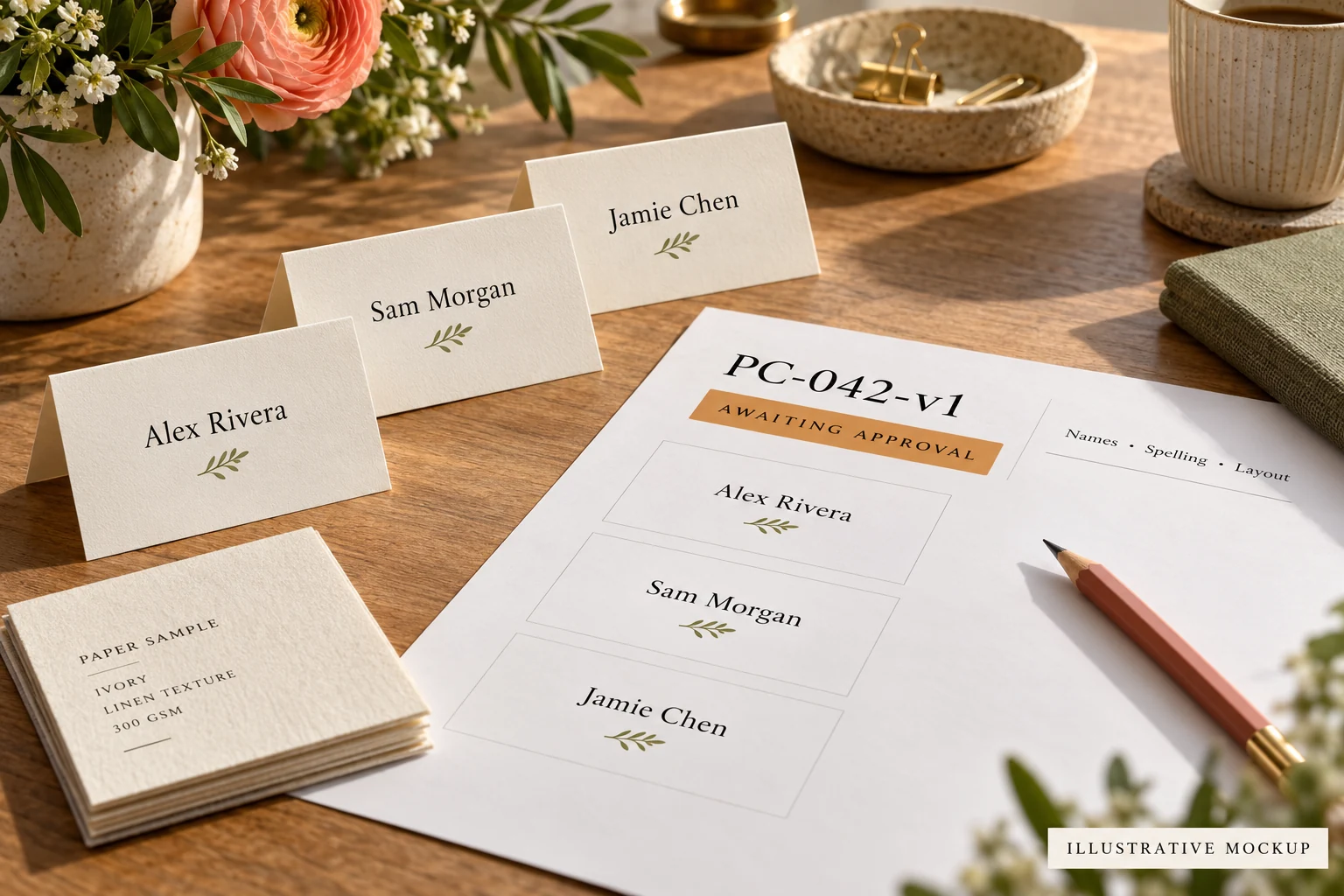
AI-generated illustrative mockup with fictional names. PC-042-v1 remains awaiting approval; the styled cards are examples, not a customer order or evidence that production was authorized. A screen proof cannot verify paper feel or exact printed finish. The proof review checks names, spelling and layout; paper properties require a separate physical check.
Give the buyer a short checking task
Separate content checking from design preference. A practical review request asks the buyer to inspect:
- Names, spelling, capitalization and punctuation.
- Event date or other factual text, if included.
- The selected style and placement of the text.
- Any quantities or sizes actually represented in the proof.
Ask for approval of the named version or a numbered correction list. Do not rely on an ambiguous “looks good” message if it is unclear which version or attachment the buyer means. Clarify the reference before releasing work.
If the request introduces a different design rather than correcting an input, handle it according to the offer you agreed. Do not silently treat it as either included work or an extra paid service without resolving the scope.
Keep received, read and approved separate
A delivery receipt shows that a message reached a destination. A read indicator, where available, shows something different. Neither should be relabeled as approval in your production record.
Use clear internal states such as proof sent, correction requested, revision ready, approved and released to production. The person printing the cards should see which exact file was released, not merely a folder containing several PDFs.
When a correction arrives, create a new revision rather than overwriting the only record of what was previously sent. If v2 changes a name, ask for the decision on v2 under your promised workflow. An earlier approval of v1 does not automatically describe the revised file.
This is an operational control, not a claim that one naming system is required by Etsy. Choose a simple format the whole production team can follow consistently.
Align the schedule with the real custom work
Etsy says processing time for a custom physical item includes the time needed to create it. Processing profiles apply to physical listings, not digital listings. Dispatch dates depend on the configured schedule and are not automatically rewritten by a sentence in the description. Processing-time guidance.
Work backward from the actual production and dispatch plan. Leave enough room for the proof step you promise, rather than assuming every buyer will reply immediately. Distinguish the customer's event date from the platform's dispatch date and any carrier estimate.
If a response is missing, identify the approaching commitment and contact the buyer through the permitted order channel under your actual shop process. Do not invent a universal 48-hour rule or automatically start production because a deadline feels inconvenient. Changes to an order or dispatch date need to follow the applicable platform process and the agreement with the buyer.
Test a correction before testing speed
Run a fictional example through the workflow without contacting a real customer. Have a reviewer introduce one spelling correction after v1. Check whether the production operator can identify the corrected version and whether the release record points to it.
Then run a no-reply example. The correct outcome for a workflow requiring explicit approval is a pending state, not a fabricated approval. This test checks your process logic; it does not demonstrate that real customers will respond faster.
For genuine orders, record where delays occurred: missing original details, unanswered proof, unclear correction or internal production handoff. Keep those categories separate from design time. A faster average without the same order mix may not mean the workflow improved.
The first useful result is one traceable proof-to-production handoff. Publish or promote only the promises you can actually honor, and keep the evidence of approval tied to the version that production uses.