How-To Guide
Check localized App Store screenshots against the language your app actually supports
Choose one actual task, such as saving a reading note.
Adding a language to store metadata does not prove that the screenshots changed or that the app works in that language. Before producing a multilingual acquisition campaign, reconcile three records: the metadata locale, the actual image files and one useful task in the candidate app.
This guide creates a localization-mismatch record, not another set of translated pages. A single worked example can reveal an inherited screenshot or an unsupported interface claim before it spreads across the launch assets.
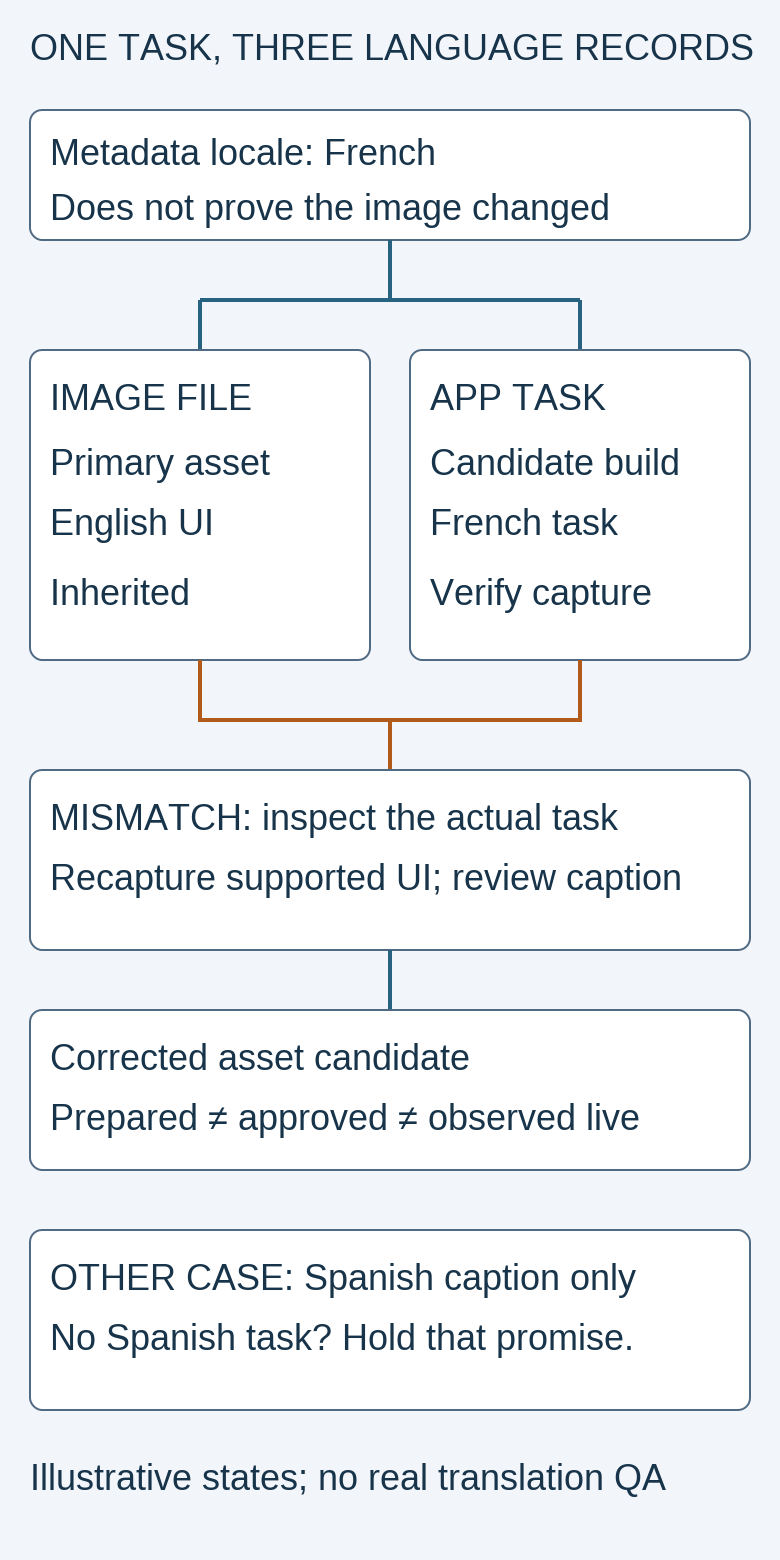
The labels are fictional teaching states, not screenshots of an app or App Store Connect. No translation or storefront observation has been validated for a real product here.
 Superdirector
Have your AI do this for your brand.
7 days free, then $29 a month.
Start with the product task, not the language dropdown
Choose one actual task, such as saving a reading note. Record the candidate build and the language used inside the app. Keep the device language in a separate field. Apple's localization guidance explains that people can select an app language independently of the device language on iOS and iPadOS.
Do not infer support from a translated marketing headline. Inspect the task itself, including its result, error messages and controls. If only the opening screen is translated, mark the rest of the demonstrated path unresolved. Do not replace interface text in an image editor and present the composite as a real localized screen.
The test can use a synthetic reading note with an original title and harmless content. It needs no customer account, private book annotations or invented testimonial. Keep the same task identity across the product recording and screenshot evidence so the reviewer can compare like with like.
Inspect what the new metadata locale inherited
Apple's Localize app information guide distinguishes store metadata from localization of the app binary. It also says that when a language is added, screenshots and properties default to the primary language, except description and keywords. A new locale entry is therefore not sufficient evidence of a translated asset set.
Record the actual file assigned to the locale, its visible UI language, any editorial caption language and its source capture. An English interface with a French caption is a different artifact from a screenshot captured from a working French interface. Either might be usable in a carefully scoped explanation, but they must not be mislabeled.
Use the localization evidence worksheet to retain these distinctions. If the inherited file is appropriate, record why. If it contradicts the promise, prepare a corrected capture from the real supported task rather than assuming the platform will translate it.
Example one: the app supports French, but the asset does not show it
Suppose the candidate reading task has been tested in French, while the new metadata entry still contains its primary English screenshot. The gap is in the asset evidence, not automatically in the app's language support.
Capture the same task in the verified French configuration. Retain the original raw image and record the app language, device context and build. Review the new caption with a qualified language reviewer, then inspect the final layout at its intended display size. A translated phrase that fits a text file may clip or overlap when composed around a phone image.
Replace the mismatched source in the proposed asset set only after that review. Keep the prior file and the reason for the revision. Do not describe the locale as publicly updated merely because a file is prepared or saved.
Example two: the caption is Spanish, but the task is not
A fictional Spanish caption over an English-only task creates a different problem. Re-recording the same unsupported interface will not solve it. Either explain the actual language limitation accurately or hold the localized product promise until support is implemented and verified.
Do not treat a localization request as permission to invent product functionality. The useful record is the mismatch: intended audience language, advertised capability, observed in-app language and next owner action. This can prevent a persuasive store image from promising an experience the buyer will not receive.
Apple's localization testing guidance recommends checking layout issues and obtaining native-speaker feedback on machine-translated content. That supports a review step, not a claim that these example translations or a particular automated pipeline have passed it.
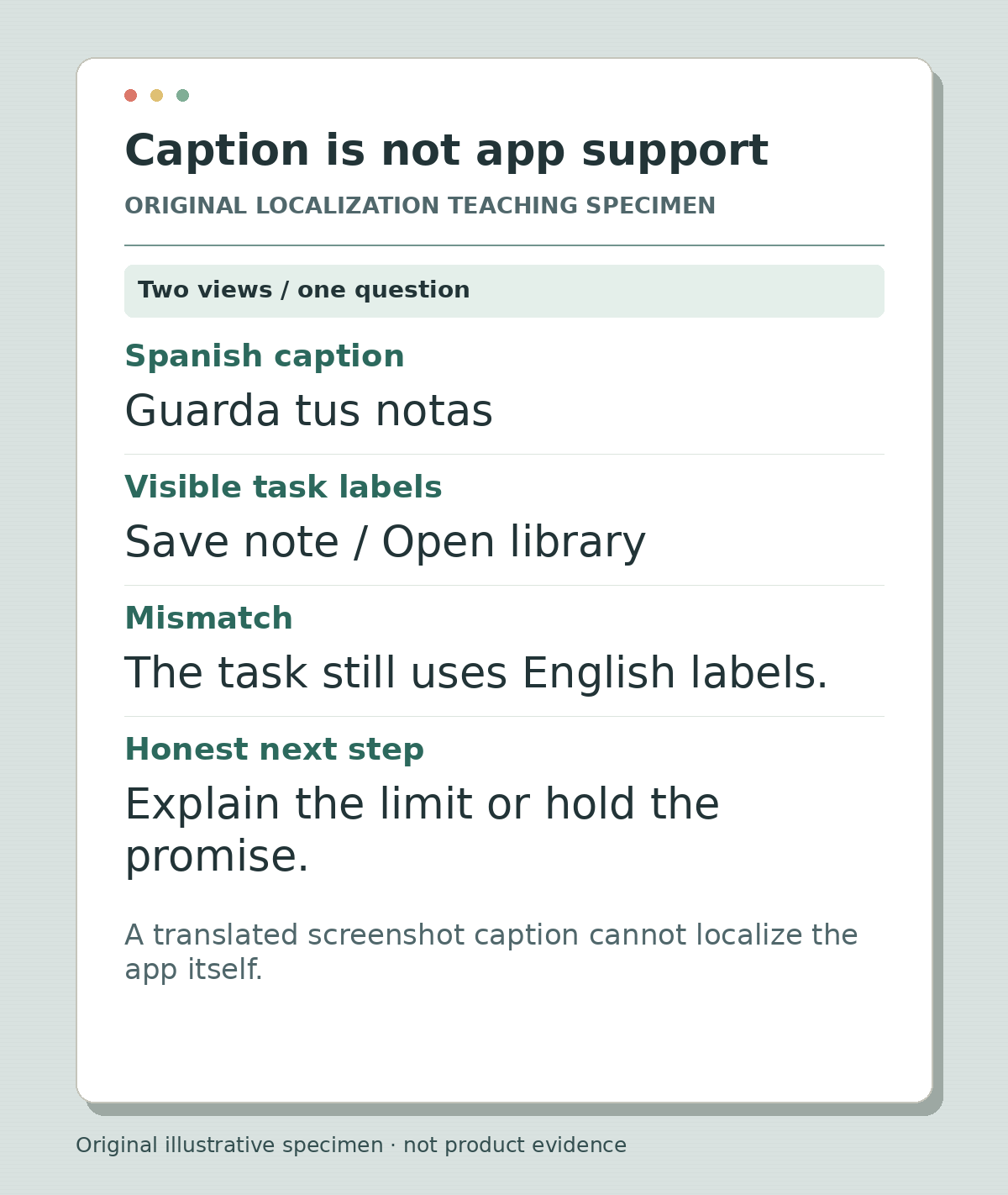
Original fictional localization specimen: a Spanish caption sits beside English task labels. It demonstrates a mismatch to investigate, not a real localized app or storefront observation.
Observe storefront context instead of assuming country equals language
The metadata guide describes language selection and fallback using available localizations and the user's context. Do not construct a universal country-to-language rule from that example. Record the storefront, user language setting, observed page language and actual served asset together when an authorized live check becomes possible.
Keep asset types distinct. Apple's screenshot specifications describe a next-best-language rule for missing app previews. That precise preview statement should not be silently rewritten as a screenshot rule. Inspect the image actually served rather than borrowing a fallback assumption from another asset type.
For each candidate, track prepared, saved, submitted, approved and observed live separately. An approval receipt does not substitute for checking the final page in the relevant context, and a local preview is not deployment evidence.
Measure the explanation without promising a conversion lift
An indie developer's question describes a multilingual app with English-only screenshots and asks whether localization helps. Replies mix screenshot changes with other changes, so they do not establish a causal improvement. A separate operator discussion asks about the production workflow and reports submission, not a completed outcome. Its displayed dates conflict, so recency remains uncertain.
Ask a reviewer which language they expect the task to use and what they believe is actually available. Resolve any mismatch before comparing acquisition results. Later, record available localized traffic and useful task completion with dates and definitions, without attributing all changes to translated screenshots.
The next action is to inspect one locale's actual image files beside one supported task capture. A small reconciled set is stronger evidence than a folder full of convincing but unverified translations.
Frequently asked questions
My app’s task is English-only. Will a Spanish caption and a new recording make it a localized experience?
SuperdirectorHave your AI do this for your brand.
7 days free, then $29 a month.