How-To Guide
Before replacing a product video, check what your Shopify funnel is counting
A weak-looking checkout rate is a reason to investigate, not a diagnosis of a bad product video. The report may describe a different population than you assume.
A weak-looking checkout rate is a reason to investigate, not a diagnosis of a bad product video. The report may describe a different population than you assume. A session-based rate can also change when measurement changes, even if the business has not gained or lost an order.
For a small shop, begin with one decision: are you trying to understand the offer, locate a checkout obstacle, or compare creative alternatives? Those tasks need different evidence. Do not commission a new video merely because a percentage appears lower than a number from another merchant.
This guide provides a bounded reporting review, not an analysis of a particular store. Platform definitions were checked on October 24, 2026. All numerical examples below are invented teaching data, not benchmarks or business results.
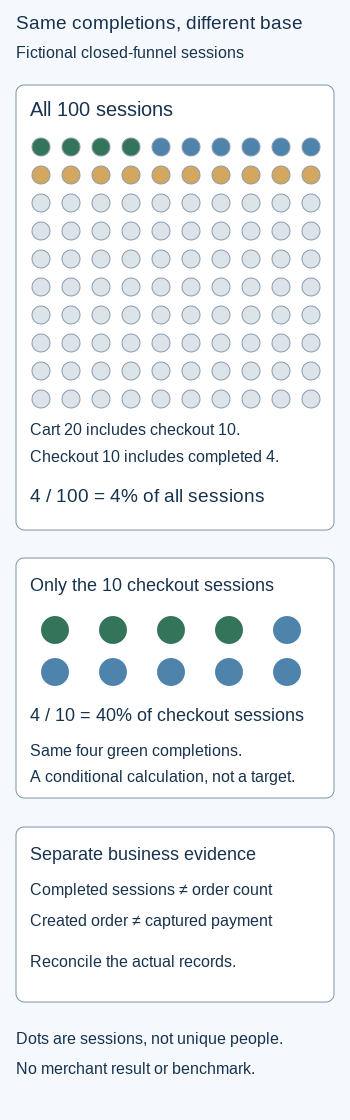
Original illustrative cohort. Dots represent sessions, not unique people, orders or verified payments. No actual customer data is shown.
 Superdirector
Have your AI do this for your brand.
7 days free, then $29 a month.
Freeze the report definition before copying the number
Record the report name, date range, time zone, filters and metric unit alongside the value. Write whether you are looking at sessions, people, events, orders or transactions. A spreadsheet column called “buyers” is not useful if its source actually counts cart sessions.
Shopify’s conversion breakdown calculates each step’s rate against total sessions. Its open funnel permits entry at different points and steps in different orders; its closed funnel requires the sequence. A direct checkout visit can therefore be represented differently across those views. Shopify behavior-report definitions
Save the funnel-mode setting with the screenshot or export. Otherwise, a later reviewer may reproduce the date range but obtain a different population and mistakenly conclude the store changed.

AI-generated illustrative mockup. These invented counts belong to one defined example population. Sessions, orders and verified payment evidence are not interchangeable, and the mockup is not a Shopify report.
Two rates can be correct without meaning the same thing
Imagine one fictional closed-funnel cohort containing 100 sessions. Twenty include a cart addition, ten reach checkout in sequence, and four complete checkout. Assume these counts belong to the same defined period and population.
Four completed sessions divided by all 100 sessions gives 4%. Four divided by the ten checkout sessions gives 40%. The first answers how often completion occurred across the whole cohort. The second asks about completion among the checkout subset. Neither number is a normal target or a verdict on the creative.
Label the second calculation as your conditional calculation, not a renamed copy of a platform field. Keep its numerator and denominator visible. If the available reports do not establish that the four completed sessions belong to those ten checkout sessions, do not manufacture that relationship by dividing unrelated exports.
Check whether the comparison crosses a measurement change
Shopify documents a session-measurement rollout from September 21 to 23, 2026. Changes include handling continued activity across UTC midnight, some direct-checkout sessions without pageviews, and identified-bot filtering. Shopify says total orders, sales and customer counts are not changed by that update. It recommends a post-update baseline for session-based trends; matching filters alone does not make pre-update and post-update sessions directly comparable. Session-measurement update
If a creative revision happened near that boundary, put the two dates on the same investigation sheet. The overlap is a reason to avoid a simple before-and-after claim, not proof that the measurement update caused your particular result.
For an illustrative shop, a smaller reported denominator could produce a higher rate without an additional purchase. That arithmetic does not establish better persuasion. Conversely, a larger denominator can lower a rate without fewer orders. Inspect the business counts alongside the rate before writing a success or failure story.
Use comparable periods after the update when they answer the decision. If a longer historical comparison remains necessary, state the measurement boundary and retain the older series rather than silently rewriting it into a continuous trend.
Reconcile sessions, orders and actual payment evidence
Shopify distinguishes completed-checkout sessions from orders because one session can contain multiple purchases. Its reached-checkout definition includes user input during checkout, not merely the assumption that a page was displayed. Preserve those definitions when naming your worksheet columns. Session and order distinctions
Then inspect payment evidence separately. Shopify distinguishes pending, authorized and paid states; a paid state can reflect capture or an order being manually marked paid. An authorization is not the same as captured funds. Order and payment statuses
For a revenue claim, keep an order identifier linked to the appropriate underlying payment record through an authorized private review. Record amount, currency and current refund state where relevant. Do not expose customer or payment details in the content brief. Do not mark an order paid or capture a charge merely to make a report reconcile.
The resulting summary can honestly contain three different counts. An unresolved difference is an investigation item, not permission to replace the smaller number with the larger one.
Investigate one observable obstacle before rewriting everything
Once the definitions are clear, choose a representative journey for review. Match the product, variant, device context and destination to the campaign you are evaluating. Use an authorized preview or test route and record what can actually be reproduced.
For example, a reviewer might discover that the selected variant changes unexpectedly, an important term is obscured, or a supported action fails. Those would be specific findings if observed. A funnel drop alone does not establish any of them, and this article has not tested a merchant’s checkout.
Keep creative hypotheses separate: perhaps the video leaves the included quantity unclear, or attracts shoppers with a different task. A useful next experiment can investigate one such uncertainty without claiming the reporting review already proved it.
Give the editor a decision, not a frightening percentage
Finish with a short evidence note: the report and population used, the two rates if relevant, the measurement boundary, the reconciled business outcomes and the one next test. If creative-level paid outcomes cannot be linked from the available evidence, label them unavailable.
That note may justify a new explanation, a checkout repair, a better comparison window or no creative change yet. The valuable result is a decision supported at the right level, not a more dramatic chart or a universal conversion target.
Frequently asked questions
Can matching report filters make Shopify session trends directly comparable across the September update?
SuperdirectorHave your AI do this for your brand.
7 days free, then $29 a month.