How-To Guide
When a product search returns the wrong items, test the query before changing the catalog
A shopper remembers the design from your video, types its name into your shop, and sees unrelated products. That is a useful discovery problem to…
By the Superdirector editorial team.
A shopper remembers the design from your video, types its name into your shop, and sees unrelated products. That is a useful discovery problem to investigate. It is not yet proof that the product is unpublished, that a theme update broke search, or that you need a new paid app.
Start with the exact query and the products a reasonable buyer would expect. Then compare the suggestion panel with the submitted results. Those observations are more actionable than a broad complaint that search is “bad.”
This is a proposed audit for one small catalog. Current platform references were checked on October 24, 2026. No merchant’s search implementation or sales outcome was tested for this article.
Define the expected set before looking at the ranking
Use a real customer question or a term actually used in your campaign. Preserve its wording rather than immediately translating it into the merchant’s internal category name. Record why the expected products satisfy the request.
For an illustrative brooch shop, the query “blue swallow brooch” might reasonably identify two swallow designs, A and B. A blue crescent, C, shares a color but not the bird motif. These are fictional products for explaining the review, not a judgment about a live store’s results.
Keep two questions separate: did the expected product appear, and where did it appear? A missing item and an included item below several alternatives can require different investigations. Do not collapse both into an “unindexed” label.

AI-generated illustrative mockup. The fictional products establish an expected set before observing a search surface. The image is not a live result page or evidence that any catalog query has been repaired.
Illustrative mockup by OpenAI image generation, editorial direction for this article. Created 2026-10-24.
Identify which search is actually running
Shopify distinguishes regular submitted search from predictive suggestions shown while typing. Its native-search documentation also warns that third-party search apps and custom experiences can behave differently. Current guidance does not offer a global setting that controls matching breadth or guarantees result order. Shopify search behavior
Ask the implementation owner to identify the active engine and relevant theme or app revision. Do not assume that installing Shopify’s native search tools would control a third-party engine. Likewise, a familiar search box does not prove it uses the default results page.
This identification can remain a read-only check. It does not require removing an app, editing the theme or changing public visibility while you are still establishing the problem.
Observe suggestions and submitted results separately
In the fictional example, design B might be absent from a short suggestion panel but present after submitting the same query. That is not the same finding as B missing from both surfaces.
Shopify’s predictive-search guidance describes a limited result set, with a default maximum of ten results across query and product suggestions. The dedicated results page can contain more. Theme compatibility and requested result types also matter. Query suggestions are proposed search terms, not the same thing as product suggestions. Predictive-search guidance
Record the language, device context, exact input, observation time and surface. Note whether the customer clicked a suggested query or submitted the original wording. If the wording changed, you no longer have an exact same-query comparison.
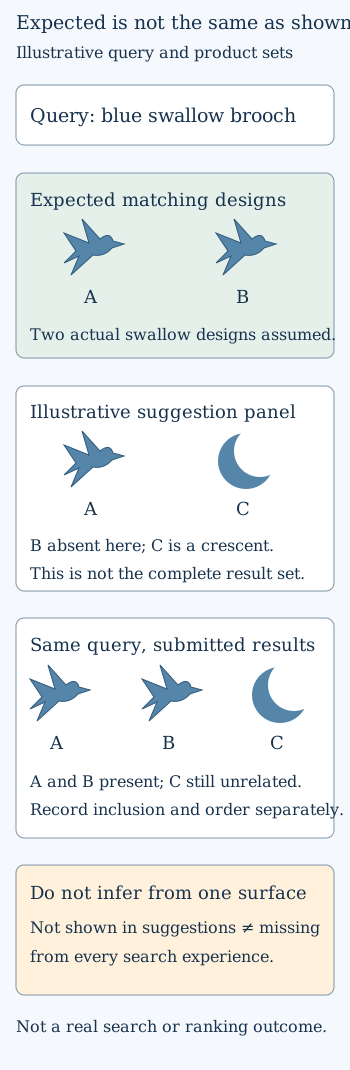
Original schematic, not a Shopify interface or an observed store result. Product labels show the intended matching task without claiming a measured ranking change.
Original visual by the Superdirector editorial team. Creation date not recorded.
Check searchability before trying to improve order
Shopify documents publication, unlisted status, hidden settings and out-of-stock handling as factors in searchability. Native controls may not apply in the same way to a third-party search app. Updates also have different propagation characteristics, so a saved change is not itself proof of a changed result. Managing searchability
For each expected product, record its intended availability and current settings. A deliberately unlisted offer should not be made public merely to make the audit look successful. Send that conflict to the responsible owner instead of changing its audience without approval.
Then inspect the actual product facts. Does the title identify the design? Is the relevant description accurate? Are there unrelated words copied into every item? The investigation should improve truthful information, not add “swallow” to the crescent just to manipulate the result set.
Use syntax as a diagnostic, not a universal repair
Shopify supports phrase and field-scoped searches. Its current documentation says search syntax turns off typo tolerance, predictive query suggestions and semantic understanding. That makes a syntax-based comparison a different search condition, not a global switch restoring every shopper’s experience. Search syntax and its limits
If an authorized reviewer uses such a comparison, record the exact input and why it was chosen. Do not tell customers they must learn technical syntax to find a plainly named product. The purpose is to narrow a question for the implementation owner, not conceal the original buyer difficulty.
Avoid instructions copied from an old tutorial unless the control still exists in the actual setup. A remembered synonym setting, an app screenshot or another merchant’s workaround is not enough to establish current availability or suitability.
Prepare one correction with a repeatable check
Choose the smallest change justified by the evidence. It might be a factual catalog correction, a review of existing result-type settings, or a concise issue report for the search owner. Include the expected product identifiers, exact query, engine, surface and reproducible observation.
After an authorized change, repeat the same small query set. Preserve the earlier results and record inclusion separately from order. Check a neighboring query as well so that helping one exact phrase does not hide an obvious regression elsewhere.
The completion note should state what changed and what was observed afterward. If the expected item is still missing, keep that unresolved. If it is present only on the full results page, report that distinction rather than declaring every search surface fixed.
Keep onsite relevance separate from external discovery
This work concerns a buyer searching inside your store. It does not establish a Google ranking gain, a ChatGPT citation, or additional paid orders. Those outcomes require separate evidence.
A useful result is narrower and still valuable: a shopper’s specific request can be tested against the right products, with a clear explanation of where the journey succeeds or fails. That gives the creative and catalog teams a concrete next action instead of another unsupported claim about an algorithm.