Purchase-scope comparison card
Use one card for one TikTok website-ad campaign, one GA4 property and one stated period. Name the exact metrics before comparing counts. Keep the private exports and order records in your owned campaign system.
Download the blank comparison CSV
Blank template: No account is connected, no purchase is measured, and nothing typed here is saved or submitted. The diagram shows reporting boundaries, not a matched customer path or an incrementality result.
Three reporting boundaries
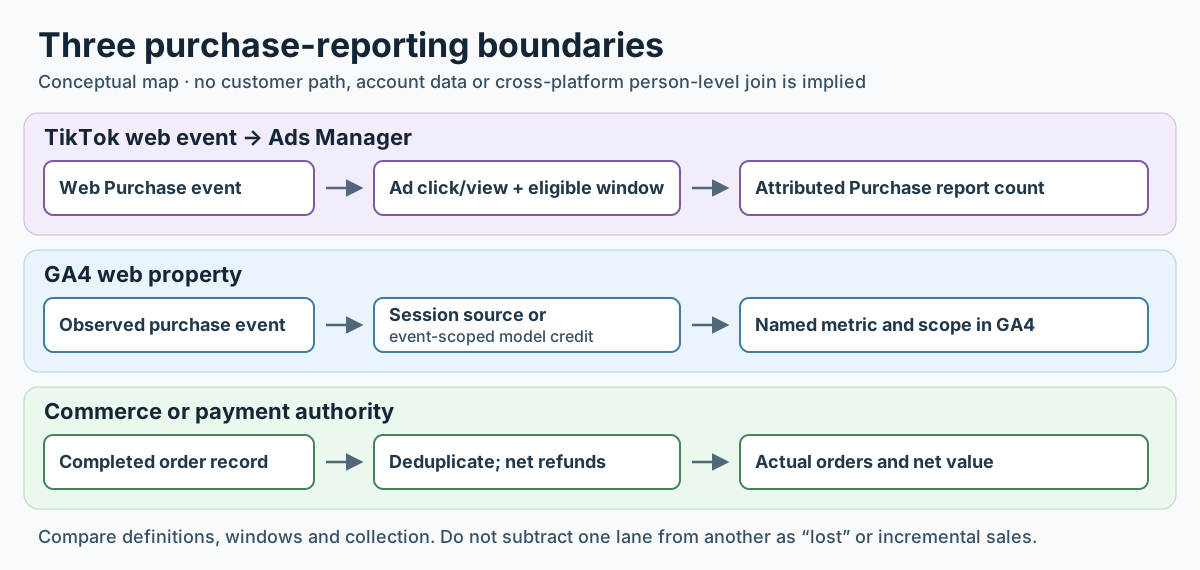
- TikTok Ads Manager: attributed web Purchase events under the selected ad interactions and attribution settings.
- GA4: observed
purchaseevents grouped by Session source, or purchase key-event credit allocated under an event-scoped model. Name which one you used. - Commerce: completed and refunded orders under the business's own reconciliation rule. This is the record for actual sales, not proof of the ad's incremental effect.
A. Name the campaign and link
B. Record three separate report definitions
C. Diagnose the gap in a fixed order
D. State the decision and the unknown
Client wording: “TikTok reported [named web Purchase count] under [ad credit settings]; GA4 reported [named purchase metric] under [traffic-source scope]. The order ledger confirms [completed/refunded orders]. We verified [reason]; [remainder] remains unresolved. Neither platform count alone establishes incremental sales.”