FEBRUARY CONTENT PLAN ๐Ÿงš๐Ÿผโ€โ™€๏ธ๐Ÿ’Œ๐Ÿ“ฑ use this as a guide to plan out your content (you should be planning out ALL of your pillars, ideas, hooks + stories every single day) no matter what planner you use!! 

+ in the spirit of love month, I would loveee to help you plan yours ๐Ÿฅฐ so PLEASE lmk if you want help coming up with a strategy or content plan for your page๐Ÿงš๐Ÿผโ€โ™€๏ธ๐Ÿค
INSTAGRAM@juliabroome

FEBRUARY CONTENT PLAN ๐Ÿงš๐Ÿผโ€โ™€๏ธ๐Ÿ’Œ๐Ÿ“ฑ use this as a guide to plan out your content (you should be planning out ALL of your pillars, ideas, hooks + stories every single day) no matter what planner you use!! + in the spirit of love month, I would loveee to help you plan yours ๐Ÿฅฐ so PLEASE lmk if you want help coming up with a strategy or content plan for your page๐Ÿงš๐Ÿผโ€โ™€๏ธ๐Ÿค

  • Alternating between talking head and screen recording keeps retention high
  • Providing 'free' value (lists of ideas) builds trust before the soft sell
  • Using a specific app as the 'hero' makes the advice actionable
urgencystatic tripodmoderate informativeTalking Head
Hook
8/10
Viral
6/10
Views160.9K
Likes7.5K
Analysis

Execution Elements

Visual Style

static tripod

soft natural front

Audio Design

energy driver

interface sound cues

The Hook

urgency

Immediate call to action ('Wake up')

Setting

indoor home office

smartphone, gold jewelry, red dress

Structure Analysis

19 shots
01

Hook

Establishes urgency and the premise of planning content for the new month.

00:00 - 00:081 SHOT
Shot 1 frame 1
100:00
medium close-upeye-levelstatic

Establish connection and urgency immediately.

Camera

static

Action

Speaker addresses camera directly, holding phone. Text overlay 'February Content Plan' appears. She gestures with hands to emphasize 'wake up' and 'second month'.

Audio

Clear direct-to-camera dialogue; music fades in.

02

Problem

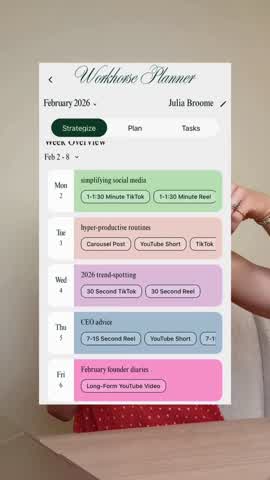
Shows a complex 'advanced' schedule to illustrate the goal of balanced content pillars.
00:08 - 00:173 SHOTS
Shot 2 frame 1
200:08
close-upeye-levelstatic

Visual proof of the concept being explained.

Camera

static

Action

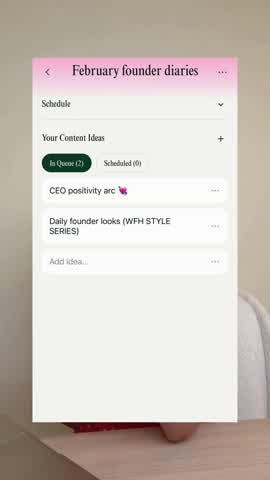
Screen recording of 'Workhorse Planner' app showing a weekly overview with color-coded content pillars.

Audio

Voiceover continues explaining content balance.

cutaway
Shot 3 frame 1
300:13
medium close-upeye-levelstatic

Re-establish connection before next graphic.

Camera

static

Action

Speaker returns to screen, gesturing with a small white object in hand.

Audio

Dialogue continues.

hard-cut
Shot 4 frame 1
400:14
close-upeye-levelstatic

Provide detailed value/information.

Camera

static

Action

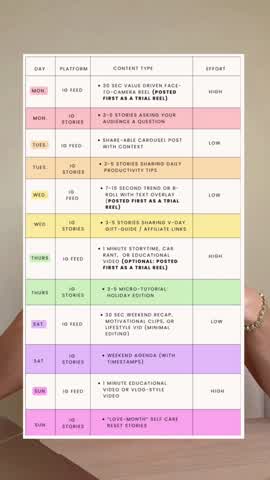
Graphic overlay showing a schedule breakdown by day, platform, and content type.

Audio

Voiceover explaining the schedule.

03

Build

Offers specific February-themed content pillars as inspiration.

00:17 - 00:252 SHOTS
Shot 5 frame 1
500:17
medium close-upeye-levelstatic

Engagement bait (ask for comments).

Camera

static

Action

Speaker talks about beginner vs intermediate levels. She gestures towards the camera.

Audio

Dialogue asking for engagement.

hard-cut
Shot 6 frame 1
600:23
close-upeye-levelstatic

Provide specific, actionable inspiration.

Camera

static

Action

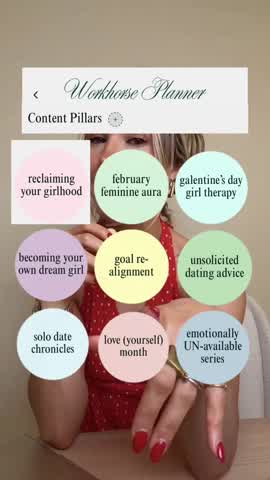
Graphic showing colorful bubbles with specific content pillar ideas like 'reclaiming your girlhood'.

Audio

Voiceover suggesting themes.

04

Solution

Demonstrates the 'Workhorse Planner' app workflow for organizing ideas.

00:25 - 00:514 SHOTS
Shot 7 frame 1
700:25
medium close-upeye-levelstatic

Transition from 'what' to 'how'.

Camera

static

Action

Speaker returns, pointing at phone/camera, transitioning to the planning phase explanation.

Audio

Dialogue shifts to 'how-to' phase.

hard-cut
Shot 8 frame 1
800:34
close-upeye-levelstatic

Demo the app's functionality.

Camera

static

Action

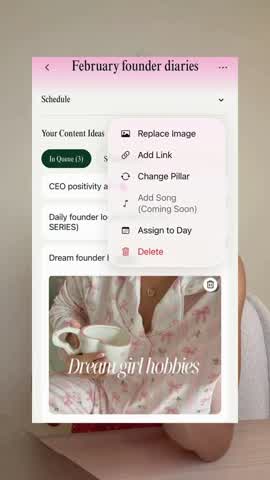
Screen recording of app: typing 'Dream founder hobbies' into a list and adding an image.

Audio

Voiceover instructions; interface SFX.

cutaway
Shot 9 frame 1
900:41
medium close-upeye-levelstatic

Build trust by not being overly salesy.

Camera

static

Action

Speaker reassures viewers they don't need the specific app, just a system.

Audio

Dialogue offering inclusivity.

hard-cut
Shot 10 frame 1
1000:46
close-upeye-levelstatic

Show ease of use.

Camera

static

Action

Screen recording: clicking 'Assign to Day' and choosing a date on the calendar.

Audio

Voiceover instructions; interface SFX.

05

Proof

Addresses viewers with 'writer's block' by showing the pre-loaded idea bank as evidence of ease.

00:51 - 01:145 SHOTS
Shot 11 frame 1
1100:51
medium close-upeye-levelstatic

Empathy and problem identification.

Camera

static

Action

Speaker addresses 'running on empty' pain point. Holds phone up to show screen.

Audio

Dialogue addressing pain point.

hard-cut
Shot 12 frame 1
1200:58
close-upeye-levelstatic

Showcase the 'killer feature' (done-for-you ideas).

Camera

static

Action

Screen recording scrolling through a list of pre-made content ideas in the app.

Audio

Voiceover highlighting the feature.

cutaway
Shot 13 frame 1
1301:02
medium close-upeye-levelstatic

Reinforce timeliness.

Camera

static

Action

Speaker mentions February specific updates.

Audio

Dialogue.

hard-cut
Shot 14 frame 1
1401:05
close-upeye-levelstatic

Provide value to non-customers to maintain engagement.

Camera

static

Action

Static graphic list of 'February Content Ideas' for non-app users.

Audio

Voiceover offering free value.

cutaway
Shot 15 frame 1
1501:09
medium close-upeye-levelstatic

Soft upsell.

Camera

static

Action

Speaker explains app users get access to everything.

Audio

Dialogue.

06

CTA

Finalizes the planning process with hooks and grid preview, encouraging action.

01:14 - 01:294 SHOTS
Shot 16 frame 1
1601:14
close-upeye-levelstatic

Show another feature (hook bank).

Camera

static

Action

Screen recording: selecting a 'Hook' from a list.

Audio

Voiceover instructions.

cutaway
Shot 17 frame 1
1701:18
medium close-upeye-levelstatic

Comprehensive advice.

Camera

static

Action

Speaker reminds to schedule stories.

Audio

Dialogue.

hard-cut
Shot 18 frame 1
1801:20
close-upeye-levelstatic

Visual payoff (aesthetic grid).

Camera

static

Action

Screen recording: Adding a cover photo and viewing the grid planner.

Audio

Voiceover pay-off.

cutaway
Shot 19 frame 1
1901:25
medium close-upeye-levelstatic

Final connection and CTA.

Camera

static

Action

Speaker signs off, offering help. Waving hand.

Audio

Closing dialogue; music fades out.

Script

Full screenplay with dialogue and action

366 words
19 shots
6 beats
EN

Screenplay

5 PAGES
Screenplay
FEBRUARY CONTENT PLAN ๐Ÿงš๐Ÿผโ€โ™€๏ธ๐Ÿ’Œ๐Ÿ“ฑ use this as a guide to plan out your content (you should be planning out ALL of your pillars, ideas, hooks + stories every single day) no matter what planner you use!! + in the spirit of love month, I would loveee to help you plan yours ๐Ÿฅฐ so PLEASE lmk if you want help coming up with a strategy or content plan for your page๐Ÿงš๐Ÿผโ€โ™€๏ธ๐Ÿค
Page
1 / 5
by juliabroome
INT./EXT. โ€” HOOK
Establishes urgency and the premise of planning content for the new month.
Speaker addresses camera directly, holding phone. Text overlay 'February Content Plan' appears. She gestures with hands to emphasize 'wake up' and 'second month'.
[00:00]
ON-SCREEN TEXT
(CAPTION)
February Content Plan
[on-screen text]
[00:00]
JULIA BROOME
Wake up, it's February 1st and we are planning your content.
[00:03]
Now it's the second month of the year.
[00:04]
So if you weren't consistent last month, we are getting it together.
[00:07]
We wanna make sure that your content formats and your content pillars are properly balanced out so that you can actually grow.
INT./EXT. โ€” PROBLEM
Shows a complex 'advanced' schedule to illustrate the goal of balanced content pillars.
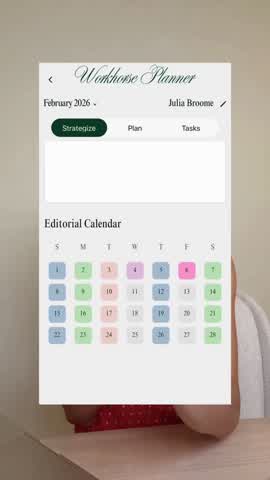
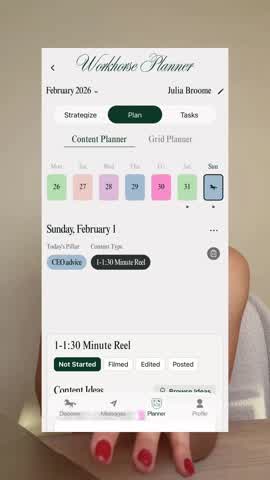
Screen recording of 'Workhorse Planner' app showing a weekly overview with color-coded content pillars.
Speaker returns to screen, gesturing with a small white object in hand.
6 Beats ยท 19 ShotsSuperdirector.appEN
Screenplay
FEBRUARY CONTENT PLAN ๐Ÿงš๐Ÿผโ€โ™€๏ธ๐Ÿ’Œ๐Ÿ“ฑ use this as a guide to plan out your content (you should be planning out ALL of your pillars, ideas, hooks + stories every single day) no matter what planner you use!! + in the spirit of love month, I would loveee to help you plan yours ๐Ÿฅฐ so PLEASE lmk if you want help coming up with a strategy or content plan for your page๐Ÿงš๐Ÿผโ€โ™€๏ธ๐Ÿค
Page
2 / 5
[00:13]
JULIA BROOME
So use this as a guide and this is more of an advanced schedule.
Graphic overlay showing a schedule breakdown by day, platform, and content type.
INT./EXT. โ€” BUILD
Offers specific February-themed content pillars as inspiration.
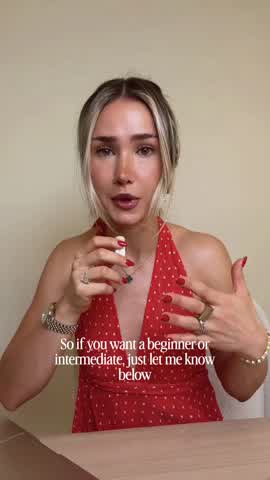
Speaker talks about beginner vs intermediate levels. She gestures towards the camera.
[00:17]
JULIA BROOME
So if you want a beginner or intermediate, just let me know below.
[00:20]
And if you're planning on adding a February themed content pillar this month, may I suggest one of these?
Graphic showing colorful bubbles with specific content pillar ideas like 'reclaiming your girlhood'.
INT./EXT. โ€” SOLUTION
Demonstrates the 'Workhorse Planner' app workflow for organizing ideas.
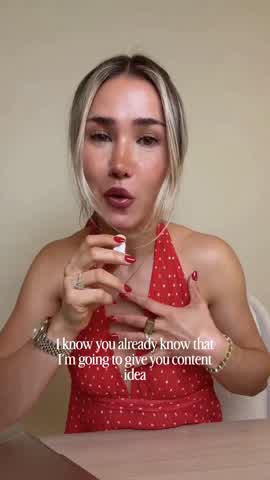
Speaker returns, pointing at phone/camera, transitioning to the planning phase explanation.
[00:25]
JULIA BROOME
Now we can move on to planning our content.
[00:27]
I know you already know that I'm going to give you content ideas.
6 Beats ยท 19 ShotsSuperdirector.appEN
Screenplay
FEBRUARY CONTENT PLAN ๐Ÿงš๐Ÿผโ€โ™€๏ธ๐Ÿ’Œ๐Ÿ“ฑ use this as a guide to plan out your content (you should be planning out ALL of your pillars, ideas, hooks + stories every single day) no matter what planner you use!! + in the spirit of love month, I would loveee to help you plan yours ๐Ÿฅฐ so PLEASE lmk if you want help coming up with a strategy or content plan for your page๐Ÿงš๐Ÿผโ€โ™€๏ธ๐Ÿค
Page
3 / 5
[00:30]
JULIA BROOME
But let's just say that you have a few ideas of your own that you want to implement this month.
Screen recording of app: typing 'Dream founder hobbies' into a list and adding an image.
[00:34]
JULIA BROOME
I want you to go into each content pillar and write out your idea directly in there or link the inspo or attach the inspo photo.
Speaker reassures viewers they don't need the specific app, just a system.
[00:41]
JULIA BROOME
And if you don't use the Workhorse app, that's okay. Just make sure that you have a system.
[00:45]
Now what we can do is click assign to day and schedule your content idea directly within each content pillar.
Screen recording: clicking 'Assign to Day' and choosing a date on the calendar.
INT./EXT. โ€” PROOF
Addresses viewers with 'writer's block' by showing the pre-loaded idea bank as evidence of ease.

Speaker addresses 'running on empty' pain point. Holds phone up to show screen.
[00:51]
JULIA BROOME
And obviously you can do that for the rest of the week, but if you are running on empty and you don't have content ideas, you know I have you.
6 Beats ยท 19 ShotsSuperdirector.appEN
Screenplay
FEBRUARY CONTENT PLAN ๐Ÿงš๐Ÿผโ€โ™€๏ธ๐Ÿ’Œ๐Ÿ“ฑ use this as a guide to plan out your content (you should be planning out ALL of your pillars, ideas, hooks + stories every single day) no matter what planner you use!! + in the spirit of love month, I would loveee to help you plan yours ๐Ÿฅฐ so PLEASE lmk if you want help coming up with a strategy or content plan for your page๐Ÿงš๐Ÿผโ€โ™€๏ธ๐Ÿค
Page
4 / 5
[00:57]
JULIA BROOME
Just go in and hit the browse ideas button. Also, there are a bunch more added for February specifically.
Screen recording scrolling through a list of pre-made content ideas in the app.
Speaker mentions February specific updates.
[01:03]
JULIA BROOME
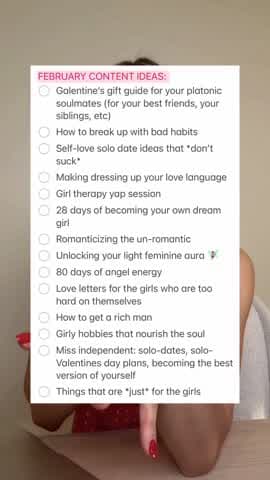
I don't want anyone who's not using the app to feel too left out, so I'm going to pop up a few content ideas.
Static graphic list of 'February Content Ideas' for non-app users.
[01:08]
JULIA BROOME
But Workhorse app users do get access to all of February's content ideas.
Speaker explains app users get access to everything.
[01:13]
JULIA BROOME
We're almost completely done.
INT./EXT. โ€” CTA
Finalizes the planning process with hooks and grid preview, encouraging action.
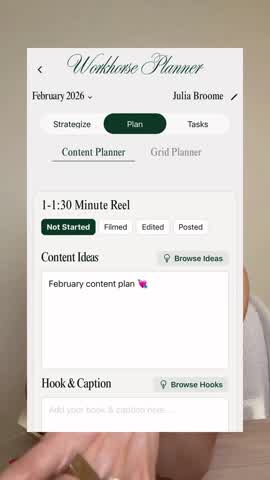
Screen recording: selecting a 'Hook' from a list.
[01:14]
JULIA BROOME
All you need to do is scroll through the hook bank and select your hook.
Speaker reminds to schedule stories.
[01:18]
JULIA BROOME
Make sure that your Instagram stories are all scheduled and then add in your cover photo.
6 Beats ยท 19 ShotsSuperdirector.appEN
Screenplay
FEBRUARY CONTENT PLAN ๐Ÿงš๐Ÿผโ€โ™€๏ธ๐Ÿ’Œ๐Ÿ“ฑ use this as a guide to plan out your content (you should be planning out ALL of your pillars, ideas, hooks + stories every single day) no matter what planner you use!! + in the spirit of love month, I would loveee to help you plan yours ๐Ÿฅฐ so PLEASE lmk if you want help coming up with a strategy or content plan for your page๐Ÿงš๐Ÿผโ€โ™€๏ธ๐Ÿค
Page
5 / 5
Screen recording: Adding a cover photo and viewing the grid planner.
[01:22]
JULIA BROOME
Once you're done, you can hit your grid planner and see your aesthetic for the rest of the week.
Speaker signs off, offering help. Waving hand.
[01:26]
JULIA BROOME
Even if you're not using the app, I am fully here to help you out. Plan your content.
โ€” THE END โ€”
6 Beats ยท 19 ShotsSuperdirector.appEN

Transcript

Monologue
366 words
23 segments
EN

February Content Plan

Wake up, it's February 1st and we are planning your content.

Now it's the second month of the year.

So if you weren't consistent last month, we are getting it together.

We wanna make sure that your content formats and your content pillars are properly balanced out so that you can actually grow.

Creator Anatomy

Explore the creator page behind this analysis.

Julia Broome

Julia Broome

@juliabroome on instagram โ€ข 318795 followers

Turn winning video patterns into your own workflow

Analyze your own account with Superdirector to turn winning hooks into your idea feed and scripts.